Compress PNG images

Drop PNGs below and get smaller PNGs back, with transparency intact. Pick Lossless to change nothing, or Smart for the big savings. Up to 16 MB a file as a guest or 32 MB with a free account. Free. No account, no watermark.

  • Stays a PNG
  • Transparency kept
  • Lossless option

Balance between the image quality and compression

Output format

Auto tries every format your image can be saved as and gives you the smallest one

Resize

Change the width, height or scale of every image you upload

Original Dimensions Percentage
px
px

Set one side to keep the proportions, or both for an exact size.

Percentage
%

Size limit

Fit every image under a file size, for a form or a site with an upload limit

Any size Under a size
KB

Saved as JPG, WebP or AVIF. When quality alone can't get there, the image is made smaller to fit.

How the size limit works

Responsive image set

Pro

The image at several widths, with a srcset to paste into your page, so each screen loads the size it needs

One size Responsive set
px

Up to 8 widths, each in the format and at the level of the result. A width wider than the image stops at its own width, so nothing is enlarged.

How responsive sizes work

Keep EXIF Keeps details such as the camera, the date and the location in each file. Leave it off to remove them and save space.
Write alt text with AI Describes each image for screen readers and search engines, and suggests a file name
Alt text language
No language matches
English
Spanish
French
German
Italian
Portuguese
Dutch
Polish
Swedish
Turkish
Russian
Ukrainian
Arabic
Persian
Hebrew
Hindi
Indonesian
Vietnamese
Thai
Japanese
Korean
Simplified Chinese
Traditional Chinese
Rename files Downloads take the suggested name instead of the one you uploaded

Pro
Uploading a zip comes with Pro: the browser opens it and uploads its images in the folders they sat in, and the zip of the results keeps them. On your plan, unzip it and drop the images here. How folders and zips work

Up to 16 MB per image PNG, JPG, WEBP, GIF, HEIC, TIFF, or a ZIP of them on a paid plan

Guests get 10 images a day, 10 left today. A free account gets 40 a day and 7 days of Pro.

Upload a folder, or a zip

Pro

Pick a folder and every image in it uploads, with the folders inside it, and Download Selected gives them back in the same folders. A zip of images dropped on the box works the same way, opened in your browser.

How folders and zips work

Auto-start
On, each image starts compressing as soon as it uploads. Off, images wait in the box so you can check the settings, then start together.
Delete this image?
The image and its optimized copy will be removed from storage. This cannot be undone.

Rename this image
Choose the name the optimized image downloads with. Its format stays the same.

Uploaded as

Rename the selected images
Each image gets this name and a number, counted in the order they were uploaded. Their formats stay the same.

Share this image
AI alt text
Alt text

Paste it into the alt attribute of the image on your page.

Choose the compression level that suits your images
Level What it promises What happens Pick it when
Lossless
Not one pixel changes in a JPEG, PNG or GIF The file is repacked, never re-encoded. JPEGs get an optimised Huffman table and progressive scan, PNGs a tighter deflate pass, GIFs a lossless gifsicle run. A lossy WebP has no repack step, so it is re-encoded at the highest quality the level allows. A sideways phone JPEG is rotated losslessly on the way through and keeps its colour profile. The one exception to the promise is a PNG or WebP tagged with a wide-gamut profile such as Display P3: its colours are converted to sRGB, so the values change but the picture doesn't. Logos, line art, anything you'll edit again, or when the file is evidence.
Smart
No visible change, targets 40 dB PSNR and a perceptual score of 70 A quality search runs per image and stops at the lowest quality that still clears the PSNR target. That answer is then scored on the SSIMULACRA 2 scale, because an average over every pixel lets a mostly flat picture through at a quality its detail doesn't deserve, and when it falls under 70 the search moves back up until it doesn't. Photos and graphics end up at different qualities because they need different ones; an image that cannot reach the targets inside the quality ceiling is encoded at the ceiling. Almost everything on a website. This is the default for a reason.
Ultra
Smallest file, targets 34 dB PSNR and a perceptual score of 50 The same two-stage search with lower targets. Fine texture softens a little; edges and text stay sharp. Thumbnails, backgrounds, email images, anything shown small or blurred anyway.
None
No compression at all Only the resize, conversion or metadata setting you chose is applied. Without a resize or a conversion every pixel comes back as it was: the file only loses its metadata, and with Keep EXIF on it comes back byte for byte. You only wanted to resize or convert, and quality is someone else's decision.

Measured, not estimated

What compression did to four real PNGs

Two screenshots, a social card and a transparent icon from our showcase, compressed as PNG at each level.

Sample Original Lossless Smart Ultra
Social card 1200 by 630 208 KB PNG 152 KB 27.2% smaller 44 KB 79.1% smaller 36 KB 82.8% smaller
Phone screenshot 1170 by 2532 0.9 MB PNG 745 KB 22.3% smaller 260 KB 72.9% smaller 216 KB 77.5% smaller
App icon 1600 by 1600 113 KB PNG 100 KB 11.6% smaller 19 KB 83% smaller 19 KB 83% smaller
Desktop screenshot 1440 by 900 303 KB PNG 180 KB 40.6% smaller 87 KB 71.4% smaller 78 KB 74.3% smaller

Metadata stripped, no resize. On the icon, Smart and Ultra are the same file. Ultra tries its own colour range, then Smart's, then the full palette, and keeps whichever came out smallest, so it never loses to Smart.

How it works

Two ways to shrink a PNG

The lossless way is repacking. A PNG's pixels are squeezed with deflate, and most software does that quickly, not well. Iminify reruns it with zopfli, a much slower compressor that finds a shorter encoding of the very same pixels. Large files get optipng instead, because zopfli's cost grows with every pixel. Nothing about the image changes either way.

The lossy way is quantisation, and it's where the big numbers come from. A normal PNG can use 16 million colours. pngquant rebuilds it with a palette of at most 256, chosen for that image and dithered where it helps. A screenshot or a logo rarely needs more, and one byte a pixel in place of three or four is a very different file.

pngquant is given a quality range, not a colour count. If it can't reach the bottom of the range it declines to write anything, and the file is repacked losslessly instead. That's how a gradient-heavy PNG avoids visible banding.

What survives

What a PNG keeps when it's compressed

  • Transparency

    Full alpha survives at every level, including partial transparency on anti-aliased edges.

  • Every pixel, at Lossless

    Lossless changes the packing and nothing else. A wide-gamut colour profile is the one exception: it's converted to sRGB.

  • EXIF, when you switch it on

    Rare in PNGs. It's written back as an eXIf chunk if Keep EXIF is on.

  • Animation

    An animated PNG comes back with every frame as it was, and only the metadata goes, unless Keep EXIF is on: pngquant, zopflipng and optipng would keep its first frame alone, so it isn't recompressed. It can't be resized either.

When not to

When PNG compression is the wrong tool

  • The PNG is a photograph. It will shrink, but a JPG, WebP or AVIF of it is many times smaller. PNG was never meant for photos.
  • It has smooth gradients and you need them perfect. Use Lossless, not Smart.
  • The format doesn't matter to you. PNG to WebP is smaller than any PNG at the same quality.

How to

Compress a PNG in three steps

  1. 1

    Drop your PNGs

    Format stays on Original, so you get PNGs back.

  2. 2

    Lossless or Smart

    Lossless for source assets. Smart for anything that only has to look right.

  3. 3

    Check, then download

    The difference map in Compare shows exactly which pixels changed, if any.

Questions

PNG compression questions

Next

From the blog

What we've measured so far

We run the encoders on real photos and screenshots and publish the numbers: when WebP beats AVIF, what quality 80 means in each encoder, and how many kilobytes an image on a web page should weigh.

All posts
Bar chart of file sizes for a photo at four print sizes, 8x10 to 24x36. PNG bars run from 11.3 to 70.6 MB and JPEG bars from 1.4 to 6.5 MB, with a dashed line at Etsy's 20 MB limit.

How many pixels does an AI print need? 300 per inch, and at 16x20 our PNG is over Etsy's download limit

The usual answer is 300 pixels per inch of print: 2400 x 3000 for an 8x10, 4800 x 6000 for a 16x20, 7200 x 10800 for a 24x36. A square Midjourney 8.2 HD image is 2048 x 2048 and a square Gemini 4K image is 4096 x 4096, so neither reaches a 16x20 at that rate without more pixels. (Shops write DPI. Here it means pixels per inch of print.) From a 4K Gemini picture we made 16x20 files of 4800 x 6000 pixels: the PNG is 35.8 MB, over Etsy's 20 MB per file for digital downloads, and the JPEG is 3.6 MB.

7 min read
Two rows of seven squares, one per test post. After the default wp media regenerate, four squares are red and read 404 and three read 200; after --skip-delete and the rewrite, all seven read 200.

Convert your existing WordPress images to WebP without a plugin: what regenerate breaks

On a WordPress 7.1.4 test site, one filter and wp media regenerate turned the resized copies WordPress makes of five full-colour (4:4:4) photographs into WebP files with 62.5% of the JPEG copies' bytes. All 25 WebP copies, five sizes of each photograph, also scored lower. The filter and regenerate also left four of our seven test posts pointing at copies WP-CLI had just deleted, and took the srcset off all seven inserted images that had one. The version below leaves no address broken and gives six of those seven their srcset back: the filter, regenerate with one flag, and a rewrite that changes an address only where a WebP exists. The recipe as printed needs WP-CLI and a shell on the server.

8 min read
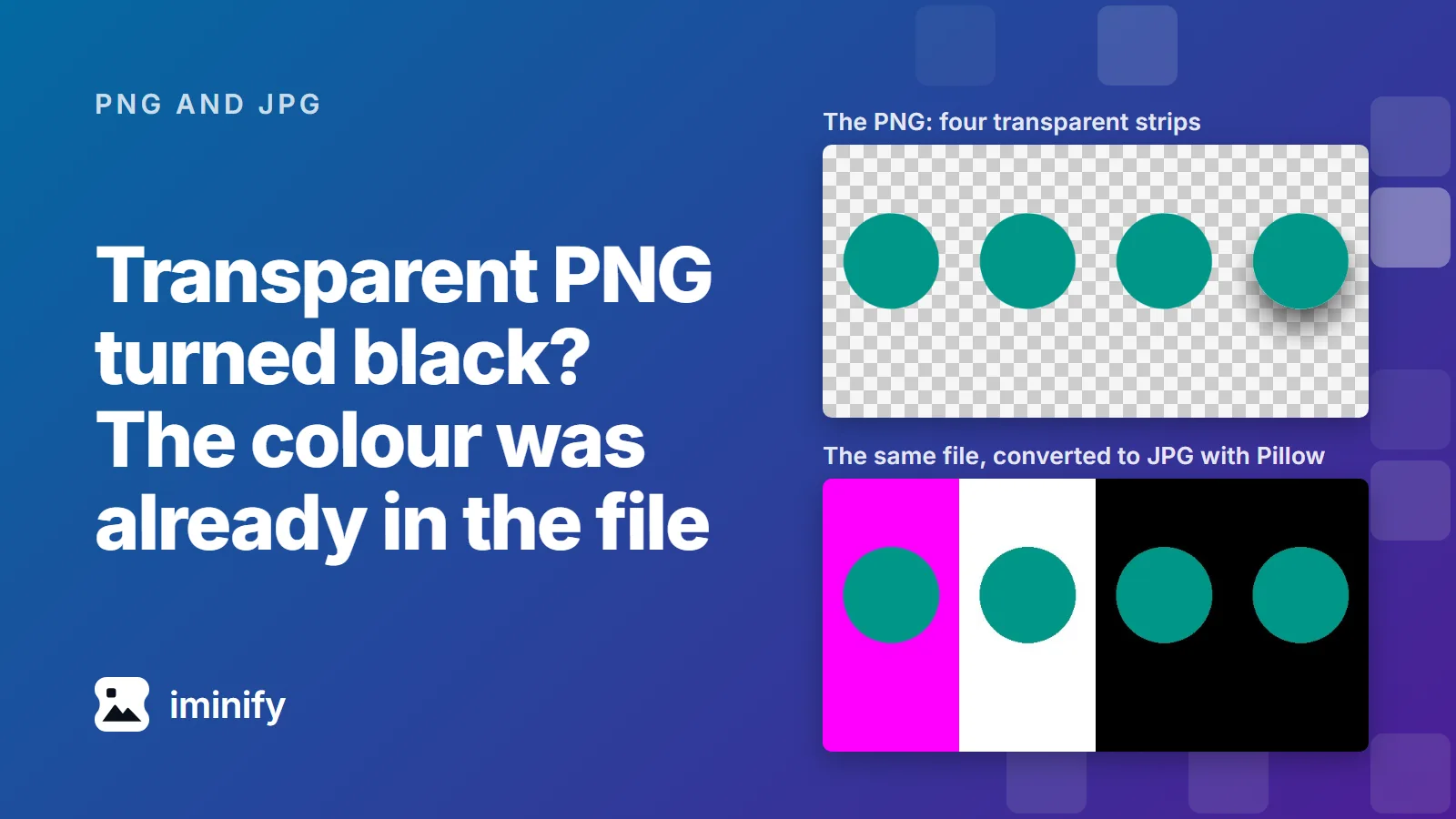
Four teal circles on a transparent background, above the same image converted to JPG with Pillow, where the strips behind them came out magenta, white, black and black.

Why does a transparent PNG turn black as a JPG? The colour hiding underneath

We made an 800x400 test PNG with four strips that look alike: the same teal circle on a transparent background, four times over (the fourth with a soft shadow). Then we turned it into a JPG with Pillow, Python's imaging library, using its convert("RGB"). The four strips came back magenta, white, black and black. Nothing was added. Those colours were already in the PNG, sitting under the transparency. A JPG can't store transparency, so whatever writes it has to put something behind the picture. Some tools paint white. Some just reveal the colour stored under the transparent pixels, which is often black. And Chrome's canvas, the drawing surface web pages use to edit images, paints black whatever was there, because the HTML standard says it must. If you want white, or any other colour, you have to choose it before the JPG is written. Iminify's JPG output puts white behind the picture, and PNG to WebP keeps the transparency instead.

8 min read

Make your PNGs lighter

Drop a PNG, pick a level and check the difference map before you download.