Compress Nano Banana images

Through the Gemini API, Nano Banana 2, Pro and 2.1 send every picture as a JPEG at quality 100, the top of the scale, so even a 1K square weighs far more than it needs to. Drop yours below and get a smaller JPG back at the same width and height. Up to 16 MB a file as a guest or 32 MB with a free account. Free. No account, no watermark.

  • Stays a JPG
  • Same width and height
  • Measured on real Gemini files

Balance between the image quality and compression

Output format

Auto tries every format your image can be saved as and gives you the smallest one

Resize

Change the width, height or scale of every image you upload

Original Dimensions Percentage
px
px

Set one side to keep the proportions, or both for an exact size.

Percentage
%

Size limit

Fit every image under a file size, for a form or a site with an upload limit

Any size Under a size
KB

Saved as JPG, WebP or AVIF. When quality alone can't get there, the image is made smaller to fit.

How the size limit works

Responsive image set

Pro

The image at several widths, with a srcset to paste into your page, so each screen loads the size it needs

One size Responsive set
px

Up to 8 widths, each in the format and at the level of the result. A width wider than the image stops at its own width, so nothing is enlarged.

How responsive sizes work

Keep EXIF Keeps details such as the camera, the date and the location in each file. Leave it off to remove them and save space.
Write alt text with AI Describes each image for screen readers and search engines, and suggests a file name
Alt text language
No language matches
English
Spanish
French
German
Italian
Portuguese
Dutch
Polish
Swedish
Turkish
Russian
Ukrainian
Arabic
Persian
Hebrew
Hindi
Indonesian
Vietnamese
Thai
Japanese
Korean
Simplified Chinese
Traditional Chinese
Rename files Downloads take the suggested name instead of the one you uploaded

Pro
Uploading a zip comes with Pro: the browser opens it and uploads its images in the folders they sat in, and the zip of the results keeps them. On your plan, unzip it and drop the images here. How folders and zips work

Up to 16 MB per image PNG, JPG, WEBP, GIF, HEIC, TIFF, or a ZIP of them on Pro

Guests get 10 images a day, 10 left today. A free account gets 40 a day and 7 days of Pro.

Upload a folder, or a zip

Pro

Pick a folder and every image in it uploads, with the folders inside it, and Download Selected gives them back in the same folders. A zip of images dropped on the box works the same way, opened in your browser.

How folders and zips work

Auto-start
On, each image starts compressing as soon as it uploads. Off, images wait in the box so you can check the settings, then start together.
Delete this image?
The image and its optimized copy will be removed from storage. This cannot be undone.

Rename this image
Choose the name the optimized image downloads with. Its format stays the same.

Uploaded as

Rename the selected images
Each image gets this name and a number, counted in the order they were uploaded. Their formats stay the same.

Share this image
AI alt text
Alt text

Paste it into the alt attribute of the image on your page.

Choose the compression level that suits your images
Level What it promises What happens Pick it when
Lossless
Not one pixel changes in a JPEG, PNG or GIF The file is repacked, never re-encoded. JPEGs get an optimised Huffman table and progressive scan, PNGs a tighter deflate pass, GIFs a lossless gifsicle run. A lossy WebP has no repack step, so it is re-encoded at the highest quality the level allows. A sideways phone JPEG is rotated losslessly on the way through and keeps its colour profile. The one exception to the promise is a PNG or WebP tagged with a wide-gamut profile such as Display P3: its colours are converted to sRGB, so the values change but the picture doesn't. Logos, line art, anything you'll edit again, or when the file is evidence.
Smart
No visible change, targets 40 dB PSNR and a perceptual score of 70 A quality search runs per image and stops at the lowest quality that still clears the PSNR target. That answer is then scored on the SSIMULACRA 2 scale, because an average over every pixel lets a mostly flat picture through at a quality its detail doesn't deserve, and when it falls under 70 the search moves back up until it doesn't. Photos and graphics end up at different qualities because they need different ones; an image that cannot reach the targets inside the quality ceiling is encoded at the ceiling. Almost everything on a website. This is the default for a reason.
Ultra
Smallest file, targets 34 dB PSNR and a perceptual score of 50 The same two-stage search with lower targets. Fine texture softens a little; edges and text stay sharp. Thumbnails, backgrounds, email images, anything shown small or blurred anyway.
None
No compression at all Only the resize, conversion or metadata setting you chose is applied. Without a resize or a conversion every pixel comes back as it was: the file only loses its metadata, and with Keep EXIF on it comes back byte for byte. You only wanted to resize or convert, and quality is someone else's decision.

Measured, not estimated

Four Nano Banana files, compressed three ways

Two pictures from Nano Banana 2.1 and two at 2K from Nano Banana 2, exactly as the Gemini API returned them, each compressed at Smart as JPG, WebP and AVIF. The photos and the illustrations went different ways: on both harbour photos the JPG came out smallest, and on both bakery drawings AVIF did, at a fraction of the JPG.

Sample Original As JPG As WebP As AVIF
Harbour photo, Nano Banana 2.1, 1K 1024 by 1024 0.9 MB JPG 272 KB 71.8% smaller 293 KB 69.7% smaller 280 KB 71% smaller
Bakery illustration, Nano Banana 2.1, 1K 1024 by 1024 445 KB JPG 53 KB 88% smaller 23 KB 94.8% smaller 15 KB 96.5% smaller
Harbour photo, Nano Banana 2, 2K 2752 by 1536 3.8 MB JPG 1.0 MB 73% smaller 1.2 MB 68.9% smaller 1.1 MB 70.1% smaller
Bakery illustration, Nano Banana 2, 2K 2752 by 1536 2.1 MB JPG 240 KB 89% smaller 109 KB 95% smaller 73 KB 96.7% smaller

Generated through the Gemini API in September and October 2026 from one photo prompt and one illustration prompt, each saved by Google at JPEG quality 100. Metadata stripped, no resize, so every result keeps the width and height in its row. Nano Banana and Gemini are Google's names; Iminify isn't affiliated with Google.

Why so big

Quality 100 is a setting Gemini's API picks for you

A JPEG stores two tables that decide how finely each block of the picture is kept. In the files Gemini's API returns, every value in both is 1, which is what quality 100 writes: no detail is rounded off, including detail nobody can see. The API has no quality option, and when we asked Nano Banana 2 for a PNG instead, it refused.

Smart decodes the file and searches for the lowest quality, in the format you picked, that still matches what Gemini sent, up to the level's ceiling. A detailed photo costs bytes in every format, which is why the harbour photos came out close together in all three. A flat illustration has large areas of one colour, which AVIF and WebP store far more cheaply than JPG.

The width and height stay as they are unless you set Resize, or a File size the picture can't reach at full size. A 2K picture is wider than most pages show it, so if it's going on a website, set Resize to the width the page displays it at.

What survives

What a Nano Banana image keeps

  • Its width and height

    Nothing is cropped, and it's only scaled when you set Resize, or a File size it can't reach at full size. Otherwise a 1K square comes back a 1K square.

  • A JPG stays a JPG

    Format starts on Original, so the file works wherever the one from Gemini did. Pick WebP or AVIF under Format when the place it's going takes them.

  • Google's Content Credentials

    Each file carries a C2PA manifest signed by Google that says it was created by Google's generative AI. The signature covers the exact bytes Google sent, so any change breaks it, and Iminify leaves it out of every file it writes, with Keep EXIF on or off. Only None with Keep EXIF on hands Gemini's file back untouched, credential and all. Each result says which happened.

  • Exact pixels, at Smart and Ultra

    Both re-encode the picture. Lossless repacks the JPEG without changing a pixel, if you need them exact.

When not to

When to keep Gemini's file, or change a setting first

  • Someone needs to check where the picture came from: a platform, a client or a newsroom that reads Content Credentials. Compressing breaks Google's signature, so send them the original.
  • You'll edit it again. Compress the final version rather than each draft, because every lossy save loses a little more.
  • It's an illustration going on a web page. Switch Format to AVIF first: on both bakery drawings in the table it came out far smaller than the JPG.

How to

Compress a Nano Banana image in three steps

  1. 1

    Drop the files

    Straight from the Gemini app, AI Studio or your API code. Format stays on Original, so you get JPGs back, and a PNG stays a PNG.

  2. 2

    Leave the level on Smart

    It tries several qualities and keeps the lowest that still matches your file. Ultra goes lower, for previews and thumbnails.

  3. 3

    Compare, then download

    Drag the slider in Compare over the finest detail before you replace anything.

What happens to Content Credentials, and how each result reports it, is in the docs. Read about Content Credentials

Questions

Nano Banana image questions

Next

From the blog

What we've measured so far

We run the encoders on real photos and screenshots and publish the numbers: when WebP beats AVIF, what quality 80 means in each encoder, and how many kilobytes an image on a web page should weigh.

All posts
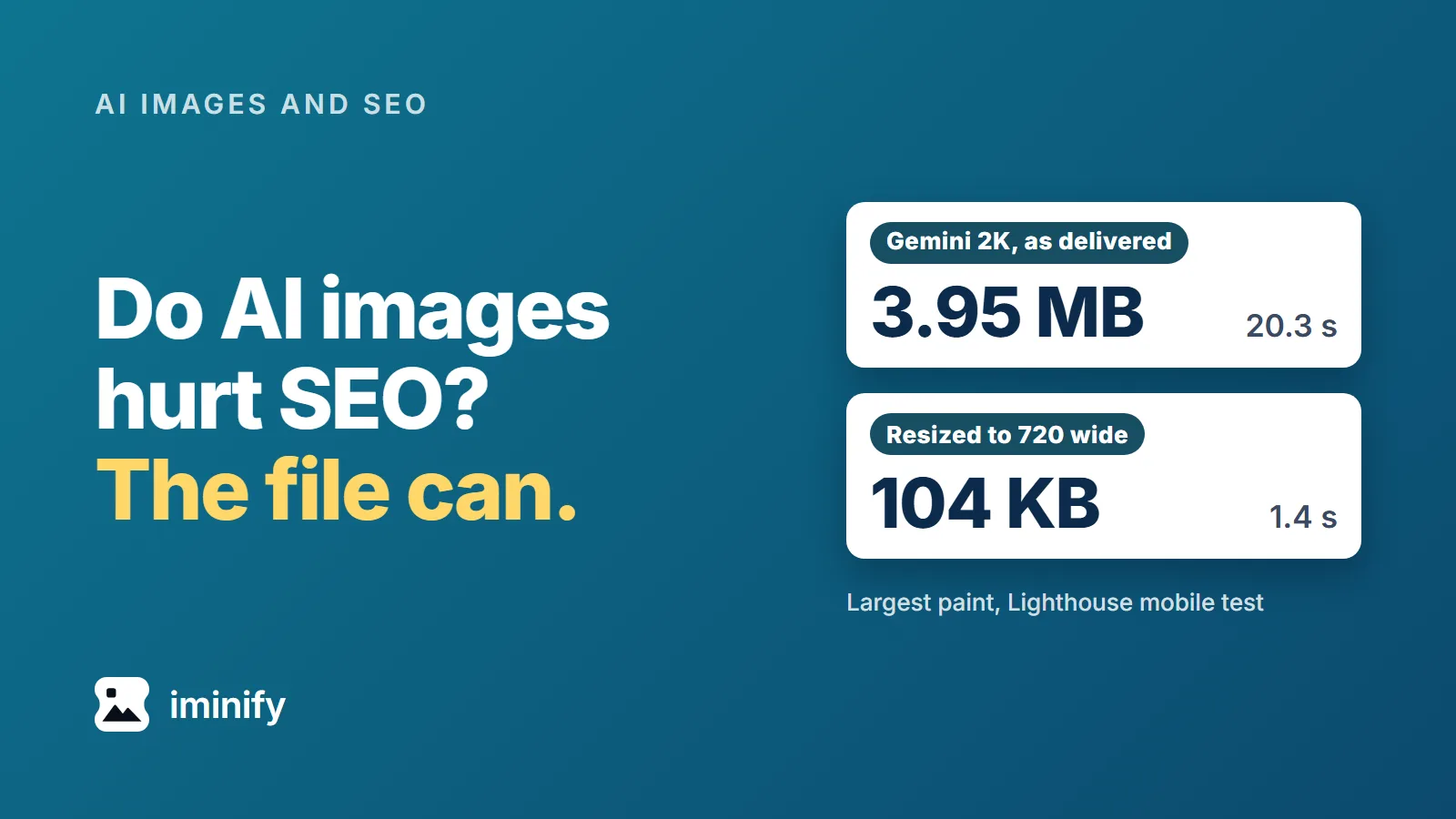
Two cards under the title "Do AI images hurt SEO? The file can.": a Gemini 2K picture as delivered, 3.95 MB, largest paint 20.3 s; the same picture resized to 720 wide, 104 KB, 1.4 s, in Lighthouse's mobile test.

Do AI images hurt SEO? What Google's pages say, and what a 2K Gemini picture did to a page

We put Gemini pictures on a plain article page, one size at a time, and ran Lighthouse's mobile test on each. Straight from the generator, the 1K file (1.06 MB) took 6.2 seconds to become the page's largest paint (LCP), the 2K file (3.95 MB) took 20.3 seconds and the 4K file (10.51 MB) took 52.4 seconds. Google's target for that metric is 2.5 seconds. Do AI images hurt SEO? In the Google pages we read, nothing marks an image down for being AI-made. The file is another matter: the same 2K picture, resized and compressed to 104 KB, took 1.4 seconds. Iminify's compressor also drops the C2PA manifest that marks a Gemini file as AI-made, and Google's Merchant Center asks sellers to keep an IPTC tag that says the same.
8 min read
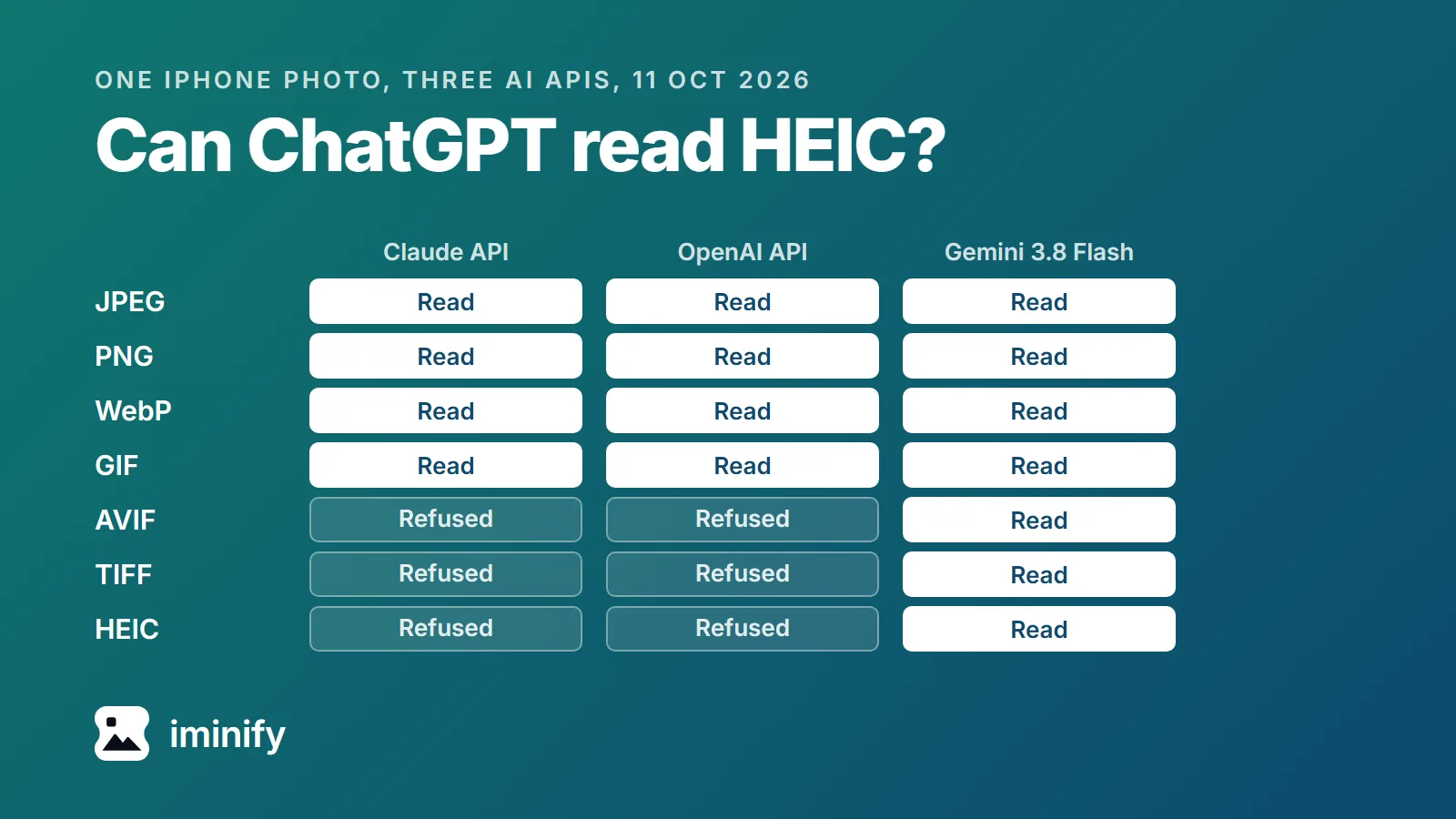
Grid of results for one iPhone photo sent in seven formats to three AI APIs: Claude's and OpenAI's read JPEG, PNG, WebP and GIF and refused AVIF, TIFF and HEIC; Gemini 3.8 Flash read all seven.

Can ChatGPT read HEIC? What five AI tools list, and what three APIs did with an iPhone photo

On 11 October 2026 we sent the same iPhone photo, a 1.7 MB HEIC of two greyhounds looking into a café, to three AI APIs (the interfaces developers use, not the chat apps). Gemini 3.8 Flash answered "Two leashed dogs looking inside a stylish, cozy restaurant." OpenAI's API replied "The image data you provided does not represent a valid image." Claude's API returned an error naming the four types it takes: JPEG, PNG, GIF and WebP. So can ChatGPT read HEIC? OpenAI's help page for ChatGPT lists three image types: PNG, JPEG and non-animated GIF. HEIC isn't one of them. Convert the photo to JPG before you attach it: JPEG, the same format as JPG, is on every format list we read from OpenAI, Anthropic, Google, Microsoft and xAI. Iminify's HEIC to JPG page converts it without an account. Two of the lists we read name HEIC: Google's image page for the Gemini API and xAI's FAQ for the Grok app.

7 min read
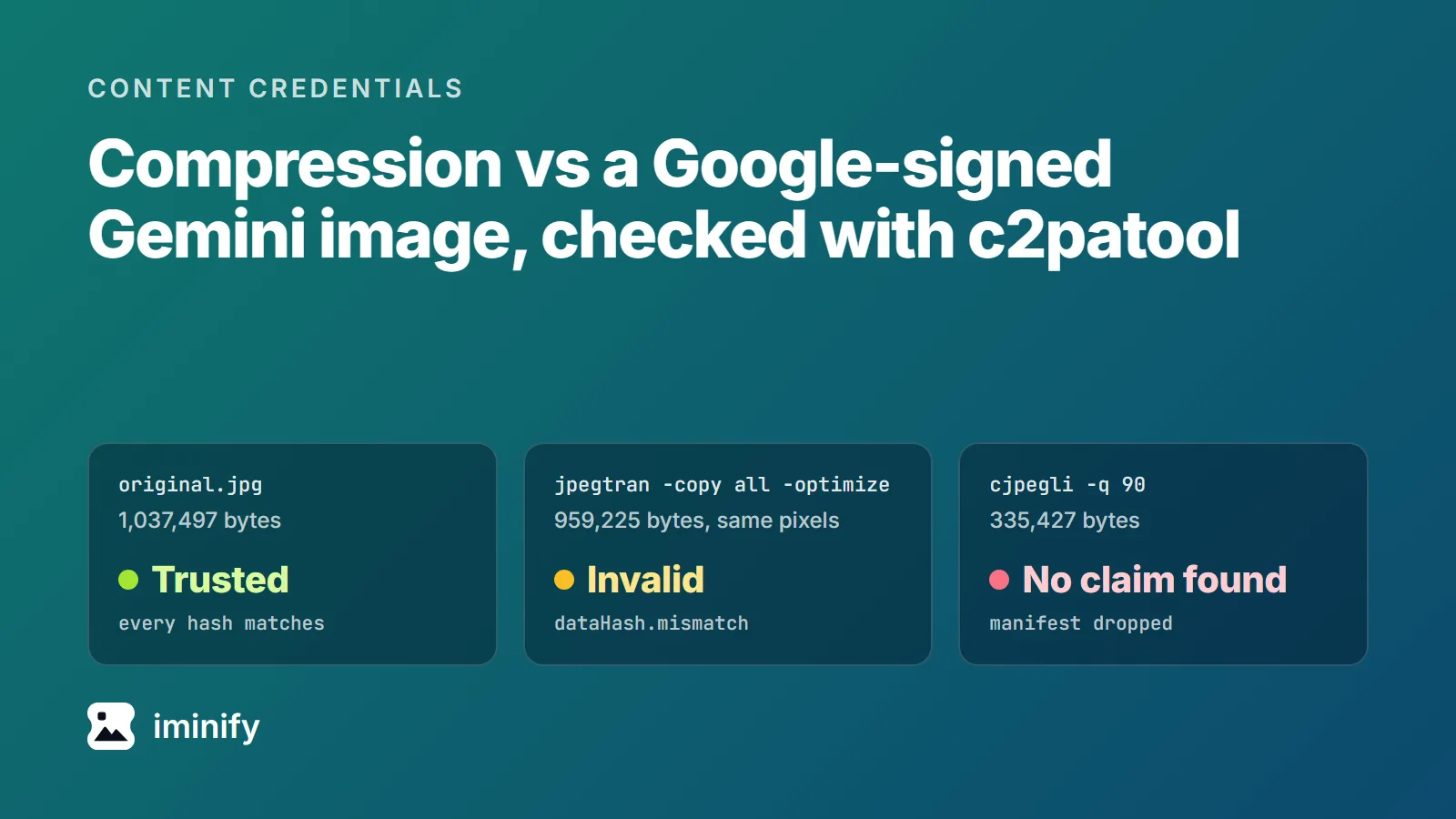
Three c2patool verdicts on a Google-signed Gemini JPEG: the 1,037,497-byte original is Trusted, a libjpeg-turbo jpegtran -copy all -optimize copy with the same pixels is Invalid (dataHash.mismatch), a cjpegli quality 90 copy has no claim.

Does compression remove Content Credentials? Two signed Gemini images through 13 tools

We took an image made by Nano Banana 2, one of Google's Gemini image models, and asked c2patool whether its Content Credentials hold. It answered "Trusted": a C2PA manifest signed by Google LLC, stating "Created by Google Generative AI.", with every hash matching. Then we ran that JPEG, and a PNG from the original Nano Banana, through 13 tools, WordPress 7.1.2 and Iminify among them, and asked again. Every file those tools wrote failed if it differed from its source by even a byte. Most tools dropped the manifest. Five kept a copy of it that no longer verified, in some cases without changing a single pixel. If a compressed file has to carry a working credential, something has to sign it again after the last byte changes, and that adds bytes of its own.

8 min read

Make your Nano Banana images lighter

Drop a file at the top of the page. It comes back in its own format at the same width and height, with Compare ready to check the detail.