Can ChatGPT read HEIC? What five AI tools list, and what three APIs did with an iPhone photo
On this page
On 11 October 2026 we sent the same iPhone photo, a 1.7 MB HEIC of two greyhounds looking into a café, to three AI APIs (the interfaces developers use, not the chat apps). Gemini 3.8 Flash answered "Two leashed dogs looking inside a stylish, cozy restaurant." OpenAI's API replied "The image data you provided does not represent a valid image." Claude's API returned an error naming the four types it takes: JPEG, PNG, GIF and WebP.
So can ChatGPT read HEIC? OpenAI's help page for ChatGPT lists three image types: PNG, JPEG and non-animated GIF. HEIC isn't one of them. Convert the photo to JPG before you attach it: JPEG, the same format as JPG, is on every format list we read from OpenAI, Anthropic, Google, Microsoft and xAI. Iminify's HEIC to JPG page converts it without an account. Two of the lists we read name HEIC: Google's image page for the Gemini API and xAI's FAQ for the Grok app.
Which image formats ChatGPT, Claude, Gemini, Copilot and Grok list
These are the lists on the vendors' own pages, read on 11 October 2026. We didn't test the chat apps themselves, so this table is what each company says, not what we saw.
| Tool | Image formats its page lists | Size limit on that page |
|---|---|---|
| ChatGPT | PNG, JPEG, non-animated GIF | 20 MB per image |
| OpenAI API | PNG, JPEG, WebP, non-animated GIF | 512 MB per request |
| Claude (app and API) | JPEG, PNG, GIF, WebP | 8000 by 8000 pixels; 10 MB (vision docs) or 500 MB (help center) |
| Gemini app | "most file types", no list | 100 MB per file |
| Gemini API | PNG, JPEG, WebP, HEIC, HEIF | 20 MB (image page) or 100 MB (file input guide), inline |
| Copilot | PNG, JPEG, PJP, JFIF | 50 MB per file |
| Copilot with a work or school licence | PNG, JPG, JPEG, GIF, BMP, TIFF | none given |
| Grok app | JPEG, PNG, WebP, HEIC, BMP (GIF varies by platform) | 150 MB per file |
| Grok (xAI API) | JPG, PNG | 20 MiB |
What three APIs did with the same photo
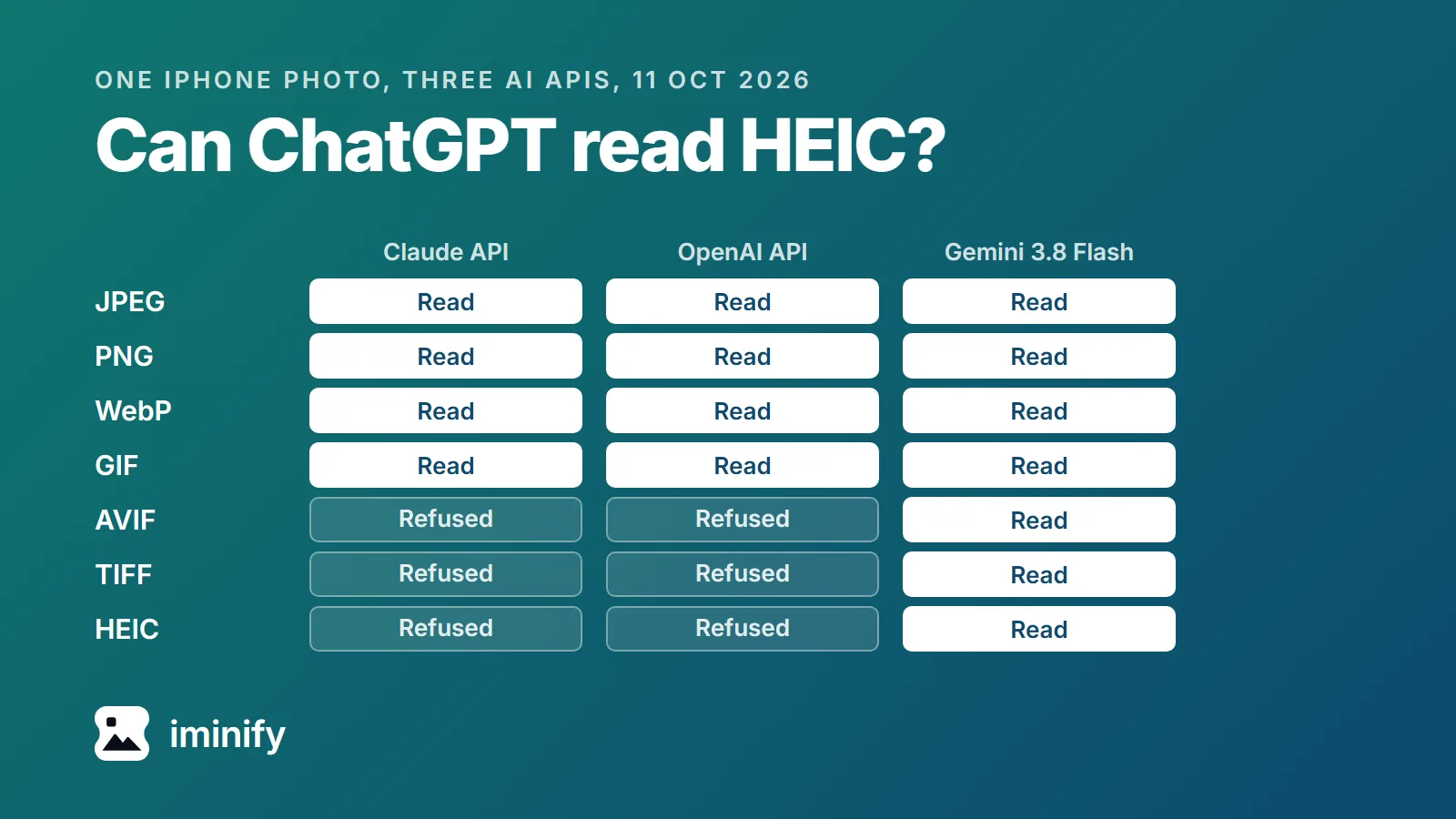
To see what happens to a real file, we turned the iPhone photo into seven formats at 768 by 1024 pixels and sent each one, plus the iPhone HEIC itself under its own name and renamed to .jpg, to three APIs: Claude's, OpenAI's and Gemini's. "Read" means the answer described the photo.
| File sent | Claude API (Haiku 5.5) | OpenAI API (GPT-5.4 mini) | Gemini API (3.8 Flash) |
|---|---|---|---|
| JPEG | Read | Read | Read |
| PNG | Read | Read | Read |
| WebP | Read | Read | Read |
| GIF | Read | Read | Read |
| AVIF | Refused | Refused | Read |
| TIFF | Refused | Refused | Read |
| HEIC, small copy | Refused | Refused | Read |
| The iPhone HEIC | Refused | Refused | Read |
| The iPhone HEIC renamed to .jpg | Refused | Refused | Read |
Claude and OpenAI read the four formats they list and refused the rest. For the AVIF, the TIFF and the two HEICs sent as HEIC, Claude's error was Input should be 'image/jpeg', 'image/png', 'image/gif' or 'image/webp'. OpenAI's error went on to list the same four types. A second model from each, Claude Sonnet 5.5 and GPT-6.1 Sol, refused the iPhone HEIC, the AVIF and the TIFF with the same errors.
Gemini 3.8 Flash read all seven formats, including three that its own documentation doesn't list: GIF, AVIF and TIFF. It did so on all three routes we tried (see How we tested). Don't build on that. Gemini 2.5 Flash, an older model on the same API, read the AVIF and the HEIC but refused the TIFF with Unsupported MIME type: image/tiff. And in December 2024 a developer on Google's forum reported HEIC refused by both AI Studio and the API.
Renaming a HEIC to .jpg doesn't convert it
Changing the ending from .heic to .jpg changes the name and nothing inside the file. Claude's API answered our renamed photo with Could not process image, and OpenAI's gave the same "does not represent a valid image" error as before. Gemini described the photo anyway, so on Gemini's API the rename got through.
Convert the HEIC to JPG, and all three APIs read it
- Open Iminify's HEIC to JPG page. JPG is already selected, and you don't need an account for files up to 16 MB.
- Drop the HEIC on it. The Keep EXIF switch starts off, which removes the location, the date and the camera details; turn it on to keep them.
- Download the JPG and attach that.
We converted the iPhone HEIC there as a guest the same day and sent the JPG it gave back to all three APIs. All three read it, Claude's and OpenAI's included.
To stop new photos arriving as HEIC, tell the iPhone to save JPG instead: Settings, Camera, Formats, Most Compatible. That changes new photos only.
WebP, AVIF and TIFF: when you need a JPG
WebP. Claude lists it, and so does OpenAI for its API, but ChatGPT's help page doesn't. If ChatGPT or Copilot refuses a WebP, convert it to JPG.
AVIF. No list names it. Of the six models we tried, only the two Gemini ones read ours. Iminify can't open AVIF files either. If you saved the AVIF from a website, ask the site for a JPEG: in our test of 12 sites, every one that sent a WebP or an AVIF would also hand over a JPEG when asked the right way.
TIFF. Only Copilot's work or school list names it. Claude and OpenAI refused ours, Gemini 3.8 Flash read it and Gemini 2.5 Flash didn't. Convert it to JPG.
An animated GIF reaches the AI as its first frame
We made a two-frame animation, the word TULIP and then the word ROCKET, and sent it as a GIF and as an animated WebP, at least three times each, to each API. Every answer was "TULIP". Anthropic's documentation says so outright: "Animations are unsupported, and only the first frame is used." OpenAI's guide and ChatGPT's help both list GIF as "non-animated GIF".
If the moment you're asking about isn't the first frame, take a screenshot of it and attach that.
How we tested
The format lists are from ChatGPT's image FAQ, OpenAI's vision guide, Claude's help center and vision docs, Gemini's help, Gemini's API image page and file input guide, Microsoft's Copilot upload and work or school Copilot pages, and xAI's Grok FAQ and API docs. We read them on 11 October 2026; OpenAI's ChatGPT page was last updated on 27 August.
The photo is "Greyhounds looking for a table", an iPhone 12 Pro HEIC from heic.digital's free samples, 1,721,433 bytes at 3024 by 4032 pixels, the same file as in our post on converting HEIC. We decoded it with libheif 1.19.8's heif-dec and made 768 by 1024 copies: JPEG at quality 85, PNG, GIF and uncompressed TIFF with ImageMagick 7.1.2-15, WebP at quality 80 with cwebp 1.5.0, AVIF at quality 60 with avifenc 1.3.0, and the small HEIC at quality 60 with heif-enc.
On 11 October 2026 each file went out labelled with its own type: the iPhone HEIC as image/heic and again as image/heif, the renamed one as image/jpeg. Claude got base64 through the Messages API: every file on Claude Haiku 5.5, and the JPEG, AVIF, TIFF and iPhone HEIC (as itself and renamed) on Claude Sonnet 5.5. OpenAI got a data URL through the Responses API at detail low: every file on GPT-5.4 mini, and the JPEG, WebP, GIF, animated GIF, AVIF, TIFF and iPhone HEIC (as itself and renamed) on GPT-6.1 Sol. Gemini 3.8 Flash got each file three ways: inline through generateContent, uploaded through the Files API, and inline through the Interactions API. Gemini 2.5 Flash got the JPEG, WebP, GIF, AVIF, TIFF and iPhone HEIC (as itself and renamed) inline. The two animations went at least three times each to Claude Haiku 5.5, GPT-5.4 mini and Gemini 3.8 Flash, and the JPG Iminify made from the iPhone HEIC once to each of those three.