Image exceeds 5 MB maximum? Claude counts the base64, not your file
On this page
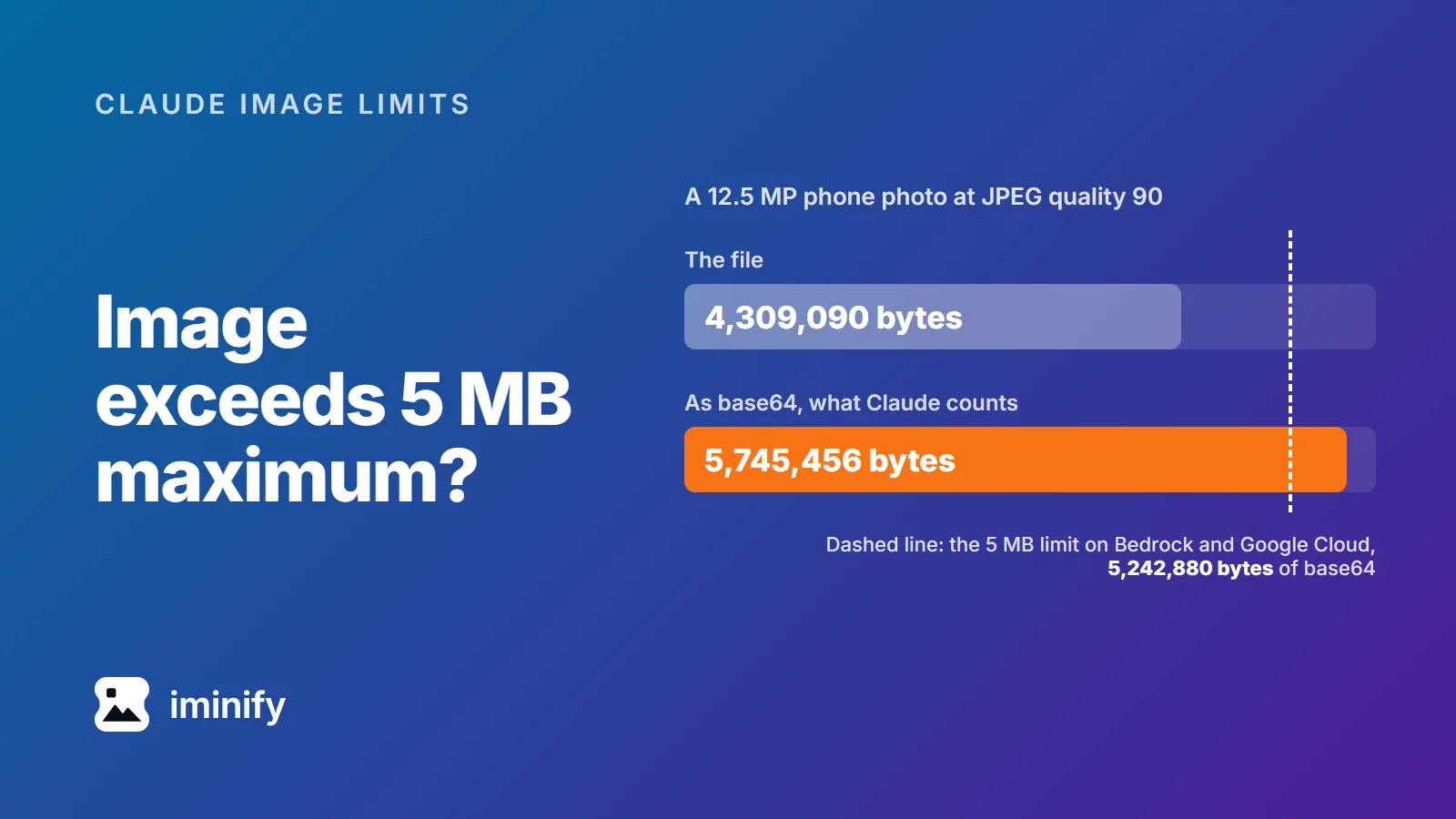
Our 12.5-megapixel test photo, re-saved with jpegli at quality 90, is 4,309,090 bytes. That's under 5 MB, and it's still too big for Claude on Amazon Bedrock or Google Cloud. Anthropic's limit there is "5 MB (base64-encoded)", and base64 turns those 4,309,090 bytes into 5,745,456. The error compares the encoded size with 5,242,880 bytes, as in this one from a Claude Code issue: image exceeds 5 MB maximum: 5281812 bytes > 5242880 bytes.
So the ceiling is 3,932,160 bytes of actual file on Bedrock and Google Cloud, and roughly 7.5 MB on the direct Claude API, whose limit is 10 MB. Separately, no side may pass 8000 pixels, or 2000 once a request carries more than 20 images. For photos, one step clears all of it: resize to 2000 pixels on the long edge and save it as JPEG.
The limit is on the base64 text, not the file
Claude's vision docs (read 23 September 2026) set these per-image limits:
| Where you call Claude | Largest image, as documented | Largest file that fits |
|---|---|---|
| Claude API, directly | 10 MB (base64-encoded) | about 7.5 MB |
| Amazon Bedrock, Google Cloud | 5 MB (base64-encoded) | 3,932,160 bytes |
| Everywhere | 8000x8000 px | |
| More than 20 images in one request | 2000 px per side |
Base64 writes every 3 bytes as 4 characters, so the encoded image is a third larger than the file. The error counts 5 MB as 5,242,880 bytes (5 x 1,048,576), and three quarters of that is 3,932,160. The direct API returned the same 5 MB error to Claude Code users as late as January 2026, and Anthropic's release notes don't say when the limit became 10 MB.
The 20-image rule counts every image in the request, including images from earlier turns that you resend and screenshots inside tool results. On Bedrock and Google Cloud, documents such as PDFs count too. So a small new image can be the one that moves a long conversation onto the 2000-pixel limit, and the error then mentions "many-image requests".
Claude reads JPEG, PNG, GIF and WebP. Nothing else.
Which files trip which limit
We measured six files. MB here is a million bytes, so the 5 MB limit is 5.24 in the tables below.
| File | Pixels | File size | As base64 | Over |
|---|---|---|---|---|
| Screenshot of our home page, 2x pixel density (PNG) | 3024x1964 | 0.40 MB | 0.53 MB | nothing |
| Screenshot of a photo page, same density (PNG) | 3024x1964 | 4.96 MB | 6.61 MB | 5 MB |
| 12.5 MP phone photo (JPEG) | 4080x3072 | 6.54 MB | 8.71 MB | 5 MB |
| Nano Banana Pro 4K image (JPEG) | 5504x3072 | 11.95 MB | 15.94 MB | 5 MB and 10 MB |
| 50 MP phone photo (JPEG) | 8160x6144 | 13.06 MB | 17.41 MB | 5 MB, 10 MB, 8000 px |
| Full-page capture of our home page (PNG) | 1440x12182 | 2.77 MB | 3.70 MB | 8000 px |
The first two rows are the same size in pixels: the screenshot of text and buttons is 0.40 MB, the one showing a photograph 4.96 MB. The photograph on screen is what hits the byte limit. And all six have a side over 2000 pixels, so in a request with more than 20 images every one of them would be refused.
Resize photos to a 2000-pixel JPEG and every limit clears
With ImageMagick 7, this shrinks anything larger than 2000 pixels on its longest side and never enlarges a smaller image:
magick photo.jpg -resize "2000x2000>" -quality 85 photo-2000.jpg
echo $(( ($(wc -c < photo-2000.jpg) + 2) / 3 * 4 ))
The second line, in bash or zsh, prints the file's base64 size in bytes, which is the number the error compares. For a PNG screenshot, drop -quality 85 and keep the .png ending. If the second line then prints more than 5242880, the picture is mostly photograph and belongs in a JPEG: keep -quality 85 and the .jpg ending. Our Nano Banana image as a 2000-pixel PNG still came to 5,669,104 bytes as base64.
| File | After | File size | As base64 |
|---|---|---|---|
| 12.5 MP phone photo | 2000x1506 JPEG | 1.32 MB | 1.76 MB |
| 50 MP phone photo | 2000x1506 JPEG | 1.08 MB | 1.44 MB |
| Nano Banana Pro 4K image | 2000x1116 JPEG | 0.68 MB | 0.91 MB |
| Screenshot of a photo page | 2000x1299 PNG | 2.42 MB | 3.23 MB |
The three JPEGs scored 82.1, 76.6 and 80.1 on SSIMULACRA 2 against a lossless copy at the same pixel size. On that scale 80 means "Distortion not noticeable" side by side and 70 "Artifacts are perceptible, but not annoying".
Why 2000? Claude shrinks big images itself before the model sees them: to fit 1568 pixels and 1,568 visual tokens on models before Claude 4.7, and 2576 pixels and 4,784 tokens from 4.7 on. It would shrink the 12.5 MP photo to 1265x952 on the older models and 2212x1666 on the newer ones. So for that photo, 2000 pixels costs almost nothing on the older models and about a tenth of the width on the newer ones, and it also passes the 20-image rule. For a single image on a 4.7 or later model, the resize function in Anthropic's docs gives the exact size Claude would use. Screenshots you return to Claude's computer use and browser use tools are the exception: over the model's limits they're refused instead of shrunk, so resize them to fit those limits, and to 2000 pixels once a request carries more than 20 images.
No terminal? Open Iminify's JPEG compressor, or the PNG one for a screenshot. Switch on Resize, keep Size, and set only Width to 2000 for a landscape image wider than that, or only Height to 2000 for a portrait image taller than that. It keeps the upload's format, so the result is still one Claude reads. It encodes with its own settings, so the bytes won't match the table.
A full-page capture needs splitting, not shrinking
Our full-page capture is 1440 pixels wide and 12,182 tall. Shrink it to 8000 tall and the error (At least one of the image dimensions exceed max allowed size: 8000 pixels) goes away, but Claude then shrinks it again to fit its long-edge limit, which leaves it 305 pixels wide on a 4.7 or later model and 185 on older ones. At 305, 16-pixel text would be about 3 pixels tall. The --screenshot-max-height flag in chrome-devtools-mcp v1.10.1 has the same catch: it shrinks the whole capture to fit the height you give it.
Split it instead:
magick full-page.png -crop x2000 +repage part-%d.png
Ours came out as seven full-width files, six at 1440x2000 and one 182 pixels tall, the largest 0.78 MB. A 1440x2000 part costs 3,744 visual tokens, under the 4,784 budget, so a 4.7 or later model reads it at full size. Iminify can't crop or split, so this step needs ImageMagick or another image editor.
Claude Code resizes for you, at a price
Claude Code has resized images before sending them since version 1.0.28, but pasted images kept hitting the limit into 2026, and since 2.1.122 its changelog gives 2000 pixels as the maximum for newer models. We pointed Claude Code 2.1.280 at a local stand-in for the API and had its Read tool open each file. Its requests, images included, went to the stand-in.
| File | What Claude Code sent | Size | JPEG quality |
|---|---|---|---|
| Screenshot of our home page | 2000x1299 JPEG | 0.22 MB | 90 |
| Screenshot of a photo page | 2000x1299 JPEG | 0.48 MB | 81 |
| 12.5 MP phone photo | 2000x1506 JPEG | 0.44 MB | 30 |
| 50 MP phone photo | 2000x1506 JPEG | 0.45 MB | 56 |
| Nano Banana Pro 4K image | 2000x1116 JPEG | 0.50 MB | 65 |
| Full-page capture | 236x1996 PNG | 0.35 MB |
The quality column is the libjpeg setting whose tables match the file's; other encoders count quality differently. Every image Claude Code sent was under 503 KB and within all four limits. But the 12.5 MP photo went at quality 30, and the full-page capture arrived 236 pixels wide. Our resized 2000-pixel copy of that photo didn't escape either: Claude Code re-encoded it at 33. A 1500x1000 crop from the middle of the original photo, saved as a JPEG, went at 79.
When detail matters, attach a crop of the region you mean, and split tall captures as above. These runs used the Read tool in claude -p with the default model. We didn't measure pasting.
If an older session keeps failing after one bad image, update Claude Code: before 2.1.142, a pasted image could stay in the conversation and repeat the error on every message. Claude Code now swaps it for a text placeholder and retries. Calling the API yourself, you resend the whole history each turn, so drop or shrink that image in the history.
How we measured
The 12.5 MP photo is Spring crocuses in Planina Dol by VlaDexa (CC BY 4.0), and the 50 MP one is Dyke Road Park Cafe, Hove by Andy Li (CC0). The Nano Banana Pro image is one of the 4K files we generated through the Gemini API on 23 September 2026. We took the screenshots of iminify.com and the crocuses' Commons page with Chrome 153 through puppeteer, at a 1512x982 viewport and twice the pixel density, and at 1440 wide for the full page.
Resizing and cropping used ImageMagick 7.1.2-12. We encoded the quality-90 JPEG from the top with jpegli (commit 031a0077f579), at 4:2:0 after an sRGB conversion, and scored with ssimulacra2 from libjxl v0.12.0. None of the test images went to Claude.