How big is a Nano Banana image? 52 files measured, from 512 px to 4K
On this page
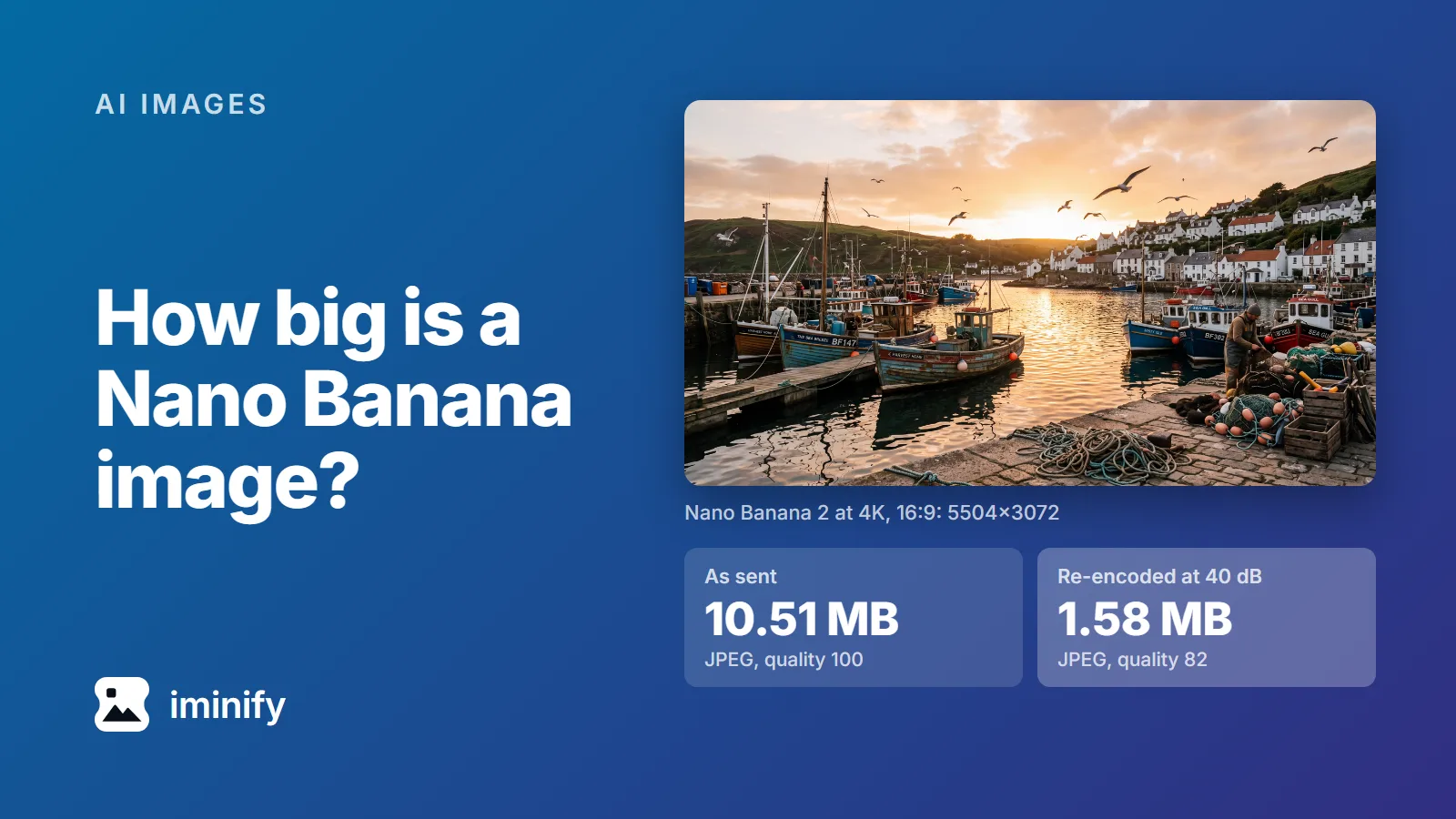
We asked Nano Banana 2 for a 4K, 16:9 picture of a fishing harbour through the Gemini API on 23 September 2026. It came back as a 5504x3072 JPEG of 10.51 MB. The same request again gave 11.10 MB. Both files were saved at JPEG quality 100, the top of the scale.
So, how big is a Nano Banana image? From Nano Banana 2 or Pro, a detailed picture is roughly 1 MB at 1K, 4 MB at 2K and 10.45 to 12.13 MB at 4K, and a flat illustration less. The original Nano Banana sends a PNG instead, about 2.1 MB for the same prompt at 1024x1024. Here are the 52 images of our test set, from all four Nano Banana models, and what five of them shrink to.
The 52 images, by model and size
We used two prompts: a photorealistic harbour at golden hour and a flat pastel illustration of a bakery. Each ran twice at every size, and the ranges below are those two runs. MB here means a million bytes; Windows 11 reports our 10.51 MB file as 10.0 MB.
| Model and size | Pixels | Harbour | Bakery |
|---|---|---|---|
| Nano Banana 2, 512 | 688x384 | 272-279 KB | 176-184 KB |
| Nano Banana 2, 1K | 1376x768 | 1.06-1.09 MB | 491-528 KB |
| Nano Banana 2, 2K | 2752x1536 | 3.83-3.95 MB | 2.10-2.23 MB |
| Nano Banana 2, 4K | 5504x3072 | 10.51-11.10 MB | 6.88-6.97 MB |
| Nano Banana 2, 512 square | 512x512 | 273-276 KB | 186-198 KB |
| Nano Banana 2, 1K square | 1024x1024 | 1.02-1.04 MB | 494-670 KB |
| Nano Banana 2, 2K square | 2048x2048 | 3.85-3.90 MB | 1.92-1.93 MB |
| Nano Banana 2, 4K square | 4096x4096 | 11.50-12.13 MB | 6.79-7.42 MB |
| Nano Banana Pro, 1K | 1376x768 | 1.02-1.04 MB | 444-465 KB |
| Nano Banana Pro, 2K | 2752x1536 | 4.26-4.43 MB | 1.85-1.95 MB |
| Nano Banana Pro, 4K | 5504x3072 | 10.45-11.95 MB | 6.65-6.74 MB |
| Nano Banana 2 Lite (1K only) | 1024x1024 | 933 KB-1.01 MB | 490-519 KB |
| Nano Banana (gemini-2.5-flash-image) | 1024x1024 | 2.07-2.11 MB, PNG | 1.08 MB, PNG |
Rows without "square" are 16:9, except the last two, which we ran square. The Nano Banana 2, Pro and original Nano Banana files all came back at the sizes in the tables on Google's image generation page, which has no table for Lite. In API calls, Nano Banana 2 is gemini-3.1-flash-image, Pro is gemini-3-pro-image and 2 Lite is gemini-3.1-flash-lite-image.
We tested the API only. Google's Gemini app help says the app downloads "at 2K resolution with a Google AI plan or at 1K without an AI plan", and doesn't say in what format.
Through the API, three of the four models send a quality-100 JPEG, not a PNG
All 48 files from Nano Banana 2, 2 Lite and Pro are baseline JPEGs with 4:2:0 colour. A JPEG stores quantisation tables that set how coarsely detail is rounded off, and in every one of these files every value in both tables is 1. That's what quality 100 writes in libjpeg: the finest rounding the format allows.
Through the Gemini API, you can't ask for anything else. Setting mime_type to image/png for Nano Banana 2 got this back from the Interactions API:
The value 'image/png' is not supported for 'response_format.mime_type'. Supported values: 'image/jpeg'.
There's no quality setting either: the Interactions API reference lists aspect ratio, size, a delivery mode and image/jpeg for the image, and no quality field. Google's Python SDK has output_mime_type and output_compression_quality fields, and its own descriptions (v2.25.0) say of both: "This field is not supported in Gemini API." The SDK passes them on only in its Gemini Enterprise Agent Platform mode (formerly Vertex AI), on Google Cloud, which we didn't test.
Watch the file name. The first text-to-image example on Google's image generation page calls gemini-3.1-flash-image and writes the bytes to generated_image.png, so a file named .png can be a JPEG inside. A JPEG starts with the bytes FF D8, a PNG with 89 50 4E 47.
The original Nano Banana, gemini-2.5-flash-image, is the exception, and Google shuts it down on 2 October 2026. It sent a real PNG every time, even when we asked for image/jpeg, and its 1024x1024 harbour weighs 2.07 to 2.11 MB, about twice the Nano Banana 2 1K file.
Leave out the aspect ratio and you can get sizes Google doesn't list
Google's page says: "By default, the model matches the output image size to that of your input image, or otherwise generates 1:1 squares."
That's not what we got. Outside the 52, we sent our two prompts five times with no aspect ratio and no size: four through the Interactions API (Nano Banana 2 and Pro, both our prompts) and one through generateContent (Pro, the harbour). All five came back 1408x768, a size that appears in none of the tables on Google's page. Asking Nano Banana 2 for 2K with no ratio gave 2816x1536, and 4K with no ratio gave 5632x3072 on both models; neither is in the tables. If the pixel size matters, set aspect_ratio every time.
What the files weigh after compression
We took five of the files through two steps.
The first changes no pixels. mozjpeg's jpegtran recodes the same data with optimised Huffman tables, in progressive order. Iminify's Lossless level does exactly this to a JPEG like these, and Smart and Ultra start with it. The repack took 11 to 14 percent off each file, and each one decoded to exactly the same pixels as before.
The second re-encodes. For each encoder we searched qualities 40 to 95 for the lowest that still holds 40 dB of PSNR against the original and, under 8 megapixels, a SSIMULACRA 2 score of 70. Those are the two floors Iminify's Smart level uses, and we used the flags it uses for photographs:
| File as generated | Lossless | JPEG (jpegli) | WebP (cwebp) | AVIF (avifenc) |
|---|---|---|---|---|
| Nano Banana 2 1K harbour, 1.06 MB | 914 KB | 439 KB (q95) | 352 KB (q91) | 265 KB (q76) |
| Nano Banana 2 2K harbour, 3.95 MB | 3.51 MB | 1.62 MB (q95) | 1.28 MB (q91) | 1.02 MB (q77) |
| Nano Banana 2 4K harbour, 10.51 MB | 9.22 MB | 1.58 MB (q82) | 1.42 MB (q85) | 805 KB (q60) |
| Nano Banana 2 4K bakery, 6.88 MB | 5.90 MB | 429 KB (q40) | 204 KB (q48) | 87 KB (q40) |
| Nano Banana Pro 4K harbour, 10.45 MB | 9.16 MB | 1.59 MB (q82) | 1.42 MB (q85) | 820 KB (q60) |
The 4K harbour as a quality-82 JPEG is 85 percent smaller than what Google sent, and as an AVIF it's about a thirteenth of the size. All 15 encodes scored between 71.8 and 87.9 on SSIMULACRA 2, so above 70 even at 4K, where we held the search to PSNR alone, as Smart does above 8 megapixels.
The smaller files were the hard ones. The 1K and 2K harbours needed jpegli's quality 95 to hold 40 dB, where the 4K version cleared it at 82. Per pixel, the file Google sent carries 8.0 bits at 1K and 7.5 at 2K, against 5.0 at 4K.
These are the encoders at settings we searched for, not Iminify's output. On a JPEG upload, Smart's search stops at quality 90, so for the 1K and 2K harbours its JPEG and WebP would stop at 90 without reaching 40 dB.
A 5504-pixel-wide picture is far wider than a web page shows it, so resize to the width you display before anything else. And the largest file in our set, 12.13 MB, fits under the 16 MB limit for a guest upload on Iminify's JPEG compressor, which keeps the file a JPEG, and on its JPG to WebP and JPG to AVIF pages.
Compression dropped Google's C2PA manifest
Every one of the 52 files carried a 6,025-byte C2PA manifest, signed with a certificate issued to Google LLC and stating "Created by Google Generative AI." and "Applied imperceptible SynthID watermark." The lossless repack dropped it, and so did each re-encode we checked; Iminify drops it on every file it rewrites. SynthID is a different mark: Google says it's embedded "directly into" the image and designed to stand up to "lossy compression". We didn't test that. If your site or a platform needs the C2PA record, keep the original next to the compressed copy.
Run it yourself
This is the request we used, a bash command with curl and jq (on Windows, run it in Git Bash, as we did; Windows PowerShell's curl is a different command):
curl -s https://generativelanguage.googleapis.com/v1beta/interactions \
  -H "x-goog-api-key: $GEMINI_API_KEY" \
  -H "Content-Type: application/json" \
  -d '{"model": "gemini-3.1-flash-image",
       "input": "A photorealistic photograph of a fishing harbour at golden hour: wooden boats with peeling paint, coiled ropes and nets on the quay, gulls in the air, low sun reflecting on rippled water, whitewashed houses on the hillside behind. Shot on a 35mm lens, natural light, fine detail.",
       "response_format": {"type": "image", "aspect_ratio": "16:9", "image_size": "4K"}}' \
  | jq -j '.steps[] | select(.type == "model_output") | .content[] | select(.type == "image") | .data' \
  | base64 -d > harbour.jpg
Our copy produced a 10.73 MB file. Keep jq -j: our jq 1.8.1 on Windows ended -r output with a carriage return, which base64 -d rejected. The bakery prompt was: "A flat vector illustration of a small bakery shop front: a striped awning, a large window showing bread and cakes, a potted plant by the door and a bicycle leaning on the wall. Clean shapes, solid pastel colours, no gradients, no text, no lettering."
The two steps, with jpegtran and djpeg from mozjpeg 4.1.5, jpegli from commit 031a007, cwebp 1.5.0 and avifenc 1.2.1 (libavif 1.4.0 changed what avifenc's -q means, so a newer build may need other numbers):
jpegtran -copy none -optimize -progressive -outfile harbour-lossless.jpg harbour.jpg
djpeg -outfile harbour.ppm harbour.jpg
cjpegli harbour.ppm harbour-q82.jpg -q 82 --chroma_subsampling=420
cwebp -m 6 -mt -pass 10 -q 85 -metadata none harbour.jpg -o harbour-q85.webp
avifenc -s 4 -j all -y 420 -q 60 --ignore-exif --ignore-xmp harbour.jpg harbour-q60.avif
Your harbour will be a different picture, and the qualities in that block may not hold 40 dB on it. They didn't quite on the harbour our copy of the command produced: 39.90 dB as the quality-82 JPEG and 39.96 dB as the quality-60 AVIF.