SSIMULACRA 2 scores in practice: what 50, 70 and 90 cost in kilobytes
On this page
We ran cwebp at quality 75 over ten images, at the settings below. A night skyline came out at 63.0 on the SSIMULACRA 2 scale, an app icon at 83.1. Same encoder, same quality number, twenty points apart, and 63 sits below the line the scale calls "artifacts are perceptible, but not annoying".
A quality number tells the encoder how hard to try. SSIMULACRA 2 describes what came out, on a scale topping out at 100, and means much the same for a JPEG, a WebP or an AVIF. So we measured what each point costs: ten public images, three encoders, a grid of quality settings across each encoder's range, bisected around each target.
The SSIMULACRA 2 scale is a set of viewing tests
The definitions come from the metric's own repository:
| Score | What it means |
|---|---|
| 50 | "medium quality... Slightly annoying artifacts." |
| 70 | "high quality... Artifacts are perceptible, but not annoying." |
| 80 | "very high quality. Distortion not noticeable... in a side-by-side comparison at 1:1." |
| 90 | "visually lossless. Distortion not noticeable... in a flicker test at 1:1." |
A flicker test swaps the two images in the same spot while you watch.
SSIMULACRA 2 was tuned on human ratings of JPEG, WebP, AVIF and three other codecs, which is what lets one number compare encoders with no shared quality scale.
What each score costs
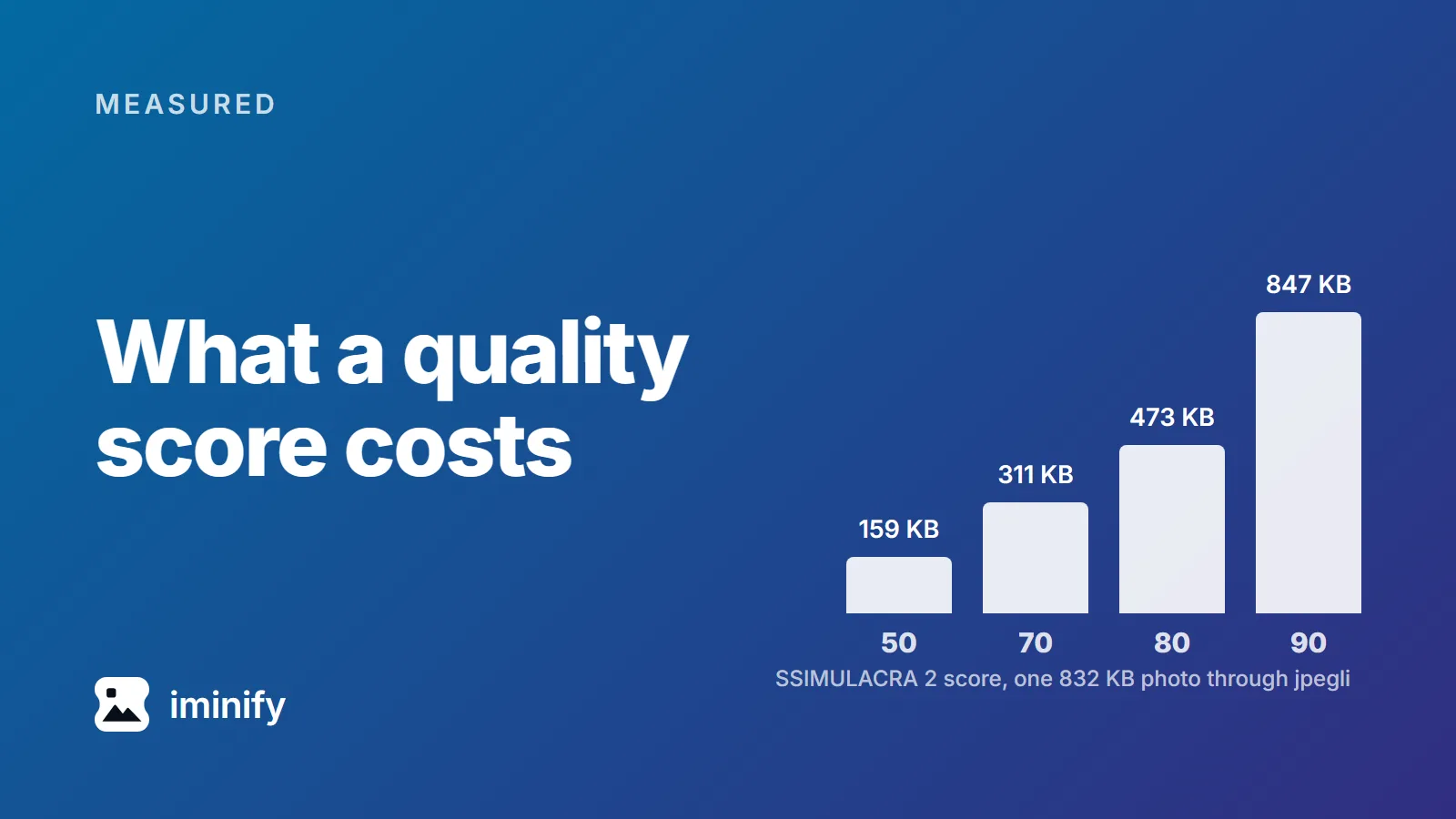
Start with one photograph: the 1800x1200 fjord shot, 832 KB as it arrives. Here's the smallest file each encoder produced clearing each score, with the quality behind it. jpegli writes ordinary JPEGs, and photographs get 4:2:0 chroma, as our pipeline does:
| Encoder | 50 | 70 | 80 | 90 |
|---|---|---|---|---|
| jpegli | 159 KB (q33) | 311 KB (q74) | 473 KB (q87) | 847 KB (q97) |
| cwebp | 179 KB (q38) | 337 KB (q78) | 518 KB (q88) | never reaches it |
| avifenc | 157 KB (q38) | 298 KB (q54) | 432 KB (q68) | 782 KB (q92) |
The curve is steep at the top. Going from 70 to 80 costs about half again as many bytes, and 80 to 90 adds another 80 percent.
That photograph at three of those scores, cropped 1:1 to 400 pixels of cliff:
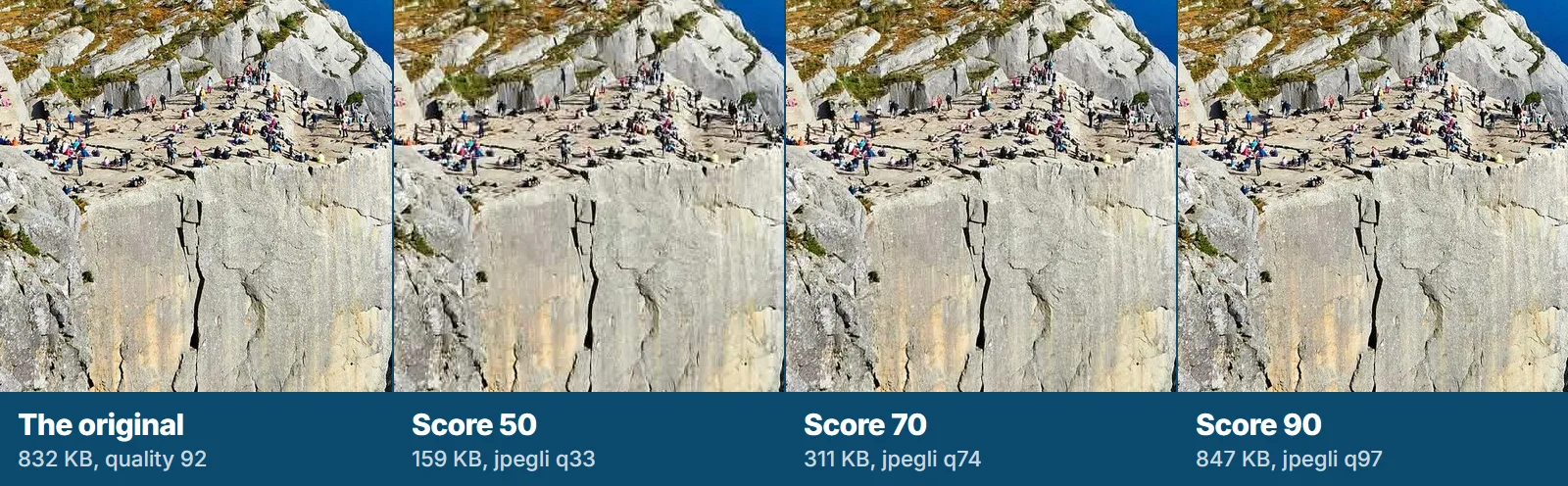
At 50 the people on the rock lose their edges. At 70 you have to hunt. This blog re-encodes uploads to WebP, so the strip is a picture of our results; the commands below make the real ones.
Across the whole corpus at a score of 70:
| Image | Original | jpegli | cwebp | avifenc |
|---|---|---|---|---|
| Fjord, photo | 832 KB jpg | 311 KB | 337 KB | 298 KB |
| Raspberries, photo | 342 KB jpg | 54 KB | 60 KB | 44 KB |
| Night skyline, photo | 427 KB jpg | 141 KB | 155 KB | 133 KB |
| Canoe, photo | 387 KB jpg | 89 KB | 91 KB | 63 KB |
| Cafe, photo | 356 KB jpg | 83 KB | 73 KB | 44 KB |
| Coffee, photo | 59 KB webp | 24 KB | 14 KB | 7 KB |
| Phone screenshot | 959 KB png | 179 KB | 129 KB | 68 KB |
| Desktop screenshot | 303 KB png | 223 KB | 98 KB | 97 KB |
| Social card, flat graphic | 208 KB png | 31 KB | 15 KB | 10 KB |
| App icon, transparent | 113 KB png | no alpha | 23 KB | 4 KB |
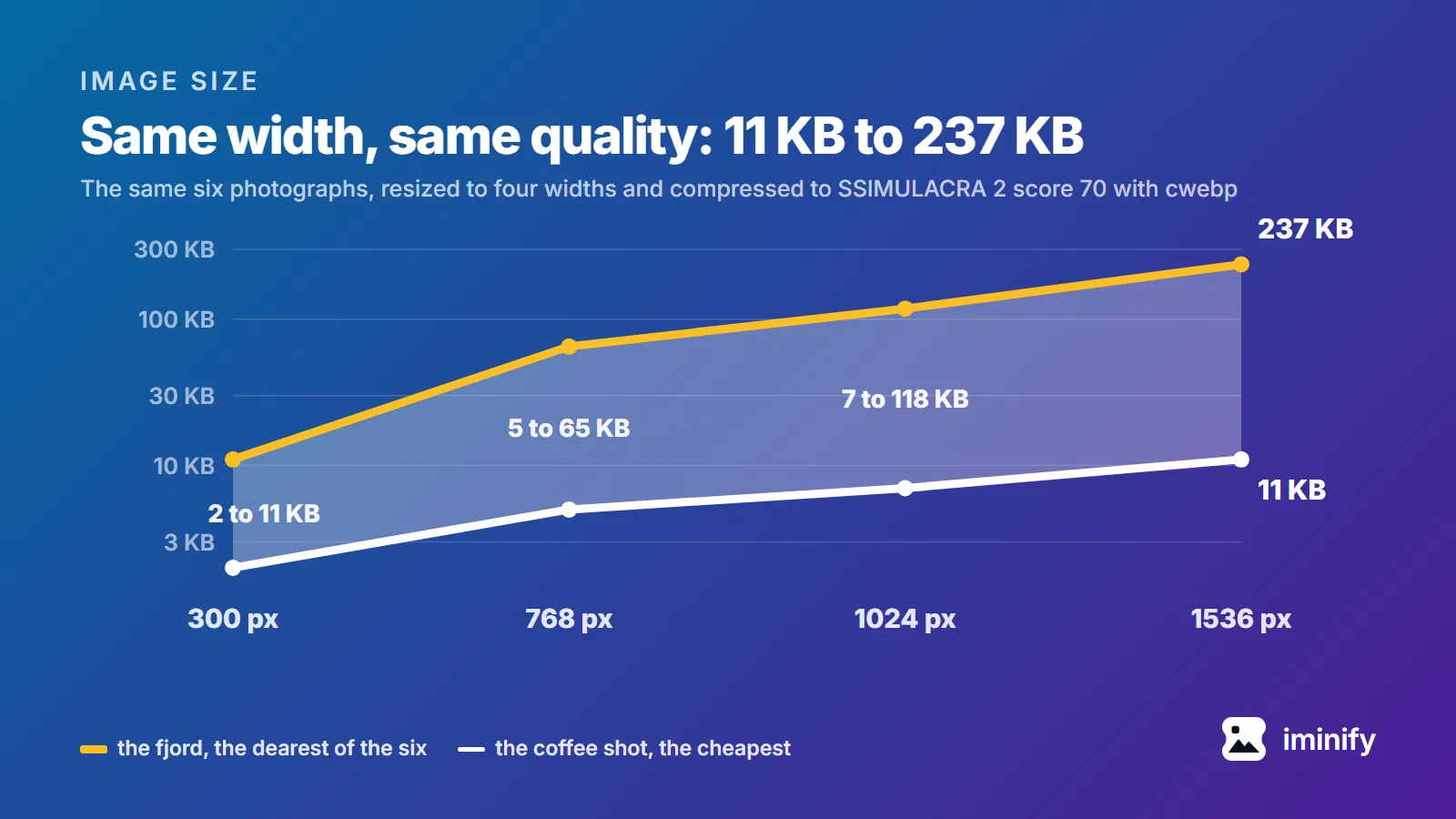
Against jpegli, AVIF was smaller on all nine images it could encode (the icon has no JPEG column: JPEG carries no alpha), by 4 percent on the fjord and over 70 percent on the coffee shot. WebP was smaller on five of those nine, and 2 to 11 percent bigger on the four photographs it lost. At 80 it wins four of nine.
Our recommendation: target 70, photographs to AVIF, screenshots and flat graphics to AVIF or WebP, and JPEG where the file has to open in software you don't control.
Google's WebP page still says "WebP lossy images are 25-34% smaller than comparable JPEG images at equivalent SSIM quality index". The study behind it used libjpeg 6b and the SSIM index. Against jpegli and this metric we measured 28 to 56 percent on screenshots and flat graphics, and the opposite on four of the six photographs.
The quality number that gets you there is different for every image
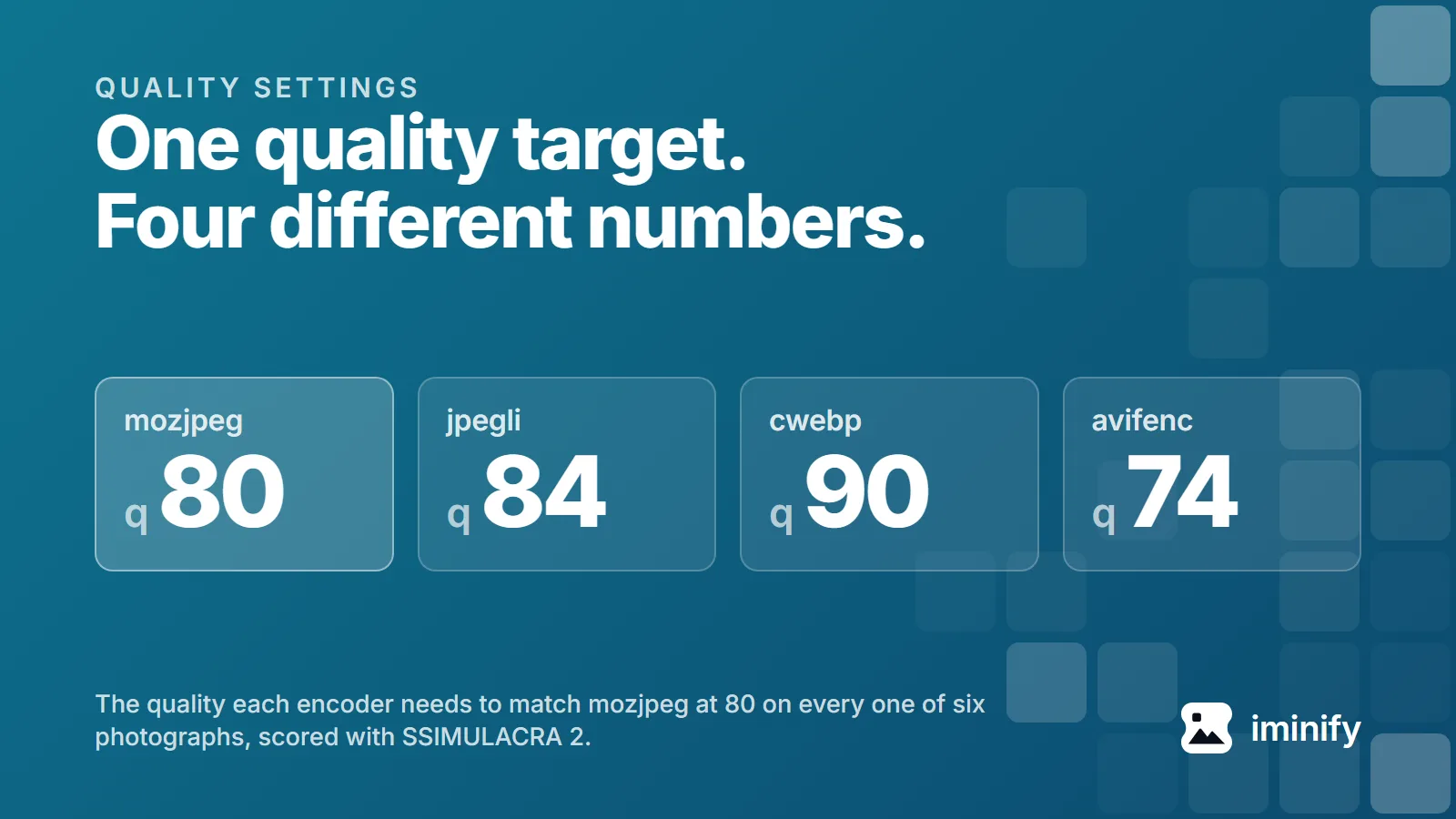
To clear 70, jpegli needed quality 39 on one image and 78 on another. cwebp ranged from 25 to 81, avifenc from 20 to 62.
The same thing from the other side: at a fixed -q 75, jpegli landed between 68.5 and 79.3, avifenc between 79.6 and 89.6, and cwebp between 63.0 and 83.1, each at our pipeline's settings for that content class (screenshots and graphics carry cwebp's -sharp_yuv, worth 0.8 points on the icon). One setting for a whole site puts every image somewhere in a band that wide.
It isn't even reliably monotonic: on the phone screenshot, cwebp with -sharp_yuv scored 75.5 at quality 54 and 69.7 at quality 60, in a file 5 percent bigger. We ran both again and got the same numbers.
Why 90, the visually lossless mark, is so expensive
We swept every encoder to its top. Lossy WebP never reached 90 on the nine sources that weren't already WebP: its best scores land between 86.6 and 88.6, and four of the five JPEG photographs needed a file bigger than the original. Google's own WebP FAQ names one constraint: "Consistent with the VP8 bitstream, lossy WebP works exclusively with an 8-bit Y'CbCr 4:2:0 (often called YUV420) image format."
jpegli and avifenc do reach 90. The bill is the point. Of the five JPEG photographs, three cost more at 90 as a 4:2:0 jpegli file than the original, two as an AVIF. The raspberries are the extreme: 342 KB in, 440 KB as a JPEG that scores 90, 990 KB as an AVIF, nearly three times what we started with.
Chroma is part of that bill. The ladder gives photographs 4:2:0, as our pipeline does; at 4:4:4, jpegli's quality 95 scores 90.5 on the fjord at 797 KB, where 4:2:0 scores 89.2 at 730 KB and has to climb to 847 KB to clear 90.
Two floors, because PSNR misses what the eye catches
Iminify's levels are score targets. Smart searches for the lowest quality clearing 40 dB of PSNR and then a score of 70. Ultra uses 34 dB and 50. They're targets, not promises: the search runs only up to 36 megapixels and the check up to 8.
The first floor is blind in a specific way. Here's what each image scores at the lowest jpegli quality clearing 40 dB (the icon has no JPEG row):
| Image | jpegli quality | PSNR | SSIMULACRA 2 |
|---|---|---|---|
| Coffee, photo | q15 | 40.1 dB | 50.2 |
| Raspberries, photo | q48 | 40.0 dB | 67.1 |
| Canoe, photo | q78 | 40.1 dB | 76.5 |
| Cafe, photo | q66 | 40.6 dB | 76.7 |
| Night skyline, photo | q90 | 42.1 dB | 84.5 |
| Social card, flat graphic | q90 | 41.2 dB | 85.0 |
| Phone screenshot | q96 | 42.0 dB | 87.4 |
| Fjord, photo | q96 | 42.9 dB | 89.7 |
| Desktop screenshot | q100 | 57.1 dB | 92.0 |
Every one clears the floor, with scores from 50.2 to 92.0. PSNR averages error over every pixel, so a mostly flat picture clears a high average while its few detailed regions are coded badly.
Seven of the nine land above 70, where a second floor changes nothing. Smart's search never goes below quality 40, so the coffee row sits under anything it could pick. The raspberries row does not: quality 48 is inside Smart's range, and 67.1 is under 70. That is the image the second floor is for.
Run it yourself
Ten files, four content classes, under 8 megapixels, public:
# photo-landscape = Fjord, photo-food = Raspberries, photo-city-night = Night skyline,
# photo-portrait = Canoe, photo-cafe = Cafe, photo-product = Coffee,
# graphic-social-card = Social card, graphic-icon-alpha = App icon
for slug in photo-landscape photo-food photo-city-night photo-portrait photo-cafe; do
  curl -o "$slug.jpg" "https://www.iminify.com/image/showcase/$slug/original.jpg"
done
for slug in screenshot-mobile screenshot-desktop graphic-social-card graphic-icon-alpha; do
  curl -o "$slug.png" "https://www.iminify.com/image/showcase/$slug/original.png"
done
curl -o photo-product.webp "https://www.iminify.com/image/showcase/photo-product/original.webp"
dwebp -quiet photo-product.webp -o photo-product.png   # cjpegli, avifenc and ssimulacra2 all refuse WebP
optipng -o0 -strip all graphic-icon-alpha.png          # the only source with colour chunks; without this its AVIF decodes to a PNG ssimulacra2 rejects
Five photographs are JPEG masters by Alexey Topolyanskiy, Ben Moore, Anders Jildén, Roberto Nickson and Luke Chesser. Justin Leibow's coffee shot is the same preparation written as a WebP, and all six carry the Unsplash License. Both screenshots come from Wikipedia's Image compression article, CC BY-SA 4.0; the card and icon are ours. The photographs are prepared masters, not camera files: fetched at 2400x1600, downscaled, saved at quality 92 with 4:4:4 chroma.
These are the encoder settings we measured with. Versions: cwebp 1.5.0, avifenc 1.2.1 on aom 3.12.1, optipng 0.7.8, jpegli at main 031a0077f579 and ssimulacra2 from libjxl v0.12.0 (a7a9c787341c), both built on 17 September 2026:
cjpegli photo-cafe.jpg out.jpg -q 75 --chroma_subsampling=420   # 444 for screenshots and graphics
cwebp -quiet -m 6 -pass 10 -mt -metadata none -q 75 photo-cafe.jpg -o out.webp   # add -sharp_yuv for screenshots and graphics
avifenc -s 4 -q 75 --ignore-exif --ignore-xmp photo-cafe.jpg out.avif
No --ignore-icc on that last line: it tells avifenc to ignore any source's gamma and chromaticity and label the output sRGB, which shifts a wide-gamut file. The optipng line above strips the one source that carries either, as our pipeline does before it encodes. Scoring takes one more step, since it reads neither WebP nor AVIF:
ssimulacra2 photo-cafe.jpg out.jpg
dwebp -quiet out.webp -o webp-decoded.png && ssimulacra2 photo-cafe.jpg webp-decoded.png
avifdec out.avif avif-decoded.png && ssimulacra2 photo-cafe.jpg avif-decoded.png
The cost tables come from running that across the grid and keeping the smallest file we measured clearing each target. PSNR we derive from ImageMagick's root mean squared error, because its own PSNR metric isn't in decibels. The table came through PHP's Imagick on 7.1.1-46, and the line below, on 7.1.2-12, agrees to four decimals:
magick compare -metric RMSE photo-cafe.jpg out.jpg null: 2>&1 # PSNR in dB = 20 * log10(1 / the bracketed value)
If you would rather not, Iminify runs this search per image on upload, and every lossy result can sit beside its original on a difference map with its PSNR: photographs to AVIF, screenshots and graphics to WebP. These ten are the corpus our later posts reuse.