ComfyUI's Flux Dev example image is a PNG of 1,215,064 bytes, and the two text chunks holding its prompt and workflow take 12,240 of them. The rest is 1024x1024 pixels stored without loss. Across the 92 PNGs in ComfyUI's examples repository that carry a workflow, the text was no more than 3.32 percent of any file, with a median of 0.62 percent. Converting to JPG shrinks the file, but ComfyUI's own loader can't read a workflow back out of a JPG. A WebP or AVIF can keep it, at about a tenth of the size. We took the text-to-image examples of ten models from ComfyUI's examples repository, made smaller copies several ways, and dropped the copies back onto ComfyUI 0.37.0's canvas to see which ones still held the workflow.
PageSpeed Insights ran Lighthouse 13.5.0 on our home page on 22 September 2026 and flagged "Improve image delivery" in the mobile report: "Est savings of 1,300 KiB". All of it came from one photograph. The fjord shot in our before-and-after comparison is on the page twice, as the 832.5 KiB original and as our own compressed copy at 555.3 KiB. Both files are 1800x1200, and the report says they're displayed at 637x425. Three later runs that day said 1,359 KiB and 364x243. If your old notes say "Serve images in next-gen formats" or "Properly size images", this is where they went: Lighthouse 13 folded four image audits into this one insight. And its savings aren't measured: each figure is arithmetic on bytes and pixels. We reproduced every number in that insight, made the file it asks for, and traced one reason the same page gets two answers.
We asked Nano Banana 2 for a 4K, 16:9 picture of a fishing harbour through the Gemini API on 23 September 2026. It came back as a 5504x3072 JPEG of 10.51 MB. The same request again gave 11.10 MB. Both files were saved at JPEG quality 100, the top of the scale. So, how big is a Nano Banana image? From Nano Banana 2 or Pro, a detailed picture is roughly 1 MB at 1K, 4 MB at 2K and 10.45 to 12.13 MB at 4K, and a flat illustration less. The original Nano Banana sends a PNG instead, about 2.1 MB for the same prompt at 1024x1024. Here are the 52 images of our test set, from all four Nano Banana models, and what five of them shrink to.
The hero photo on the Allbirds home page has a file name that ends in .jpg. On 23 September 2026 the site sent Chrome a WebP of 572 KB. Ask the same image address for a JPEG and it sends one, 663 KB. That's why your saved image is a WebP. Many sites pick the format each time they send a picture, from a list of formats your browser says it can show. Twelve sites made it into our test: nine sent Chrome a WebP or an AVIF, and every one of those nine would also hand over a JPEG (JPG is the same format) if asked the right way. The four ways that worked are below the table.
Five of the fifteen pages we read for "avif vs webp file size" put AVIF 20 to 30% under WebP, ShortPixel among them. Six give no comparable figure, three put it between 11.76% and 50%, and one forum thread reports an AVIF twice the size. We put the ten images of our published corpus through cwebp and two builds of avifenc, bisecting each to the same SSIMULACRA 2 score of 80. The totals: 1,675.4 KB for WebP, 1,114.7 KB for a current AVIF, 33.5% smaller. So the headline is roughly right. It's also the least useful number here. If the verdict is all you want: AVIF for photographs and screenshots, WebP for lossless, and WebP again on our one transparent image once both encoders keep the alpha plane lossless.
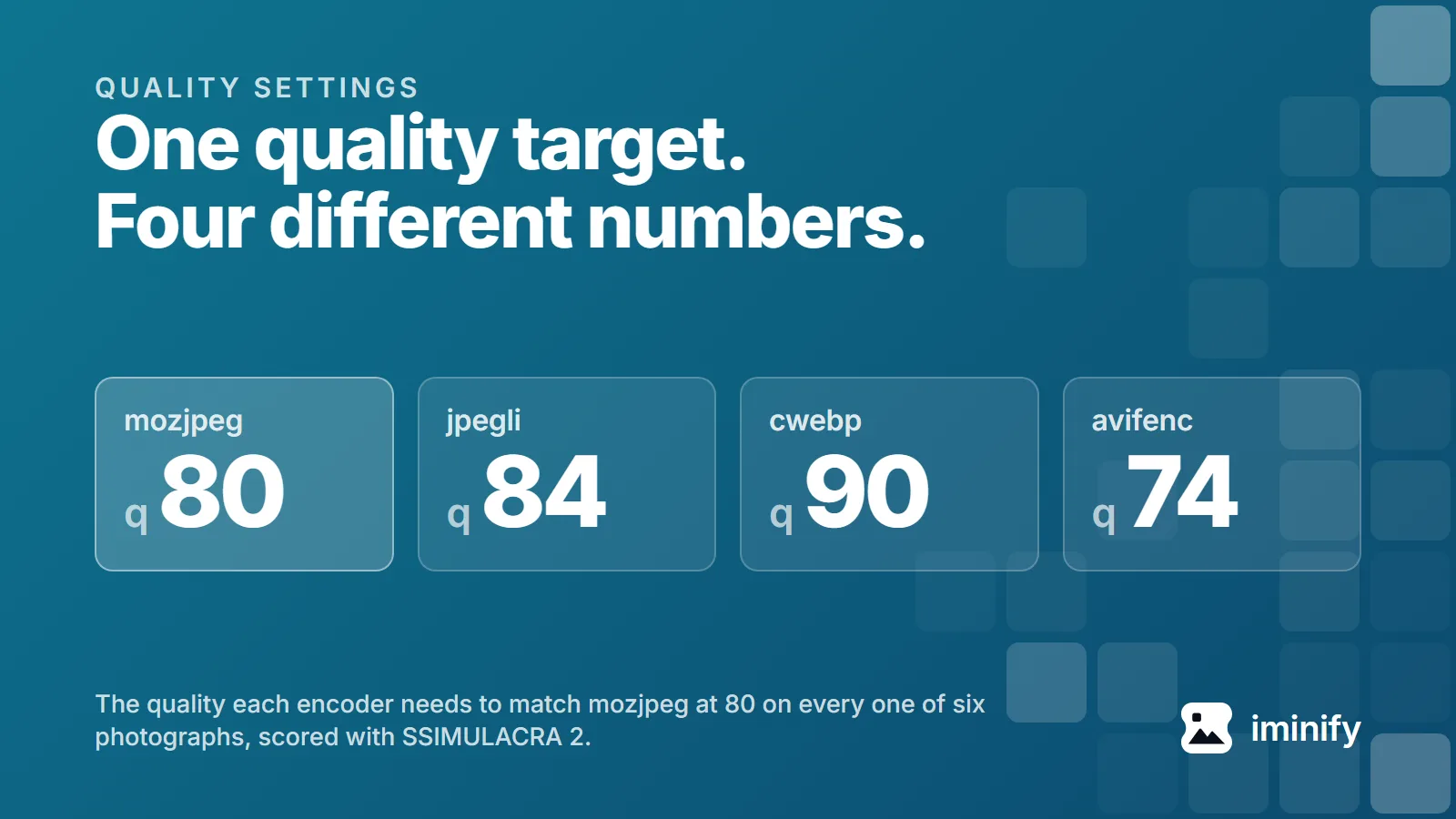
We set four encoders to quality 80 and pointed them at one photograph, an 1800x1200 shot of a fjord. jpegli scored 74.2 on the SSIMULACRA 2 scale, mozjpeg 74.8, cwebp 72.8, avifenc 85.5. One picture, one number typed into four tools, and nearly thirteen points between the best result and the worst. Quality 80 names four unrelated parameters that happen to share a range. We measured what each produces across ten public images, worked backwards to the number every encoder needs to land in the same place, and read all four sources to see why they disagree.
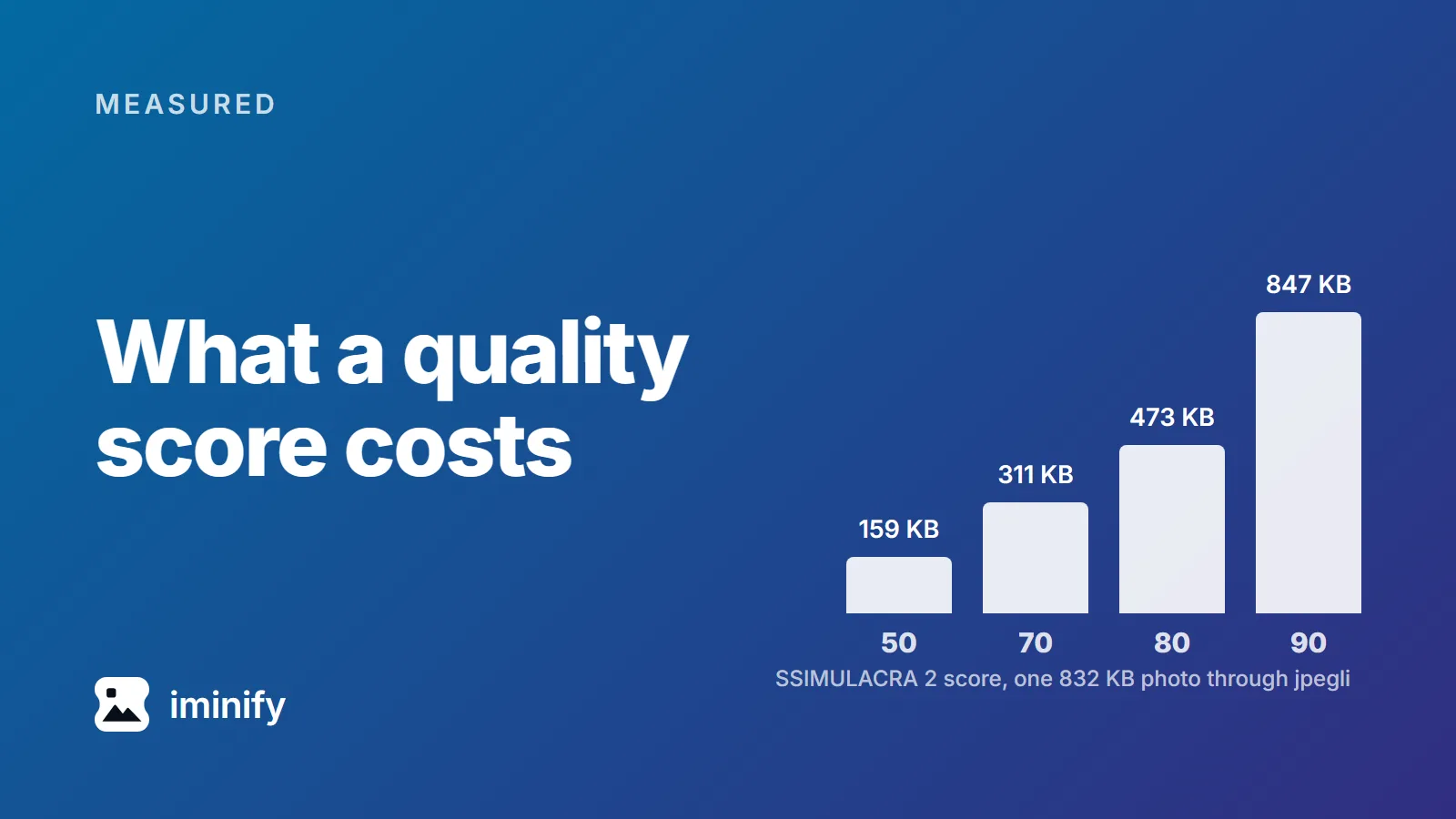
We ran cwebp at quality 75 over ten images, at the settings below. A night skyline came out at 63.0 on the SSIMULACRA 2 scale, an app icon at 83.1. Same encoder, same quality number, twenty points apart, and 63 sits below the line the scale calls "artifacts are perceptible, but not annoying". A quality number tells the encoder how hard to try. SSIMULACRA 2 describes what came out, on a scale topping out at 100, and means much the same for a JPEG, a WebP or an AVIF. So we measured what each point costs: ten public images, three encoders, a grid of quality settings across each encoder's range, bisected around each target.
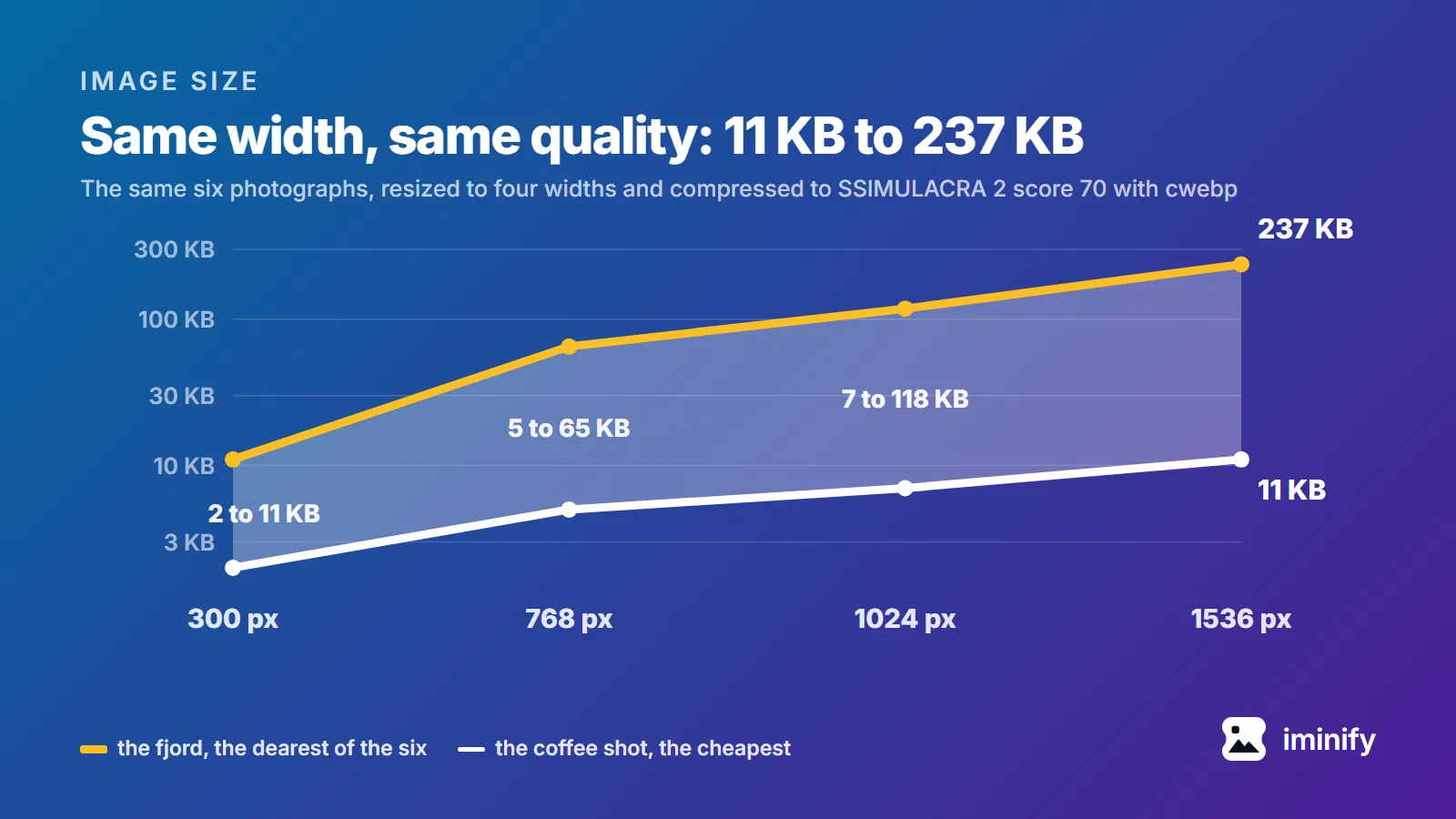
The pages that rank for "image size for website in kb" don't agree. We opened four and read what each recommends for one full-width hero image. ShortPixel says 200 KB or less. ForegroundWeb says every image on the site should be "less than 500 KB". HubSpot says "The file size is recommended at 10 MB" and adds that smaller is better, and Shopify's blog labels a hero the same, with 20 MB for a background. Fifty times between tightest and loosest, for the same picture in the same slot. Three of them pair the figure with a pixel size, which is the right instinct, and one suggests a JPEG quality to save at. None says what visual quality its number actually buys. So we measured it: ten images, four widths, three encoders, every file held to the same visual quality score. The tool that will judge the page has had a budget all along, and none of those four pages mentions that budget.
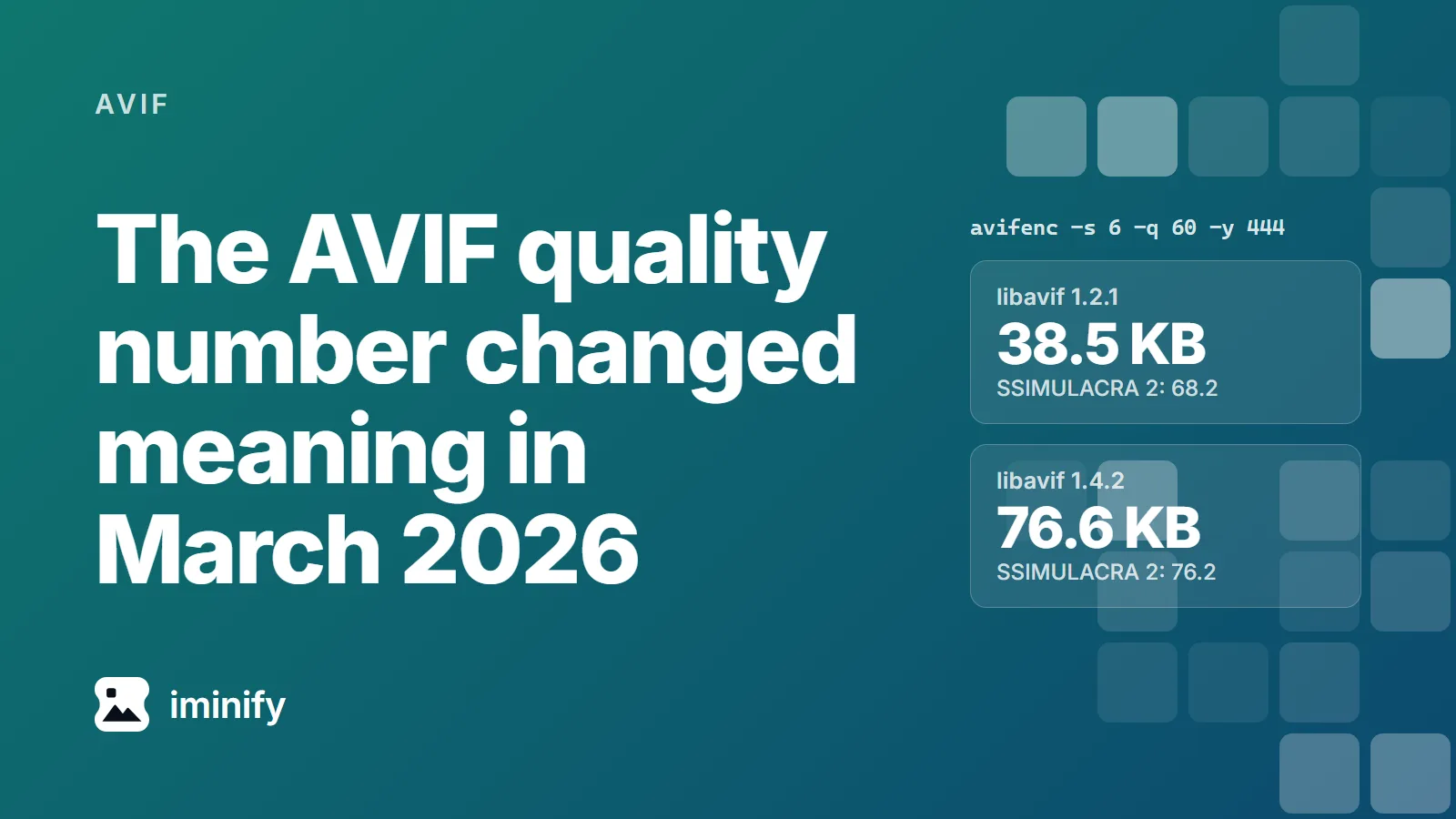
We ran one avifenc command on one photo, the raspberries from our corpus, in two containers. On Debian 13, whose libavif-bin is 1.2.1, it wrote 38.5 KB. On Alpine edge, which packages libavif 1.4.2, it wrote 76.6 KB: twice the file, the biggest increase of our ten, at a SSIMULACRA 2 score of 76.2 instead of 68.2. Neither container is broken. In March 2026 libavif changed what the number means.
·
7 min read
Try it on your own images
Drop a photograph in, pick Smart, and compare the result with the original before you download. Free, no account needed.
Google Ads and Google Analytics cookies show us which pages bring people here and let us show our ads to people who have visited.
Accept keeps them on; Reject turns them off and removes the ones we can reach.
Signing in and your theme work either way.
Cookie details