Why is red text blurry in JPG and WebP? Chroma subsampling, measured
On this page
On a test page we made full of red text, no quality from 30 to 100 lifted a plain 4:2:0 encode (no -sharp_yuv) past 58.2 on the SSIMULACRA 2 scale, which runs to 100: JPEG (cjpegli) reached 57.9, WebP 55.2, AVIF (avifenc) 58.2. The same JPEG written at 4:4:4 scored 81.6 at quality 90.
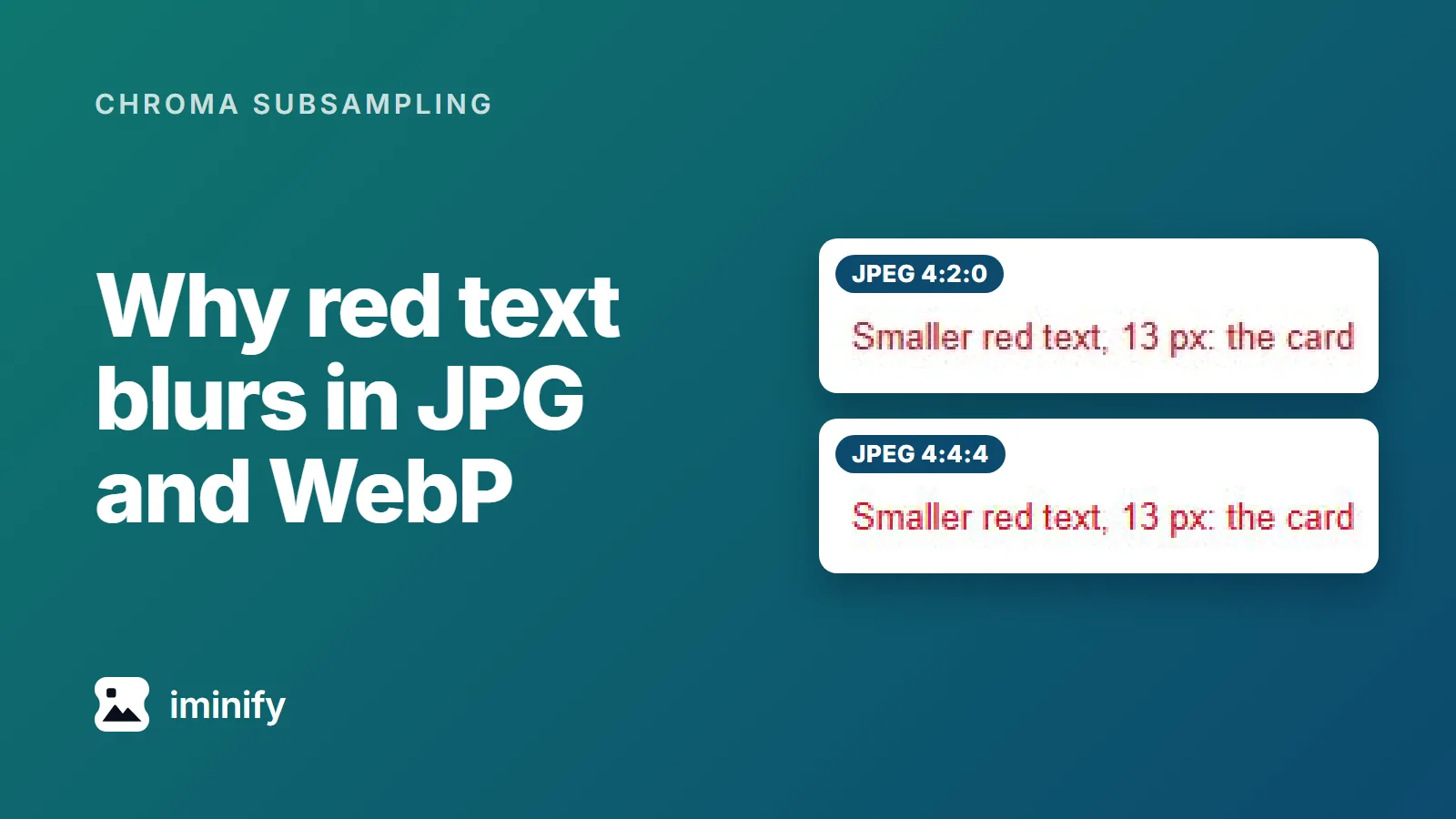
That gap is chroma subsampling: 4:2:0 keeps colour at a quarter of the detail that brightness gets, and 4:4:4 keeps all of it. It's why red text looks blurry in a JPG or a WebP. The fix is 4:4:4 for JPEG and AVIF, -sharp_yuv for lossy WebP (which narrows the gap), or lossless WebP on a flat page; What we'd use has the numbers and commands.
The colour blurs, the letter shapes don't
At 4:2:0 one colour value covers a 2x2 block of pixels. RFC 6386 says VP8, the codec inside lossy WebP, "works exclusively with an 8-bit YUV 4:2:0 image format". So a red stroke on white shares its edge colour across a block.
Our red-text page at quality 80, enlarged four times, original PNG on top. The plain 4:2:0 strips keep the letter shapes and lose the red:
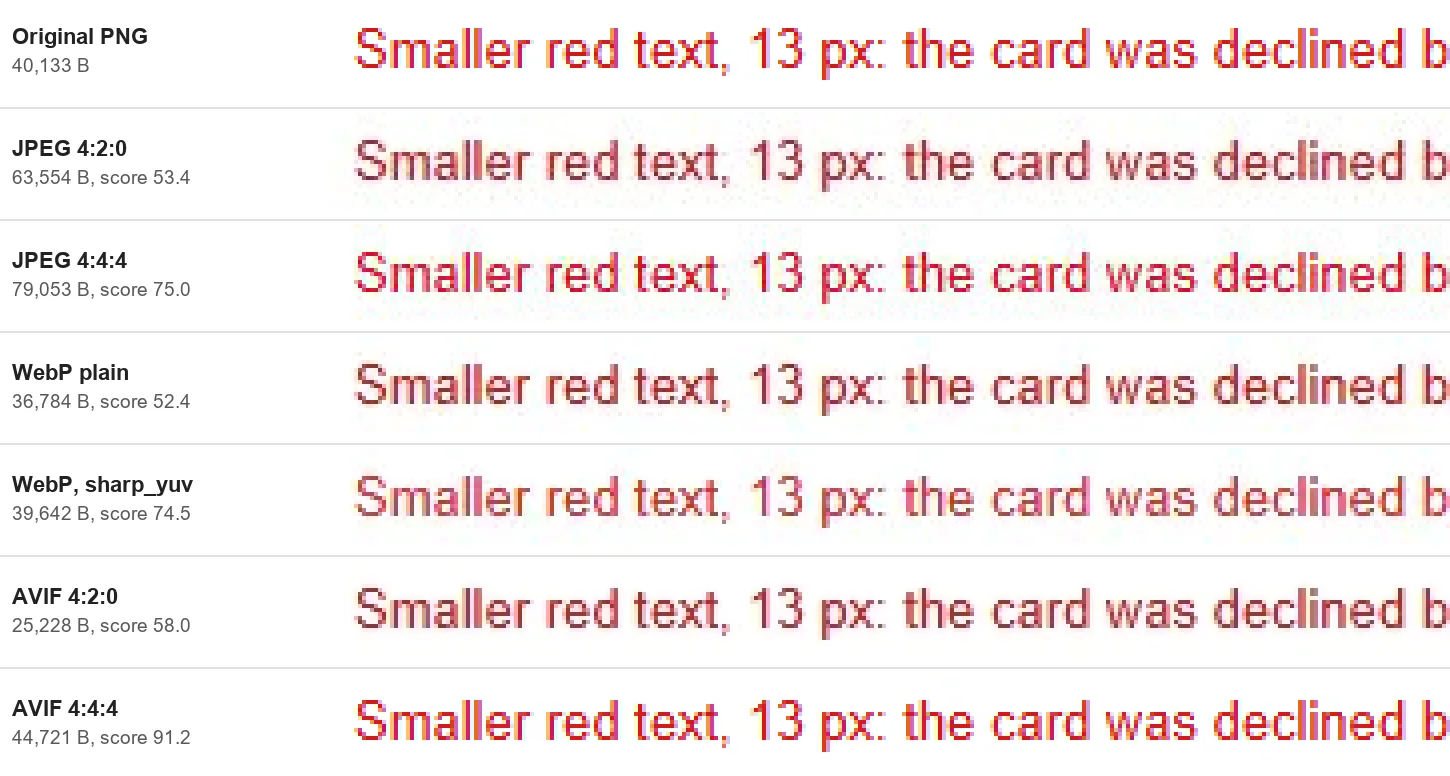
Our blog re-encodes this figure as lossy WebP, which dulls its top strip's red channel by about 5 percent; the gap between strips survives. A real page loses less: on Wikipedia's Red link article, JPEG at quality 80 scored 69.9 at 4:2:0 and 70.5 at 4:4:4.
The plain 4:2:0 ceiling is 55 to 58 on red text and above 88 on our two photographs
We encoded seven images in six settings at every quality from 30 to 100 (40 to 100 for the two photographs) and scored every file. The best score any quality reached:
| Image | JPEG 4:2:0 | JPEG 4:4:4 | WebP plain | WebP sharp_yuv | AVIF 4:2:0 | AVIF 4:4:4 |
|---|---|---|---|---|---|---|
| Red-text page | 57.9 | 92.9 | 55.2 | 78.5 | 58.2 | 93.3 |
| Red link page | 80.2 | 91.6 | 79.1 | 86.7 | 80.4 | 92.1 |
| Desktop screenshot | 79.3 | 92.0 | 77.9 | 87.0 | 79.5 | 92.3 |
| Phone screenshot | 83.1 | 90.0 | 82.4 | 87.5 | 83.2 | 90.4 |
| Social card | 87.6 | 92.0 | 83.9 | 87.2 | 86.9 | 90.9 |
| Fjord photo | 90.9 | 93.6 | 88.6 | 89.5 | 90.3 | 92.4 |
| Café photo | 92.5 | 93.1 | 88.5 | 88.7 | 91.8 | 92.0 |
Our first post quotes the metric's own scale: 80 is "very high quality", with no distortion noticeable side by side at 1:1.
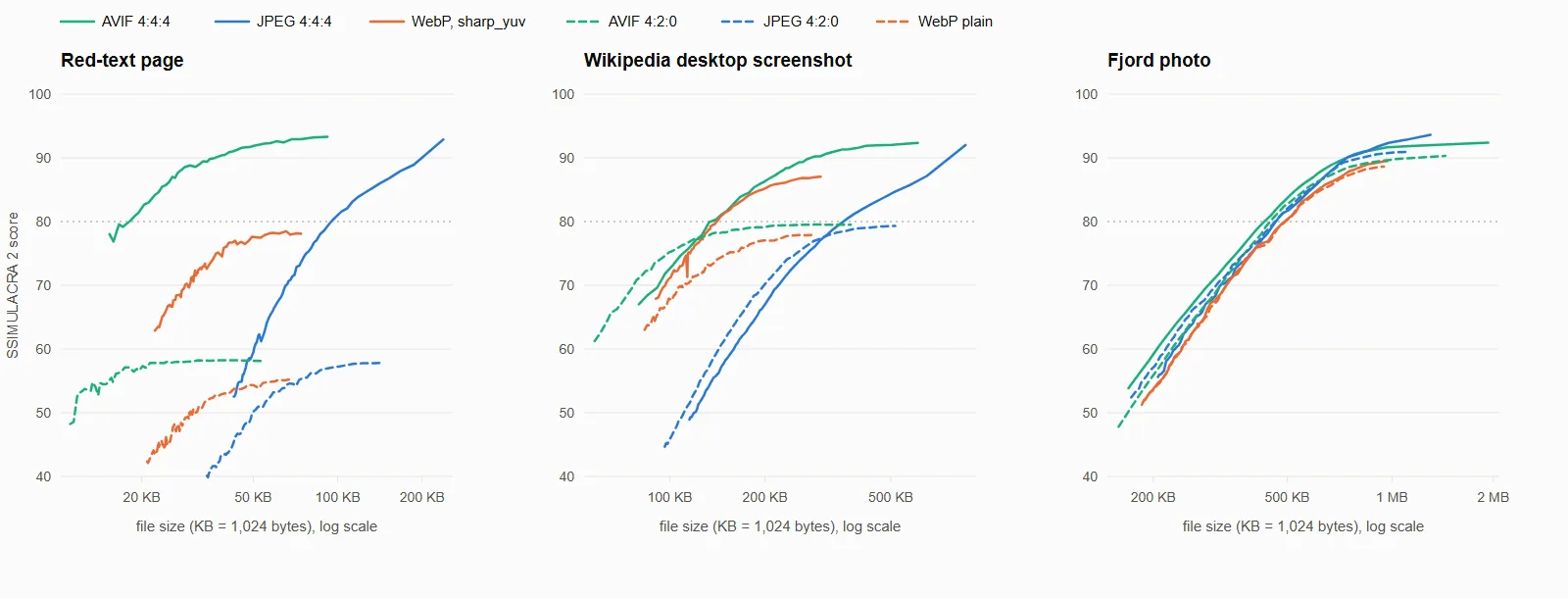
Dashed lines are the settings at 4:2:0 without sharp_yuv; WebP with sharp_yuv is solid but still 4:2:0.
At a score of 80, full colour costs from 34 percent less to 12 percent more
At JPEG quality 80, 4:4:4 costs 17.5 to 24.4 percent more bytes on all seven images, and a same-quality comparison counts that as 4:2:0's saving. It leaves out the lower score: about half a point on the red link page, 21.6 on the red-text page.
Each cell is the named setting's bytes against the same format's plain 4:2:0 setting at a score of 80; "never" means the plain 4:2:0 setting never reached it:
| Image | JPEG 4:4:4 | WebP sharp_yuv | AVIF 4:4:4 |
|---|---|---|---|
| Red-text page | never | never | never |
| Red link page | -24.1% | never | -34.1% |
| Desktop screenshot | never | never | never |
| Phone screenshot | -11.5% | -21.6% | -9.0% |
| Social card | +5.1% | -17.7% | +11.7% |
| Fjord photo | -1.5% | -4.6% | -6.1% |
| Café photo | +6.0% | +5.2% | +0.7% |
At 80 the 4:4:4 settings were cheaper in six of the ten cells where the plain 4:2:0 setting got there, and sharp_yuv in three of four. At 70, JPEG 4:4:4 cost 2.8 to 17.5 percent more on six images, and AVIF 4:4:4 ranged from 10.6 percent fewer bytes to 23.4 percent more on five (not counting the red link page, already above 70 at quality 30).
Lossy WebP always subsamples colour, but sharp_yuv narrows the gap
Lossy WebP has no 4:4:4 mode. Its -sharp_yuv flag changes how colour is averaged down, and libwebp's header says the conversion minimizes "artefacts caused by chroma subsampling". ctrl.blog found the flag came "at no cost to the file size" at a DSSIM target, a metric it suspects "can't properly account for the color differences".
At quality 80 the flag cost 6.9 to 8.8 percent more bytes on the five screenshots and graphics and 2.4 and 3.4 on the photographs, and bought 2 to 22 points on those five and under one on the photographs.
Which tools subsample colour until you say otherwise
Sampling read back from red text saved with each tool (Chrome exported a canvas we drew):
| Tool | Wrote 4:2:0 | Wrote 4:4:4 |
|---|---|---|
| cjpegli (jpegli) | none of the four settings | default, 75, 90, 95 |
| Pillow 11.1.0 and 12.2.0 | default, 95, 100 | with subsampling=0 |
mozjpeg 4.1.5 cjpeg |
default, 75, 79 | 90, 95 (4:2:2 at 80, 85, 89) |
| ImageMagick 7.1.1 | quality 75, 89 | no quality, 90, 100 |
| Chrome 155 canvas export | default, six values from 0.5 to 0.99 | 1.0 |
avifenc 1.2.1 |
from a 4:2:0 JPEG | from a PNG |
cwebp 1.5.0, lossy |
every file | no |
mozjpeg switches at 80 and 90 and ImageMagick at 90, so comparing two quality numbers in either also changes the chroma.
At Smart, Iminify writes 4:4:4 JPEG and AVIF for graphics and 4:2:0 for photographs
Iminify is ours. We sent the five screenshots and graphics and the two photographs through its API at the Smart level, its default, on 24 October 2026 and read every file. On the five, JPEG and AVIF came back 4:4:4. WebP came back from WebP's lossless coder for the red-text page and the red link page (both scored 100.00) and the desktop screenshot (a near-lossless file, 90.72), and as lossy 4:2:0 for the phone screenshot and the social card. On the photographs, JPEG and AVIF were 4:2:0 and WebP was plain lossy.
Each JPEG, AVIF and lossy WebP matched a setting of our sweep byte for byte, with sharp_yuv at quality 90 for the two lossy graphics and without it for the photographs. Its API has no chroma option.
What we'd use
For a flat page that is mostly text, use lossless WebP, as PNG to WebP at Lossless writes it. At 100.00 it was 10 percent smaller than the smallest lossy file that scored 80 on the red link page, 8 percent smaller on the red-text page and 9 percent larger on the desktop screenshot, where Iminify's near-lossless file (102,858 bytes, 90.72) beat every swept lossy file that scored 80.
For a screenshot with a photo or a gradient in it, use AVIF: on the phone screenshot it needed 126,157 bytes to reach 80, against 168,368 for WebP with sharp_yuv, 298,719 for JPEG 4:4:4 and 555,372 for lossless.
For a JPEG you must ship, use 4:4:4, and for a lossy WebP, -sharp_yuv. Photographs gain little from full colour: it raised the best score of their JPEG and AVIF files by only 0.2 to 2.7 points, so leave them at 4:2:0. These ran as printed in our container (cjpegli ships with jpegli), and the JPEGs and AVIF came out full colour:
cjpegli in.png cjpegli.jpg -q 80 --chroma_subsampling=444
magick in.png -quality 80 -sampling-factor 1x1 magick.jpg
cwebp -q 80 -sharp_yuv in.png -o out.webp
avifenc -q 80 -y 444 in.png out.avif
To check a file, exiftool -YCbCrSubSampling photo.jpg prints YCbCr4:2:0 (2 2) for 4:2:0, and avifdec --info photo.avif prints YUV420.
How we measured
The images are our red-text page, Wikipedia's Red link page (24 October 2026) and Iminify's published showcase on its home page, which supplies two Wikipedia screenshots, a social card and two photographs (JPEG masters, decoded with djpeg), all as bare 8-bit PNGs.
In our pinned container (cwebp 1.5.0, avifenc 1.2.1 on aom 3.12.1, cjpegli from jpegli at commit 031a0077f579) every setting was swept in steps of 1: cjpegli -q N with --chroma_subsampling=420 or 444, cwebp -m 6 -pass 10 -mt -q N -metadata none with and without -sharp_yuv, and avifenc -s 4 -j 2 -q N --ignore-exif --ignore-xmp with -y 420 or -y 444.
Files were decoded with djpeg, dwebp and avifdec and scored whole against the source PNG with ssimulacra2 from libjxl 0.12.0. "Reaches 80" means the lowest swept quality scoring 80 or more. Lossless WebP is the file Iminify's Lossless level returned on 24 October 2026, which matched cwebp -m 6 -pass 10 -lossless -z 9 (the command in our lossless WebP post) byte for byte and decoded to the source's pixels on all five. -lossless -z 9 alone gave files 2 to 7 percent smaller.