How much does lossless JPEG compression save? 25 files, every pixel checked
On this page
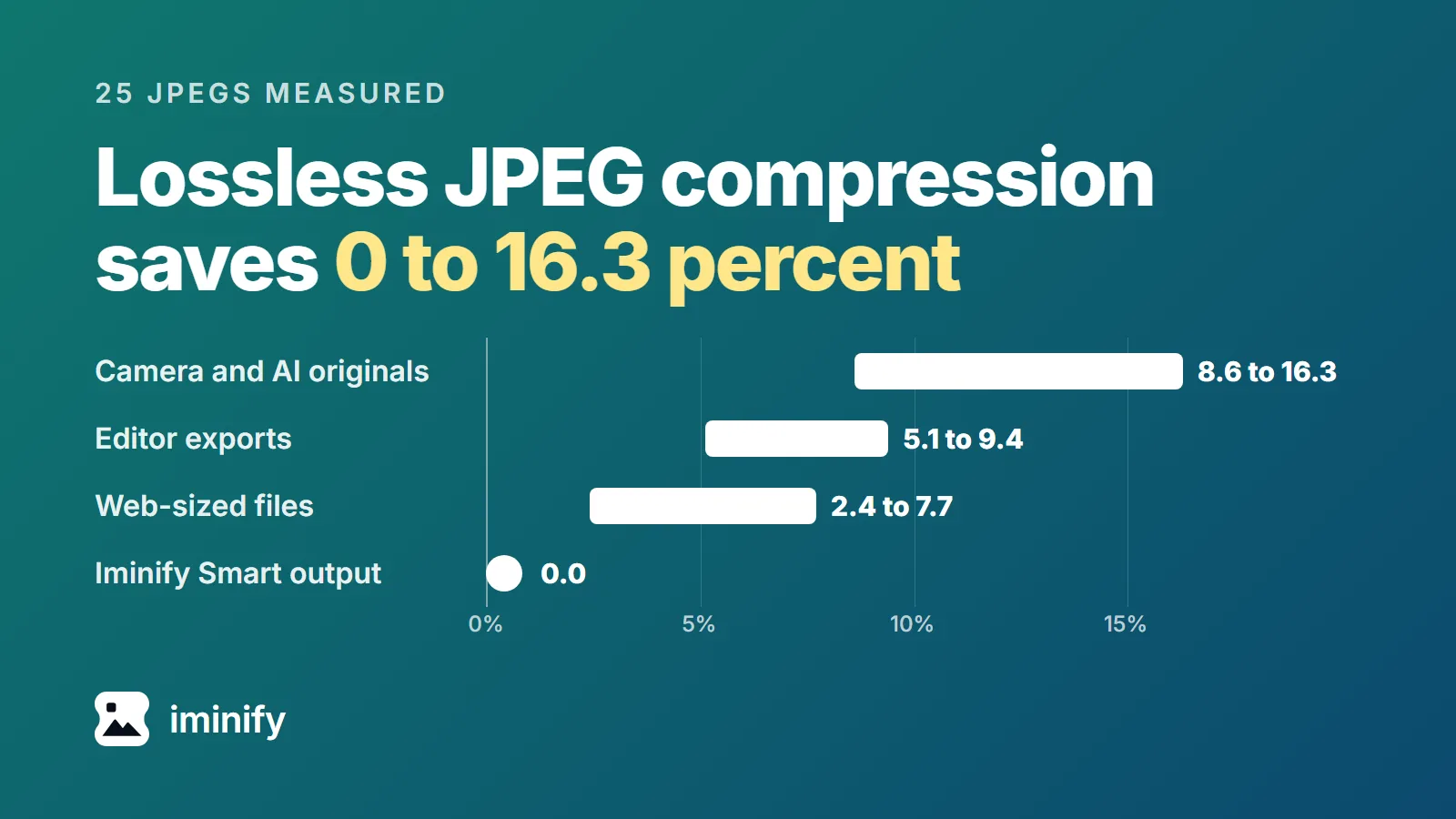
Lossless JPEG compression with mozjpeg's jpegtran -copy none took between 0 and 16.3 percent off the 25 JPEGs we tested. Together they shrank 9.5 percent, from 164.1 MB to 148.5 MB, and the median file lost 6.6 percent. Every one still decodes to the same pixels.
Where a file lands depends on where it came from. Camera and AI originals saved 8.6 to 16.3 percent, files exported from an editor 5.1 to 9.4, and thumbnails and sample photos sized for the web 2.4 to 7.7. The one file that Iminify's Smart level had already compressed, the Smart file below, saved nothing. Cloudflare's documentation says its lossless mode saves 21 percent on average "compared to unoptimized image files", with no figure for JPEG alone (page updated 21 April 2026). We didn't run it, and the best of ours saved 16.3.
"Lossless JPEG" is also the name of a separate mode, dated to 1993 by Wikipedia, that predicts each pixel from its neighbours and is used in medical imaging and DNG raw files. This post is about the other meaning: rewriting an ordinary JPEG so it holds the same picture in fewer bytes.
Progressive scans were the biggest step in every group
jpegtran changes how a JPEG's coefficients are packed and leaves the coefficients alone, so its manual says "there is no image degradation at all". We measured four steps, each added to the last, as a percentage of the group's bytes (the 25th file, the Smart file, is outside the table):
| Files | Metadata and second images | -optimize |
-progressive |
mozjpeg's scans | Total |
|---|---|---|---|---|---|
| 7 camera and AI originals | 3.12 | 3.41 | 5.57 | 0.60 | 12.70 |
| 4 editor exports | 0.23 | 0.89 | 4.85 | 1.28 | 7.25 |
| 13 web-sized files | 0.07 | -0.01 | 3.76 | 1.09 | 4.91 |
-optimize rebuilds the Huffman tables, the code that packs the coefficients. It paid when the file had the standard tables: the six camera and phone files and the AI image saved 0.76 to 6.82 percent from it, a median of 2.20. The 17 baseline files that already carried custom tables saved 0.00 at the median and 2.41 at most.
-progressive stores the picture in several passes, and libjpeg always optimises the tables with it. On the 24 baseline files it saved 1.05 to 7.36 percent.
mozjpeg's jpegtran has optimising, progressive output and a search over scan layouts switched on by default. It saved another 0.06 to 2.12 percent. With -fastcrush, which turns the search off, mozjpeg's total was 8.49 percent, against libjpeg-turbo's progressive 8.53 and its own default's 9.51.
In 2015, a test of 920 web-shop JPEGs found 5.42 percent for jpegtran and 7.16 for mozjpeg's, with -copy none -optimize -progressive. Our 13 web-sized files saved 4.91 percent of their bytes with mozjpeg's.
Every pixel came back the same
We decoded each original and its ten outputs with four decoders (libjpeg-turbo's and mozjpeg's djpeg, jpegli's djpegli and Pillow) and hashed the pixels. All 1,000 comparisons matched.
Turning a progressive output back into a baseline file with jpegtran -optimize gave the optimised baseline's exact bytes on all 25 files, for libjpeg-turbo's progressive output and for mozjpeg's with and without -fastcrush. So the progressive files hold the same quantised coefficients, not only the same pixels from a decoder. The 2015 test and Softpicker's roundup report bytes and no pixel check.
Identical pixels can still lose a second image, a profile or a tag
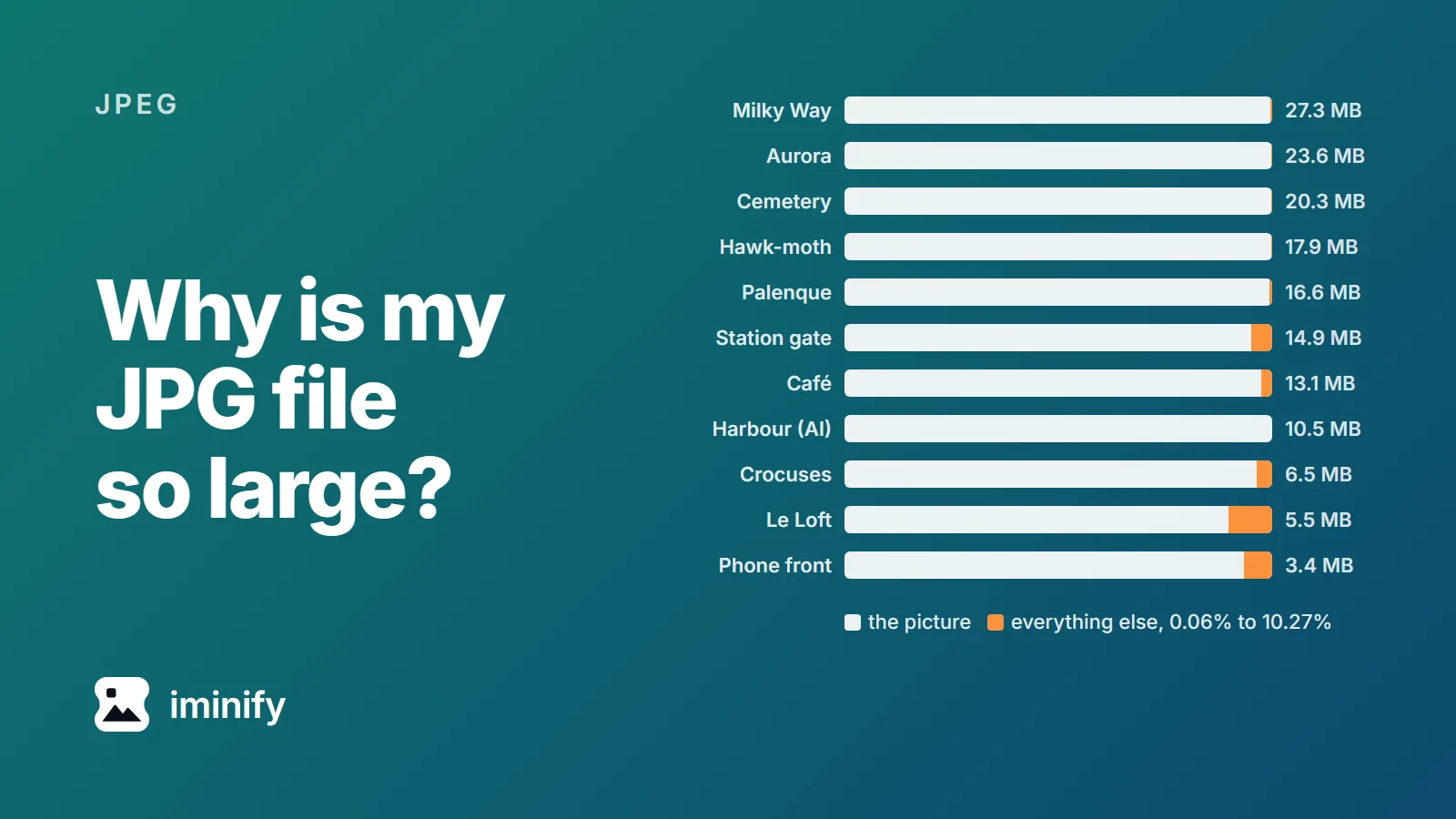
Five of the files had bytes after the picture's end marker, mostly a second image: an HDR gain map in the Pixel 8 Pro, Pixel 8 and 3.4 MB Galaxy S24 Ultra photos, a preview in the two Sony A7 III photos. Those bytes were 1.68 percent of the Pixel 8 Pro file, 1.69 of the Pixel 8's, 4.60 of the Galaxy's, 8.30 of the 5.5 MB Sony photo's and 4.17 of the 14.9 MB one's, and they are inside the savings above. jpegtran -copy all copied none of them. With -optimize too, the 13,056,759-byte Pixel 8 Pro photo came out at 12,628,374 bytes, and the marker it keeps still says the second image starts at byte 12,837,790.
-copy none also drops the colour profile (the Pixel 8 photo is Display P3) and the rotation tag (the Fujifilm and 3.4 MB Galaxy photos are stored sideways). A pixel hash sees neither; our post on big JPEGs shows what each looks like. -copy icc keeps the profile only. And jpegtran -copy all -optimize kept a signed Gemini image's manifest byte for byte and still broke its Content Credentials.
Some commands grow a file, and progressive takes longer to decode
libjpeg-turbo's jpegtran -copy none on its own, without -optimize, made 18 of the 25 files bigger, by up to 8.01 percent. libjpeg starts from its defaults, which include the standard Huffman tables, unless told to optimise, so a file that had better ones loses them.
The Smart file is progressive, with 15 scans. libjpeg-turbo's -optimize -progressive grew it 0.77 percent, and -optimize alone, which writes a baseline file, grew it 4.61. mozjpeg's jpegtran returned the file's own bytes: unless you pass -progressive or a transform, it writes the input back when its result would be larger, and then ignores -copy. Over all 25 files, libjpeg-turbo's -optimize -progressive grew one file and mozjpeg's none.
Progressive files also decode more slowly. libjpeg-turbo's djpeg took a median 1.37 times as long on the progressive output as on the optimised baseline, from 0.92 to 1.75 times, and was slower on 24 of 25 files. The 14.9 MB Sony photo went from 771 ms to 1,241 ms. Other work was running on the machine and we didn't test browsers, so read the ratio as rough.
jpegoptim 1.4.7 matched jpegtran, and Softpicker's figure was higher
jpegoptim 1.4.7 ran on libjpeg-turbo 2.1.5 (Debian's libjpeg62-turbo package), the version of our jpegtran. With --strip-all it produced jpegtran -copy none -optimize's exact bytes on 24 of 25 files. The 25th was the progressive one, which it kept progressive. With --all-progressive it matched libjpeg-turbo's -optimize -progressive on all 25. Of the three tools we ran, only mozjpeg went further. We ran Debian's 1.4.7; on 22 October 2026 the current release was 1.5.6.
Softpicker's roundup reports 19 percent for Compressor.io's lossless mode on one 4.7 MB product photo, whose format it doesn't state. Compressor.io answered our headless browser with a block page, so we didn't run it. None of our 25 reached 19: the best, 16.3, was a Sony photo with 8.3 percent of its bytes after the picture, most of it a preview image.
How to compress a JPEG losslessly with jpegtran
Use mozjpeg's jpegtran (jpegtran -version says which one you have, and -copy icc needs mozjpeg 4.1.1 or libjpeg-turbo 2.1.1 or newer). Its defaults supply -optimize, -progressive and the scan search:
jpegtran -copy icc -outfile out.jpg in.jpg
That is -copy icc, which keeps a colour profile; the figures above are -copy none. With -copy icc the 25 files saved 9.48 percent in total, with a median of 6.26, and the web-sized ones 2.43 to 6.64, because a small profile is a bigger share of a thumbnail. With libjpeg-turbo's jpegtran, add -optimize -progressive (8.50 percent in total) and keep the original when the output isn't smaller.
-copy icc drops EXIF, unless mozjpeg hands your file back as it was, so a file stored sideways needs rotating too. exiftool -Orientation in.jpg shows the tag, and -perfect -rotate 90 suits "Rotate 90 CW"; our test of repeated turns found the pixels unchanged. If -perfect refuses, as it did on a 4000x3000 phone photo, use -copy all, which keeps the tag and also GPS. To check the pixels:
djpeg -ppm in.jpg | sha256sum
djpeg -ppm out.jpg | sha256sum
Same hash, same pixels. A rotated file has rotated pixels, so its hash differs.
Lossless on Iminify, which we build, runs mozjpeg's jpegtran. On 23 of our 25 files, the Smart file included, its result was byte for byte mozjpeg's -copy none output, or -copy icc for the five whose profile name lacks "sRGB". The Fujifilm photo came back upright, rotated first with jpegtran -perfect -rotate 90. The 3.4 MB Galaxy photo, stored sideways, can't be rotated that way without leaving edge blocks, so it kept its rotation tag as its only metadata. Across the 25 files its results totalled 148,456,537 bytes, 9.53 percent less than the originals.
How we measured
The 25 files are ten Wikimedia Commons photos from Canon, Nikon, Sony and Fujifilm cameras and Samsung and Google phones (the ones in the post on big JPEGs, which links each photo's Commons page with its author and licence), and eight 320 and 960 pixel Commons thumbnails of four of them. The other seven are a 4K Nano Banana 2 image from our saved Gemini set of 23 September (the AI image), the Smart file, and Iminify's five published sample photos, credited in our first post. Everything but the AI image was downloaded on 22 October 2026. Seven files carry the standard Huffman tables, compared with the ones cjpeg writes without -optimize: the six camera and phone files and the AI image.
Each output came from the original with one command. jpegtran from libjpeg-turbo 2.1.5 ran with -copy all, -copy none, -copy none -optimize, -copy none -optimize -progressive, -copy all -optimize, -copy all -optimize -progressive and -copy icc -optimize -progressive; mozjpeg 4.1.5's jpegtran, its newest tag on 22 October 2026, ran with -copy none, -copy none -fastcrush and -copy icc. libjpeg-turbo's current release on 22 October 2026 was 3.2.0, where the code behaves the same way, but we didn't re-measure with it. Metadata and second images are the original's APP and comment segments plus its bytes after the end marker. The -optimize column is the original's size minus that, minus the size of the -copy none -optimize output; the next two columns are size differences between outputs. jpegoptim ran with -f, which writes the file even when it grows. Decode times are the median of seven runs of djpeg -ppm. Iminify's results came through its API on 22 October 2026, at Lossless with Keep EXIF off.