Why is my JPG file so large? What 11 real JPEGs are made of
On this page
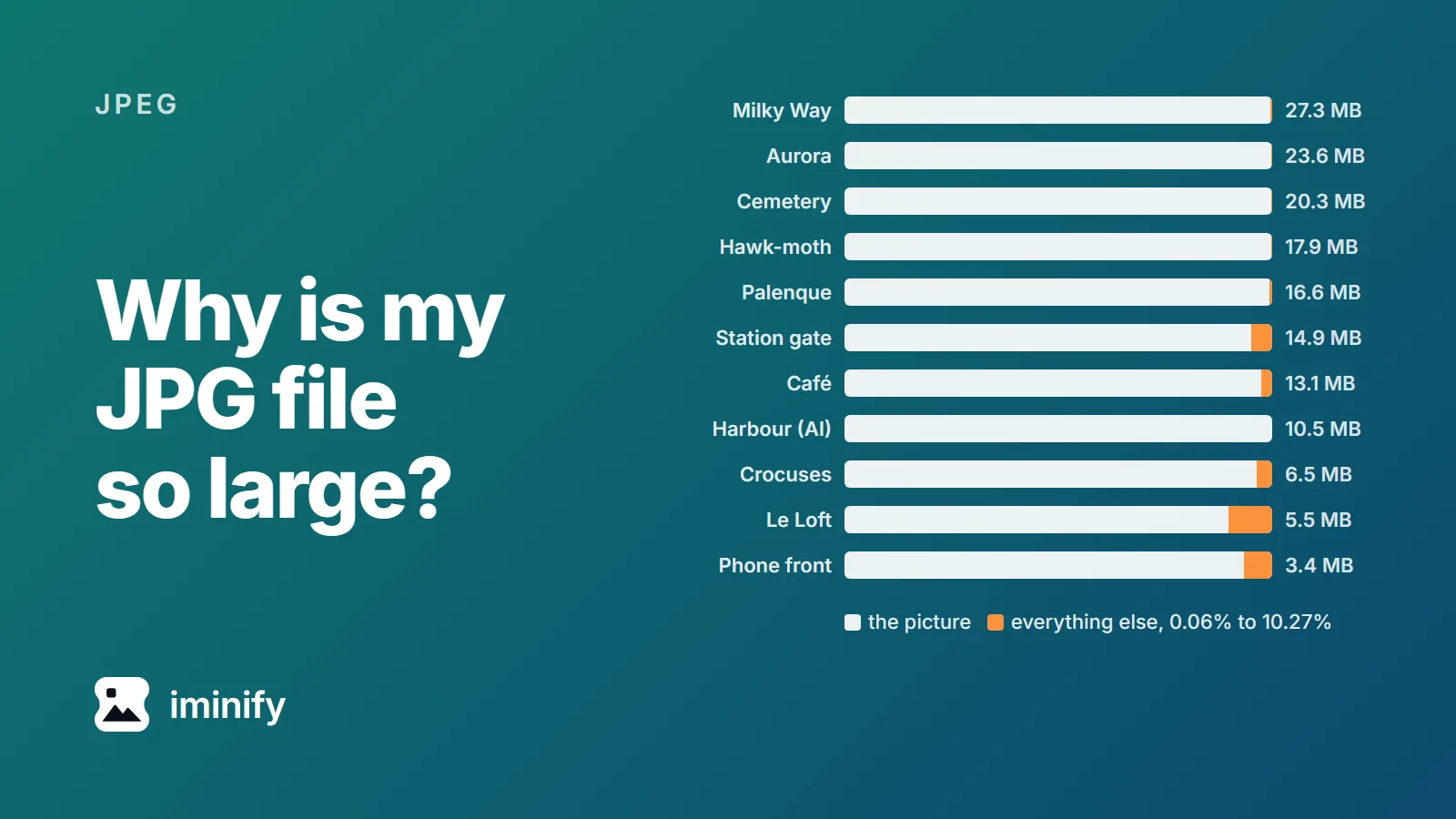
The biggest JPG we opened was 27.3 MB: a 20-megapixel photo of the Milky Way, exported from Adobe Camera Raw. The picture itself was 99.56 percent of the file. Everything else (editing notes, camera data, a thumbnail, a colour profile) came to 0.44 percent.
Ten more JPEGs, from phones, cameras, photo editors and an AI image model, told the same story: the picture was between 89.7 and 99.9 percent of every file. So if your JPG is too big, it most likely has more pixels than you need, or it was saved at a quality setting at or near 100. The steps to fix both are at the end.
Eleven JPEGs, split by what's inside
A JPG holds the compressed picture plus optional extras: camera settings (EXIF), a small thumbnail, sometimes a second image, a colour profile, and editing notes (XMP). We wrote a script that counts the bytes in each part, and ran it on eleven files:
| File | Where it came from | Size | Megapixels | Saved at quality | Not the picture |
|---|---|---|---|---|---|
| Milky Way | Canon EOS R6, Camera Raw export | 27.3 MB | 20.0 | ~99 | 0.44% |
| Aurora | Nikon Z 6, Lightroom export | 23.6 MB | 23.8 | ~99 | 0.15% |
| Cemetery | Galaxy S24 Ultra, Photoshop export | 20.3 MB | 41.6 | ~96 | 0.14% |
| Hawk-moth | Canon EOS R6, Photoshop export | 17.9 MB | 20.7 | ~99 | 0.15% |
| Palenque | Fujifilm X-T4, camera JPEG | 16.6 MB | 26.0 | ~98 | 0.70% |
| Station gate | Sony A7 III, camera JPEG | 14.9 MB | 24.0 | ~100 | 4.88% |
| Café | Pixel 8 Pro | 13.1 MB | 50.1 | ~94 | 2.49% |
| Harbour | Nano Banana 2 (Gemini API), 4K | 10.5 MB | 16.9 | 100 | 0.06% |
| Crocuses | Pixel 8 | 6.5 MB | 12.5 | ~94 | 3.61% |
| Le Loft | Sony A7 III, camera JPEG | 5.5 MB | 24.0 | ~96 | 10.27% |
| Phone front | Galaxy S24 Ultra | 3.4 MB | 12.0 | ~97 | 6.60% |
Only the harbour's 100 is exact: every value in its compression tables is 1, the finest setting JPEG has. The rest are estimates from each file's tables. MB means a million bytes and KB a thousand. Each photo's author and licence are on its linked Wikimedia Commons page; the harbour comes from our own set of Gemini API images.
Cause one: more pixels than the job needs
A JPG's size follows its pixel count. The café photo is 8160 by 6144 pixels, 50 megapixels, from a Pixel 8 Pro. We re-encoded it with jpegli, the JPEG encoder Iminify runs, at quality 90:
- Full size, 8160x6144: 8.6 MB
- Half the width and height, 4080x3072: 3.1 MB
- A quarter of the width and height, 2040x1536: 1.0 MB
Halving the width and height leaves a quarter of the pixels, and here just over a third of the bytes. On a web page, serve the width it's shown at and the file follows.
Cause two: saved at quality 100 or Maximum
The AI harbour was saved at exactly 100, the Sony station photo at about 100, and the Milky Way, Aurora and Hawk-moth exports at about 99.
All eleven got smaller when we re-saved them with jpegli at quality 90, and those five shrank the most: 3.8 to 5.0 times. The harbour went from 10.5 MB to 2.2 MB and scored 84.05 on SSIMULACRA 2, a measure of how close a copy looks to its original, where 80 means differences you can't see side by side at full size. The two night skies scored lowest of all eleven, 75.21 and 68.47, below that mark.
One page that ranks for this, jpg.now, says quality 100 is "roughly twice the size" of 92, and 85 "half the size" of 100. We re-saved eight of the files with libjpeg-turbo 3.1.4.1 (a quality number means something different in each encoder). Quality 100 came out 1.95 to 3.08 times the size of 92, and 85 was well under half: 23 to 37 percent of the size of 100. The four Adobe exports also keep full colour detail (4:4:4) instead of the half-resolution colour (4:2:0) the phones use. Full colour detail, which the page puts at "roughly 30 percent more", cost 8 to 34 percent more bytes at quality 90.
Re-saving a file at a higher quality than it had makes it bigger without making it better. The crocus photo left the Pixel at about 94 and 6.5 MB. Re-saved at 100 with libjpeg-turbo, it grew to 11.8 MB and scored 94.29 against the original; a perfect copy would be 100. An Adobe forum thread shows the same: an 11 MB scan became 20.4 MB when saved at Photoshop's "Maximum".
Metadata and other extras are small
- Thumbnails, in ten of the eleven: 6 to 49 KB.
- A second image: both Sony files carry a 1616x1080 preview, 434 and 596 KB. The two Pixel photos and Phone front carry an HDR gain map, 111 to 219 KB, which Android's Ultra HDR format stores as a second image. The Fujifilm's Palenque photo has none.
- XMP notes: 94 KB on the Milky Way, mostly Camera Raw's record of brush strokes; 78 KB on the crocus photo, most of it a Google camera note; 57 KB on each Sony file, almost all blank space.
- Colour profiles: 584 bytes to 3.1 KB.
- Content Credentials on the AI harbour: 6 KB.
The jpg.now page also says Sony A7 and Fujifilm X-T cameras can add a full-resolution preview of 2 to 4 MB, and that metadata can reach 1.5 to 3 MB. The biggest preview we found was 596 KB and not full resolution, and the biggest metadata block 94 KB. No file held more than 729 KB outside its picture (4.88 percent of the Sony station photo).
Stripping every extra with mozjpeg's jpegtran removes just those bytes: 0.06 to 10.27 percent of each file. The same command also repacks the picture data without changing a pixel, and on ten of the eleven files the repack saved more than the stripping: 5.0 to 14.3 percent of each file.
Two pieces of metadata you shouldn't strip
Orientation. Cameras and phones can store a portrait photo on its side, with a tag that says "turn this". Browsers follow the tag by default (MDN). The Palenque photo is stored 6240 pixels wide and 4160 tall, with that tag. We stripped its metadata with jpegtran -copy none, and Chrome showed this (photo by Ulrich Dus, CC BY-SA 4.0):

The colour profile. The crocus photo was saved in Display P3, a wider colour range than standard sRGB, and a 584-byte profile says so. Strip it and browsers treat the colours as sRGB, as the CSS colour spec tells them to. On this photo the shift was slight: a median colour difference of 1.7 on the CIEDE2000 scale, where 0 means identical, and 3.5 at most. Keeping the profile costs about 600 bytes, so keep it.
What to do with a JPG that's too big
- Open Compress JPEG and leave the level on Smart.
- If the photo will be seen on a screen, switch on Resize and enter the width you need.
- Drop the file in. The results list shows the new size and dimensions.
Guests can upload up to 16 MB as the site counts it, which is 16.8 MB in this post's units; the four exports from 17.9 MB up need a free account with a verified email, which takes twice that.
Smart repacks the file without loss, then tries jpegli qualities from 40 to 90 for the lowest that still measures close to your upload (above 36 megapixels it uses 90), and keeps the smaller file. Orientation is applied to the pixels, and a Display P3 photo keeps its profile, or is converted to sRGB when the re-encode wins.
We ran three of the eleven through it. The harbour went from 10.5 MB to 1.6 MB. Stored on its side, the Phone front photo came back upright at 1.3 MB from 3.4 MB, but without its colour profile: Samsung names it "DCI-P3 D65 Gamut with sRGB Transfer", and Iminify read the "sRGB" in the name and treated it as sRGB. The crocus photo went from 6.5 MB to 4.3 MB, only 34 percent smaller; it had left the phone at about 94.
There's no target-file-size mode. If a form wants something under a limit, resize further until it fits. And if every pixel has to stay as it is, pick Lossless: it does the repack, keeps a profile named Display P3, and turns a sideways photo upright without re-encoding it where it can, keeping the tag where it can't. The Palenque photo came back from it upright, 15 percent smaller.
How we measured: the byte-counting script above, mozjpeg 4.1.5's djpeg and jpegtran, jpegli (main, commit 031a0077, at 4:2:0 as Iminify encodes photos), libjpeg-turbo 3.1.4.1 through Pillow 12.3.0, ImageMagick 7.1.2-12's Lanczos filter for the resizes, and SSIMULACRA 2 from libjxl 0.12.0, scoring each copy against the decoded original. The live uploads went through the site on 24 September 2026.