Compress JPEG photos

Drop JPEGs below and get smaller JPEGs back. Lossless repacks the file without touching a pixel; Smart finds the lowest quality that still matches each photo. Up to 16 MB as a guest or 32 MB with a free account. Free. No account, no watermark.

  • Stays a JPG
  • Lossless option
  • Quality searched per photo
Compression Level
None
No compression, only apply settings on image
Lossless
Without any visual change in the image quality
Ultra
Max compression with some quality loss
Smart
Balance between the image quality and compression
Change Format Will allow you to convert images to different extensions
Resize Will allow you to change the width, height or scale of images
Keep EXIF Will allow you to preserve meta data in images
Maximum file size is 16 MB per image and supported formats are: PNG, JPG, JPEG, WEBP, GIF, HEIC, HEIF, TIFF, TIF
Guests get 10 images a day, 10 left today. A free account gets 40 a day.
Delete this image?
The image and its optimized copy will be removed from storage. This cannot be undone.

Rename this image
Choose the name the optimized image downloads with. Its format stays the same.

Uploaded as

Rename the selected images
Each image gets this name and a number, counted in the order they were uploaded. Their formats stay the same.

Share this image
Choose the compression level that suits your images
Level What it promises What happens Pick it when
Lossless
Not one pixel changes in a JPEG, PNG or GIF The file is repacked, never re-encoded. JPEGs get an optimised Huffman table and progressive scan, PNGs a tighter deflate pass, GIFs a lossless gifsicle run. A lossy WebP has no repack step, so it is re-encoded at the highest quality the level allows. A sideways phone JPEG is rotated losslessly on the way through and keeps its colour profile. The one exception to the promise is a PNG or WebP tagged with a wide-gamut profile such as Display P3: its colours are converted to sRGB, so the values change but the picture doesn't. Logos, line art, anything you'll edit again, or when the file is evidence.
Smart
No visible change, targets 40 dB PSNR and a perceptual score of 70 A quality search runs per image and stops at the lowest quality that still clears the PSNR target. That answer is then scored on the SSIMULACRA 2 scale, because an average over every pixel lets a mostly flat picture through at a quality its detail doesn't deserve, and when it falls under 70 the search moves back up until it doesn't. Photos and graphics end up at different qualities because they need different ones; an image that cannot reach the targets inside the quality ceiling is encoded at the ceiling. Almost everything on a website. This is the default for a reason.
Ultra
Smallest file, targets 34 dB PSNR and a perceptual score of 50 The same two-stage search with lower targets. Fine texture softens a little; edges and text stay sharp. Thumbnails, backgrounds, email images, anything shown small or blurred anyway.
None
No compression at all Only the resize, conversion or metadata setting you chose is applied. An untouched upload comes back byte for byte. You only wanted to resize or convert, and quality is someone else's decision.

Measured, not estimated

What compression did to five real JPEGs

The five JPG photographs from our showcase, compressed as JPG at each level. The range is the point: the same level saves very different amounts on different photos.

Sample Original Lossless Smart Ultra
Fjord 1800 by 1200 832 KB JPG 786 KB 5.6% smaller 555 KB 33.3% smaller 317 KB 61.9% smaller
Raspberries 1800 by 1200 342 KB JPG 332 KB 3% smaller 56 KB 83.7% smaller 46 KB 86.5% smaller
Night skyline 1800 by 1200 427 KB JPG 408 KB 4.3% smaller 236 KB 44.7% smaller 107 KB 74.8% smaller
Canoe at dusk 1800 by 1200 387 KB JPG 375 KB 3.3% smaller 125 KB 67.6% smaller 68 KB 82.4% smaller
Café interior 1800 by 1200 356 KB JPG 347 KB 2.4% smaller 90 KB 74.6% smaller 75 KB 78.9% smaller

Sources are 1800 by 1200 JPGs at quality 92. Metadata stripped, no resize. The landscape is dense foliage and needs a high quality to hold the target, so it gives up the least.

How it works

Why one quality number doesn't fit every photo

Most compressors give you a slider. Set it to 80 and a foggy sky comes out well while a brick wall comes out rough, because the same number costs different photos different amounts. In our tests one photo held a 40 dB target at quality 61 and another needed 95.

So Smart measures instead of guessing. It encodes your photo at several qualities with jpegli, compares each result with your upload, and keeps the smallest that clears 40 dB PSNR. Then it checks that result on the SSIMULACRA 2 scale and moves back up if it scores under 70. Ultra does the same with lower targets. The quality search runs on images up to 36 megapixels and the perceptual check on images up to 8; anything larger is encoded at the level's ceiling.

Lossless is a different operation altogether. mozjpeg's jpegtran rebuilds the file's Huffman tables and rearranges it into progressive scans without decoding it. Not one pixel changes, and no lossy result is ever delivered if it would be bigger than that repack.

What survives

What a JPEG keeps when it's compressed

  • Every pixel, at Lossless

    The repack works on the file's coefficients, never on decoded pixels, so the image is bit-for-bit what you uploaded.

  • The right way up, losslessly

    A sideways phone JPEG is turned by moving its blocks, not by re-encoding, so turning it usually costs nothing. When the dimensions leave edge blocks that can't be moved whole, Lossless keeps the pixels as stored with the orientation tag, and Smart and Ultra turn them as part of their one encode.

  • A wide-gamut profile, at Lossless

    Nothing on the lossless path can convert colours, so a Display P3 profile stays in the file. Smart and Ultra convert it to sRGB.

  • Metadata, unless you ask

    EXIF is stripped by default: camera, exposure, GPS. Turn on Keep EXIF to keep it.

When not to

When it won't help much

  • The JPEG was already compressed hard for the web. There's little left to remove, and Iminify hands back your original when nothing beats it.
  • The image is a screenshot or a logo. Those don't belong in a JPEG; a PNG or WebP of the source is sharper and smaller.
  • You can change format. The same photo as WebP or AVIF is usually smaller again, as the JPG to AVIF page shows.

How to

Compress a JPEG in three steps

  1. 1

    Drop your JPEGs

    Change Format stays off, so you get JPGs back. Both .jpg and .jpeg are accepted.

  2. 2

    Pick a level

    Lossless if the file is evidence or a master. Smart for the web. Ultra for thumbnails.

  3. 3

    Compare, then download

    The Compare view reports the PSNR between your upload and the result.

Questions

JPEG compression questions

From the blog

What we've measured so far

We run the encoders on real photos and screenshots and publish the numbers: when WebP beats AVIF, what quality 80 means in each encoder, and how many kilobytes an image on a web page should weigh.

All posts
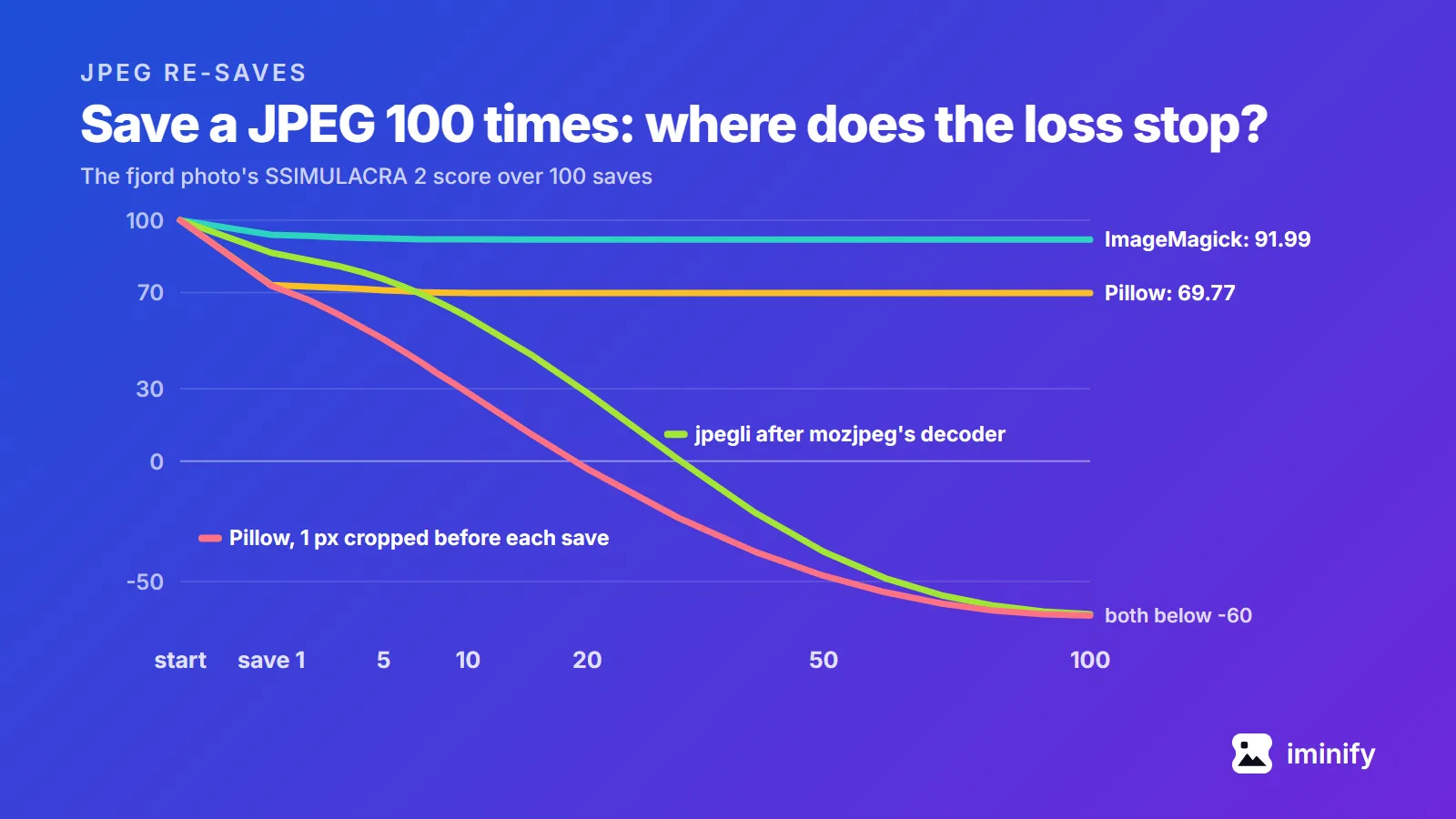
Line chart of the fjord photo's SSIMULACRA 2 score over 100 saves: ImageMagick levels off at 91.99 and Pillow at 69.77, while Pillow with 1 pixel cropped before each save and jpegli after mozjpeg's decoder both fall below -60.

Does a JPEG lose quality every time you save it? We saved five photos 100 times

Two of the tests that come up for this question disagree. Fstoppers opened a photo in Photoshop 2020 and saved it 99 times at maximum quality, and saw "significant quality loss after you save it six times". Improve Photography saved one 30 times at maximum quality, painting a pixel white each time, and found "no noticeable reduction in image quality. None." Both judged by eye. We opened a JPEG 100 times, copied it and zipped it, then saved five photos 100 times in a row in five programs and scored every save against the file we started from. The short answer: Opening, copying and zipping never changed a byte. In every same-setting run, no later save cost as much as the first. Saving again at the same setting, with no edits, then mostly stopped costing: at their defaults, by save 73, ImageMagick, Chrome and Pillow were writing identical files on all five photos, and mozjpeg on four. Cropping one pixel or turning the photo before each save kept eating it. One pairing of two JPEG libraries lost quality with every save: the jpegli encoder fed by mozjpeg's decoder. Iminify runs that pairing, so we tested our own tool too.
7 min read
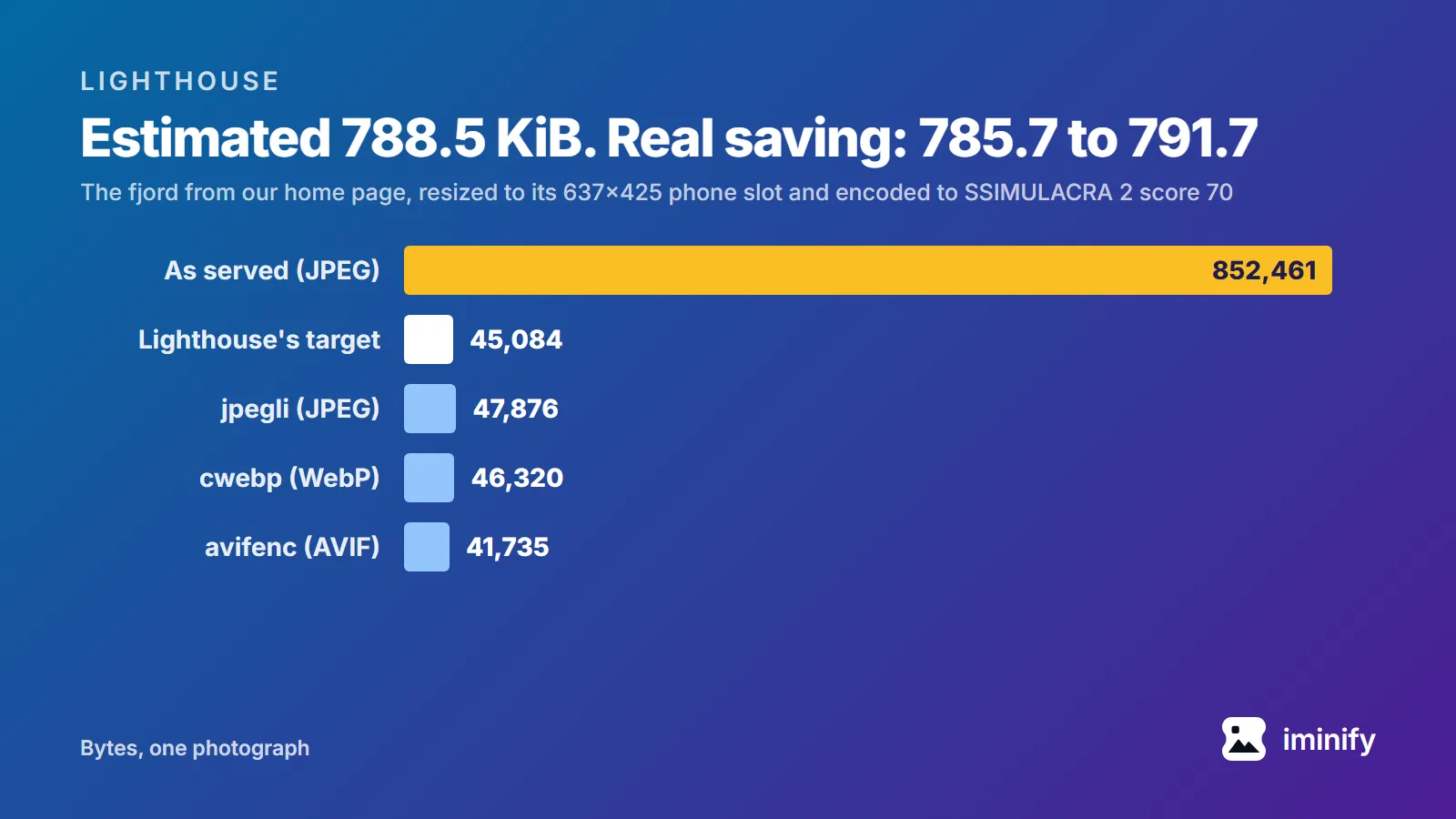
Bar chart of one photograph in bytes: 852,461 as served, against Lighthouse's target of 45,084 at its phone slot and encodes of 47,876 (JPEG), 46,320 (WebP) and 41,735 (AVIF).

Improve image delivery in Lighthouse: what it replaced and how it counts savings

PageSpeed Insights ran Lighthouse 13.5.0 on our home page on 22 September 2026 and flagged "Improve image delivery" in the mobile report: "Est savings of 1,300 KiB". All of it came from one photograph. The fjord shot in our before-and-after comparison is on the page twice, as the 832.5 KiB original and as our own compressed copy at 555.3 KiB. Both files are 1800x1200, and the report says they're displayed at 637x425. Three later runs that day said 1,359 KiB and 364x243. If your old notes say "Serve images in next-gen formats" or "Properly size images", this is where they went: Lighthouse 13 folded four image audits into this one insight. And its savings aren't measured: each figure is arithmetic on bytes and pixels. We reproduced every number in that insight, made the file it asks for, and traced one reason the same page gets two answers.

8 min read
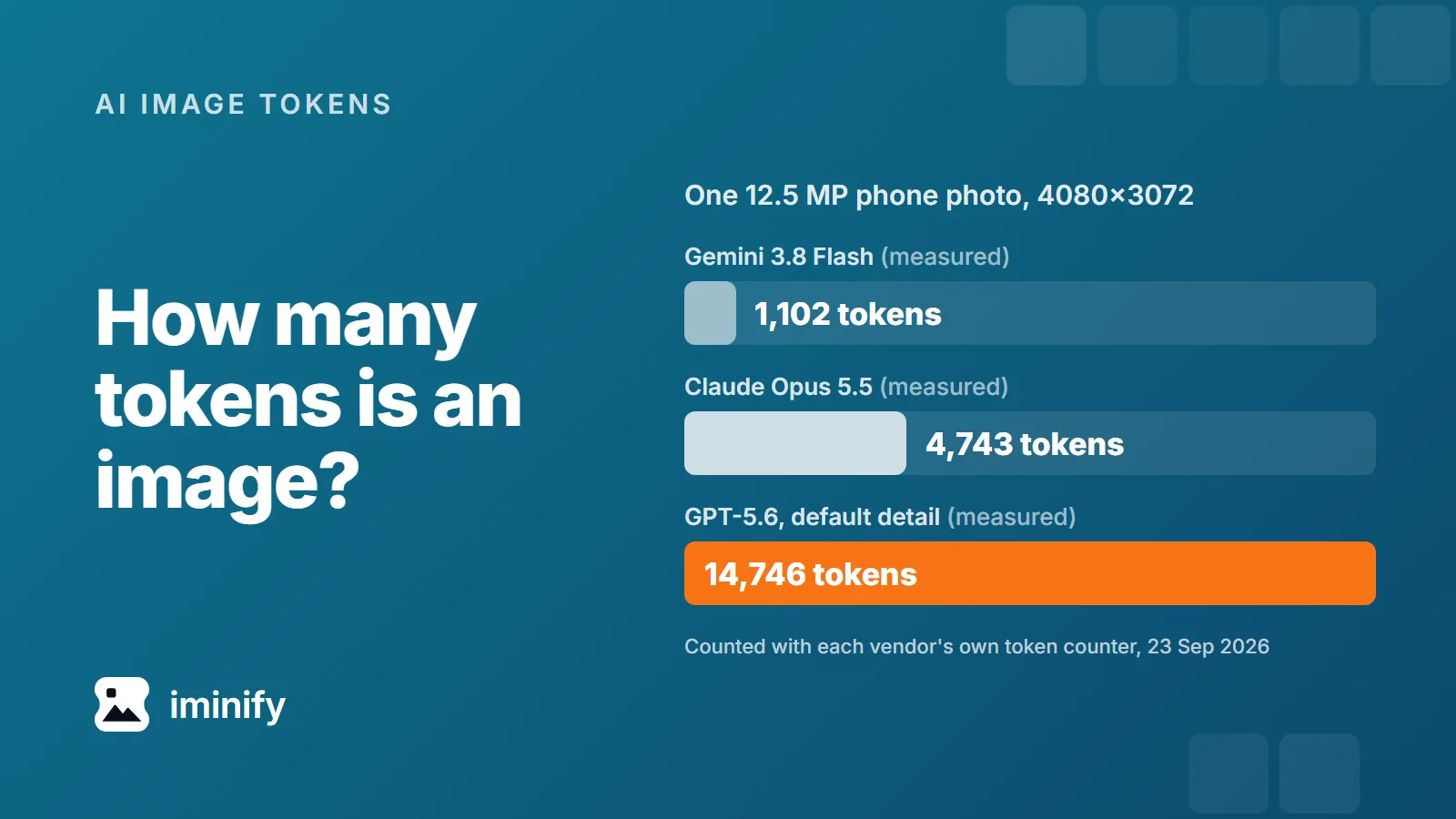
Bar chart for one 4080x3072 phone photo, measured with each vendor's token counter: 1,102 tokens on Gemini 3.8 Flash, 4,743 on Claude Opus 5.5 and 14,746 on GPT-5.6 at default detail.

How many tokens is an image? Claude, GPT and Gemini, measured on seven real files

A 12.5-megapixel phone photo counts 4,743 input tokens on Claude Opus 5.5, 1,102 on Gemini 3.8 Flash and 14,746 on GPT-5.6 at its default detail setting, over 13 times Gemini's count. We measured all three with the vendors' own token counters on 23 September 2026. And none of the three depends on how many bytes the file has. Claude counts pixels up to a cap, GPT-5.6 counts every pixel unless you ask for less, and Gemini 3 barely looks at the size.

7 min read

Make your JPEGs lighter

Drop a photo and open Compare. The PSNR is right there next to the slider.