Topic

AI

4 posts on AI.

ComfyUI's Flux Dev example render of a fox-eared girl in a maid dress holding a cake, captioned: 1,215,064-byte PNG to 125,684-byte WebP, and the workflow still loads in ComfyUI.

ComfyUI PNG to JPG loses the workflow. WebP and AVIF can keep it

ComfyUI's Flux Dev example image is a PNG of 1,215,064 bytes, and the two text chunks holding its prompt and workflow take 12,240 of them. The rest is 1024x1024 pixels stored without loss. Across the 92 PNGs in ComfyUI's examples repository that carry a workflow, the text was no more than 3.32 percent of any file, with a median of 0.62 percent. Converting to JPG shrinks the file, but ComfyUI's own loader can't read a workflow back out of a JPG. A WebP or AVIF can keep it, at about a tenth of the size. We took the text-to-image examples of ten models from ComfyUI's examples repository, made smaller copies several ways, and dropped the copies back onto ComfyUI 0.37.0's canvas to see which ones still held the workflow.

6 min read
Bar chart for one 4080x3072 phone photo, measured with each vendor's token counter: 1,102 tokens on Gemini 3.8 Flash, 4,743 on Claude Opus 5.5 and 14,746 on GPT-5.6 at default detail.

How many tokens is an image? Claude, GPT and Gemini, measured on seven real files

A 12.5-megapixel phone photo counts 4,743 input tokens on Claude Opus 5.5, 1,102 on Gemini 3.8 Flash and 14,746 on GPT-5.6 at its default detail setting, over 13 times Gemini's count. We measured all three with the vendors' own token counters on 23 September 2026. And none of the three depends on how many bytes the file has. Claude counts pixels up to a cap, GPT-5.6 counts every pixel unless you ask for less, and Gemini 3 barely looks at the size.

7 min read
Bar chart: a 12.5 MP phone photo at JPEG quality 90 is 4,309,090 bytes as a file and 5,745,456 bytes as base64, past a dashed line at the 5,242,880-byte limit on Bedrock and Google Cloud.

Image exceeds 5 MB maximum? Claude counts the base64, not your file

Our 12.5-megapixel test photo, re-saved with jpegli at quality 90, is 4,309,090 bytes. That's under 5 MB, and it's still too big for Claude on Amazon Bedrock or Google Cloud. Anthropic's limit there is "5 MB (base64-encoded)", and base64 turns those 4,309,090 bytes into 5,745,456. The error compares the encoded size with 5,242,880 bytes, as in this one from a Claude Code issue: image exceeds 5 MB maximum: 5281812 bytes > 5242880 bytes. So the ceiling is 3,932,160 bytes of actual file on Bedrock and Google Cloud, and roughly 7.5 MB on the direct Claude API, whose limit is 10 MB. Separately, no side may pass 8000 pixels, or 2000 once a request carries more than 20 images. For photos, one step clears all of it: resize to 2000 pixels on the long edge and save it as JPEG.

8 min read
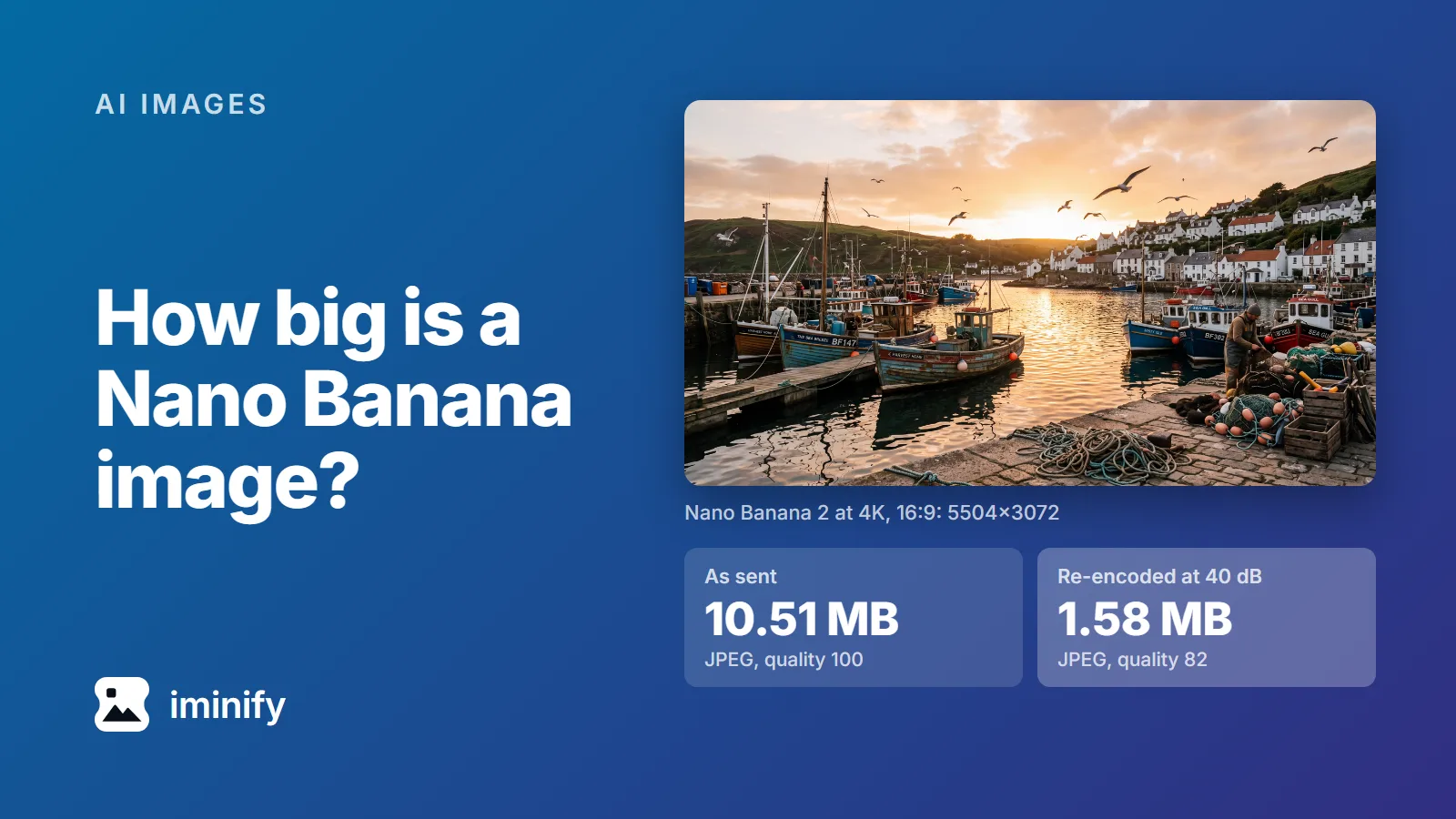
The harbour picture Nano Banana 2 generated at 4K, 5504x3072: 10.51 MB as sent, a quality-100 JPEG, and 1.58 MB re-encoded as a quality-82 JPEG holding 40 dB.

How big is a Nano Banana image? 52 files measured, from 512 px to 4K

We asked Nano Banana 2 for a 4K, 16:9 picture of a fishing harbour through the Gemini API on 23 September 2026. It came back as a 5504x3072 JPEG of 10.51 MB. The same request again gave 11.10 MB. Both files were saved at JPEG quality 100, the top of the scale. So, how big is a Nano Banana image? From Nano Banana 2 or Pro, a detailed picture is roughly 1 MB at 1K, 4 MB at 2K and 10.45 to 12.13 MB at 4K, and a flat illustration less. The original Nano Banana sends a PNG instead, about 2.1 MB for the same prompt at 1024x1024. Here are the 52 images of our test set, from all four Nano Banana models, and what five of them shrink to.

9 min read

Try it on your own images

Drop a photograph in, pick Smart, and compare the result with the original before you download. Free, no account needed.