How many tokens is an image? Claude, GPT and Gemini, measured on seven real files
On this page
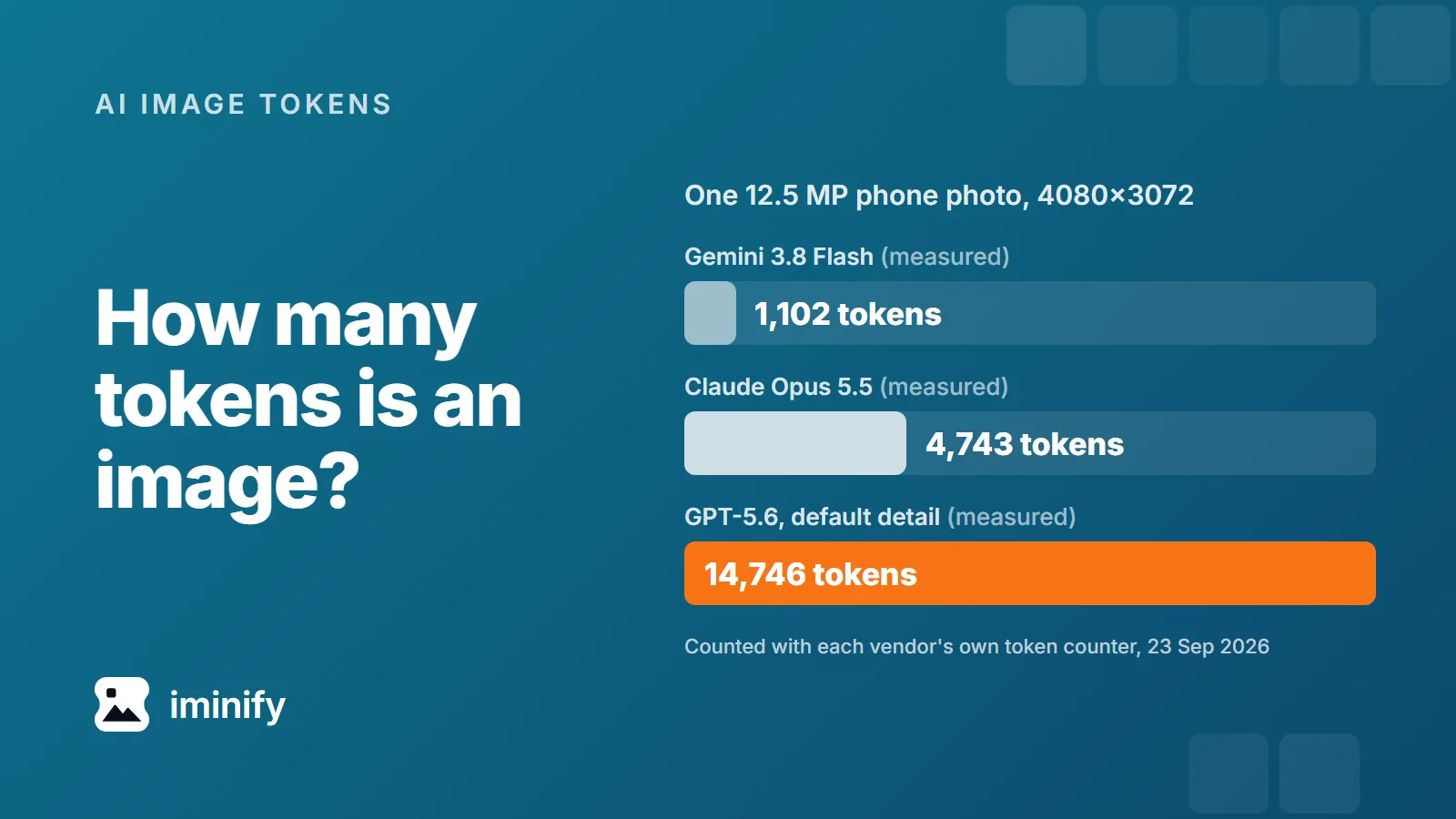
A 12.5-megapixel phone photo counts 4,743 input tokens on Claude Opus 5.5, 1,102 on Gemini 3.8 Flash and 14,746 on GPT-5.6 at its default detail setting, over 13 times Gemini's count. We measured all three with the vendors' own token counters on 23 September 2026. And none of the three depends on how many bytes the file has.
Claude counts pixels up to a cap, GPT-5.6 counts every pixel unless you ask for less, and Gemini 3 barely looks at the size.
Seven files, counted three ways
We counted seven real files: a 1K and a 4K image from our own Nano Banana test set, two Pixel photos from Wikimedia Commons, and three screenshots of iminify.com. Anthropic's count_tokens endpoint is free, and it, Gemini's countTokens and OpenAI's input token counter all matched what a paid request billed when we checked (4,760 input tokens for the phone photo plus a one-line prompt on Opus 5.5). OpenAI's image cost calculator, which works from the rule in its images and vision guide, came out one lower on five cells of the table below. The guide says "Floating-point rounding in billing can make the final count differ from the estimate by one token."
| File | Pixels | Claude Opus 5.5 | GPT-5.6, default | GPT-5.6, high |
Gemini 3.8 Flash |
|---|---|---|---|---|---|
| Nano Banana 2 image, 1K | 1024x1024 | 1,372 | 1,229 | 1,229 | 1,089 |
| Full HD screenshot | 1920x1080 | 2,694 | 2,449 | 2,449 | 1,100 |
| Screenshot at 2x density | 3024x1964 | 4,763 | 7,069 | 2,977 | 1,066 |
| 12.5 MP phone photo | 4080x3072 | 4,743 | 14,746 | 2,942 | 1,102 |
| Nano Banana Pro image, 4K | 5504x3072 | refused | 19,815 | 2,765 | 1,100 |
| 50 MP phone photo | 8160x6144 | refused | refused | 2,942 | 1,102 |
| Full-page capture | 1440x12182 | refused | 20,575 | 615 | 1,067 |
"Refused" in the Claude column is the Messages API turning the file down. It refuses an image with a side over 8000 pixels and, on the direct API, one over 10 MB once it's base64-encoded (5 MB on Amazon Bedrock and Google Cloud). The Nano Banana Pro file, 11.95 MB, is 15.9 MB as base64, and the 50 MP photo breaks both limits. OpenAI's counter refused the 50 MP photo at the default detail: The image you provided requires 48960 patches after processing, exceeding the limit of 30000. A patch there is a 32-pixel square.
Claude counts 28-pixel squares, up to a cap
Anthropic's vision docs give the rule: each 28x28-pixel square is one visual token, so an image costs ⌈width / 28⌉ × ⌈height / 28⌉. A bigger image is shrunk first, to fit 2576 pixels on the long edge and 4,784 tokens on Claude 4.7 and later (Opus 5.5, Sonnet 5 and Fable 5.1), or 1568 pixels and 1,568 tokens on older models such as Haiku 4.5. Our counts ran a few tokens above the formula, 3 per image on Opus 5.5.
The cap is why the phone photo and the 2x screenshot cost almost the same, 4,743 and 4,763. Haiku 4.5 stops at about 1,570 for either.
count_tokens didn't check the pixel limit. It counted the 12,182-pixel-tall page capture at 1,015 tokens, and the Messages API then refused the same file with At least one of the image dimensions exceed max allowed size: 8000 pixels. count_tokens did check the 10 MB limit.
GPT-5.6 sends the whole picture unless you ask for less
OpenAI counts 32x32-pixel patches and multiplies the count by 1.2, rounding up, on GPT-5.6 and GPT-6 Astra. detail defaults to auto, and on GPT-5.6 (Sol, Terra and Luna) and GPT-6 Astra, auto behaves like original: the image keeps its full size up to 65,535 pixels a side. So the phone photo is 12,288 patches, or 14,746 tokens, and the default column holds for GPT-6 Astra too.
Set "detail": "high" and a budget comes back: 2048 pixels and 2,500 patches on GPT-5.6, which OpenAI's counter puts at 3,001 tokens at most. The photo drops to 2,942. GPT-6 Astra's high keeps the patch budget but not the 2048-pixel limit, which is why the tall capture costs 2,938 there and 615 on GPT-5.6.
Older models count differently. GPT-5.4 treats auto as high. GPT-5.1, GPT-4.1 and GPT-4o still use 512-pixel tiles: a base of 85 tokens plus 170 per tile on GPT-4o and GPT-4.1, 70 plus 140 on GPT-5.1.
On 23 September, Claude Opus 5.5 and GPT-5.6 Sol both listed $4 per million input tokens, for GPT-5.6 Sol a promotional price that OpenAI says runs at least through 21 November. At that price the photo costs 1.9 cents on Opus and 5.9 cents on GPT-5.6 Sol at the default, or 1.2 cents at high. On Gemini 3.8 Flash, at $0.75 per million until the end of 2026, it's under a tenth of a cent.
Gemini 3 charges about 1,100 per image, whatever size you send
Gemini 3.8 Flash, 3.7 Flash, 3.5 Flash, 3.1 Flash-Lite and 3.1 Pro Preview gave identical default counts for the same image, and so did the three -latest aliases. On 3.8 Flash our seven files came out between 1,066 and 1,102 at the default, and a 100x100 test image at 1,089. What moves the count is the media_resolution setting:
media_resolution |
Our seven files | Google's table |
|---|---|---|
| low | 240 to 266 | 280 |
| medium | 527 to 551 | 560 |
| high, or not set | 1,066 to 1,102 | 1,120 |
| ultra_high (per image only) | 2,192 to 2,214 | 2,240 |
Google's media resolution page calls its figures approximate and describes them as a maximum, and every count we got was under them.
Gemini 2.5 Flash and 2.5 Pro count 258 per image at the default, for every size we sent, and step up in 258-token units at high. Google's tokens page still says larger images "are tiled into 768x768 pixel tiles, each counting as 258 tokens". Its image understanding page works through a 960x540 image and gets six tiles. 2.5 Flash counted that size at 258 by default and 1,806 at high, which is seven units of 258, not six.
Compressing an image doesn't lower its token count
We sent one 4K image from Nano Banana 2 to Gemini 3.8 Flash five ways, all 5504x3072: as delivered (10.5 MB), through jpegli at quality 90 (2.5 MB) and at 50 (1.1 MB), as a 0.94 MB WebP and as a 23.6 MB PNG. All five counted 1,100. On Claude, a noisy 4032x3024 JPEG of 2.47 MB and a flat one of 0.19 MB both counted 4,743. On GPT-5.6 the same five counted 19,815 each.
Bytes matter for the limits. The Nano Banana Pro 4K file is 11.95 MB, and Claude refused it. Re-encoded at the same pixels with jpegli at quality 90, it's 3.35 MB, and Opus 5.5 counts it at 4,787, the cap plus the usual 3. If you do this, choose the quality for what the model has to read. Anthropic warns that "heavy JPEG compression can make text difficult to read", and a quality number means something different in each encoder.
Resizing pays on Claude and GPT-5.6
Here is the phone photo at five widths, measured on all three:
| Width | Claude Opus 5.5 | GPT-5.6, default | Gemini 3.8 Flash |
|---|---|---|---|
| 4080 (as shot) | 4,743 | 14,746 | 1,102 |
| 2576 | 4,743 | 5,930 | 1,102 |
| 2048 | 4,147 | 3,764 | 1,102 |
| 1568 | 2,411 | 2,176 | 1,102 |
| 1000 | 975 | 922 | 1,102 |
Resizing to 2576 wide saves nothing on Claude, which shrinks the photo to 2212x1666 anyway, but cuts GPT-5.6's count by 60%. Below the size Claude shrinks it to, both fall roughly in step with the pixel count. Gemini stays put, which gives it the highest count of the three for small images: at 512 pixels wide the photo is 269 tokens on Opus 5.5, 250 on GPT-5.6 and 1,102 on Gemini, or 266 with media_resolution set to low.
So: for GPT-5.6, resize or send "detail": "high". On Claude, go below the size it would shrink to only when the task doesn't need the detail; Anthropic's reference code gives that size for any image. On Gemini 3, set media_resolution.
To resize by hand, open Iminify with JPG output, turn on Resize, choose Size and type a width. The height follows the aspect ratio, and the width applies to every image you add while it's set, enlarging any that is narrower. From a script, Iminify's API takes the same width, on a free account with a verified email. Keep the output to JPG, PNG or WebP, which all three vendors list: Iminify's Auto format can pick AVIF, which none of them lists.