Does compression remove Content Credentials? Two signed Gemini images through 13 tools
On this page
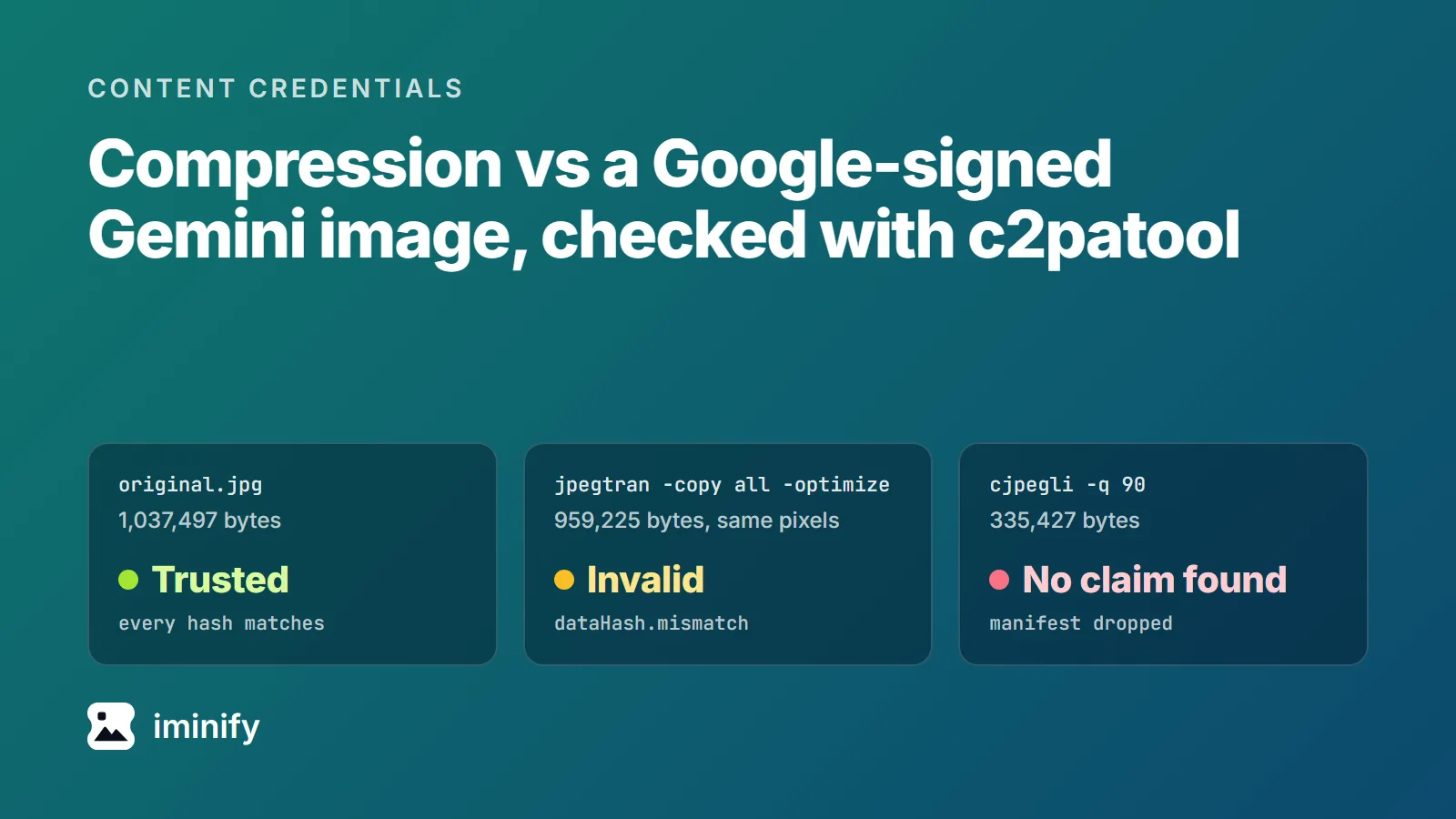
We took an image made by Nano Banana 2, one of Google's Gemini image models, and asked c2patool whether its Content Credentials hold. It answered "Trusted": a C2PA manifest signed by Google LLC, stating "Created by Google Generative AI.", with every hash matching. Then we ran that JPEG, and a PNG from the original Nano Banana, through 13 tools, WordPress 7.1.2 and Iminify among them, and asked again.
Every file those tools wrote failed if it differed from its source by even a byte. Most tools dropped the manifest. Five kept a copy of it that no longer verified, in some cases without changing a single pixel. If a compressed file has to carry a working credential, something has to sign it again after the last byte changes, and that adds bytes of its own.
Every tool that changed the file broke the credential
Both files come from our Nano Banana sample set, generated through the Gemini API on 23 September 2026: a 1024x1024 JPEG of 1,037,497 bytes and a 1024x1024 PNG of 2,069,122 bytes, each carrying a 6,025-byte manifest. We checked every output with c2patool 0.28.0 against the official C2PA trust list on 24 September. "Gone" means c2patool reported "No claim found". "Invalid" means the manifest was still there, signed by Google, but c2patool failed it with assertion.dataHash.mismatch.
| Tool, as we ran it | Gemini JPEG | Gemini PNG |
|---|---|---|
| A plain copy | Trusted | Trusted |
libjpeg-turbo 2.1.5 jpegtran -copy all, nothing else |
Trusted (identical bytes) | not run |
the same with -optimize or -rotate 90 |
Invalid | not run |
mozjpeg 4.1.5 jpegtran -copy all |
Invalid | not run |
optipng 0.7.8 -o2 |
not run | Invalid |
zopflipng 1.0.3 --keepchunks=caBX |
not run | Invalid |
| zopflipng defaults, pngquant 2.18.0 | not run | Gone |
libjpeg-turbo jpegtran -copy none -optimize |
Gone | not run |
cjpegli -q 90 |
Gone | Gone |
mozjpeg cjpeg -quality 85, fed the JPEG |
Invalid | not run |
the same, fed the pixels djpeg decoded |
Gone | not run |
cwebp 1.5.0 -metadata all, avifenc 1.2.1 |
Gone | Gone |
| ImageMagick 7.1.2: re-save, 50% resize, WebP | Gone | Gone |
| Pillow 12.3.0 | Gone | Gone |
| WordPress 7.1.2, every size it generated | Gone | Gone |
| Iminify, Lossless and Smart | Gone | Gone |
The C2PA 2.4 specification gives each format its own slot for the manifest: an APP11 segment in a JPEG, a caBX chunk in a PNG, a chunk named C2PA in a WebP, a uuid box in an AVIF. None of the WebP or AVIF files we made had one. cwebp's -metadata all copies what its documentation lists (EXIF, ICC and XMP). Pillow read the JPEG's APP11 segment and didn't write it back.
A lossless repack keeps every pixel and still fails
libjpeg-turbo's jpegtran -copy all -optimize rebuilt the JPEG's Huffman tables and saved 78,272 bytes. We decoded both files and hashed the pixels: identical. The manifest came through byte for byte, Google's signature on it still checked out, and c2patool rejected the file anyway.
A standard C2PA manifest carries exactly one hard binding, which the specification defines as "one or more cryptographic hashes that uniquely identifies either the entire asset or a portion thereof". Google's manifest hashes every byte of the file except its own 6,025. Store the same picture more compactly and the hash no longer matches.
The PNG went the same way. optipng merged the file's 252 IDAT chunks into one and kept the caBX chunk, with the pixels unchanged. The PNG specification says an editor that has changed critical chunks "shall not" copy an unrecognised unsafe-to-copy chunk, and C2PA declares caBX unsafe to copy. optipng copied it anyway. zopflipng drops it unless you name it in --keepchunks, and naming it gave the same Invalid result.
WordPress keeps your upload and serves copies
WordPress 7.1.2 stored both uploads byte for byte, and both stayed Trusted. None of the sizes it generated carried a manifest. We tried two of the ways it makes them: ImageMagick on the server, and the browser, which WordPress 7.1 can use for block-editor uploads in Chrome 137 and later.
We added a 5504x3072 Nano Banana 2 JPEG: WordPress kept the original, and the image URLs a post uses all point at copies, a 2560x1429 -scaled file as the full size and five resized ones in srcset. A visitor to the post never gets the one file that verifies. A 1024-pixel upload fares a little better: the original doubles as the large size, so it sits in srcset next to 150, 300 and 768-pixel copies with no manifest.
Keeping a credential means signing again
If the compressed file has to verify, sign it again after compressing, and name the original as the parent so Google's manifest comes along. c2patool does this with -p. We signed the JPEG's cjpegli copy (335,427 bytes) with this manifest definition, saved as manifest.json:
{
  "assertions": [
    {"label": "c2pa.actions", "data": {"actions": [{"action": "c2pa.transcoded"}]}}
  ]
}
c2pa.transcoded is the specification's name for a change of encoding that isn't an edit. Then a settings file, no-thumbnails.toml:
[builder.thumbnail]
enabled = false
It stops c2patool embedding thumbnails. Run this in a folder holding those two files and the two images, named original.jpg and compressed.jpg:
c2patool compressed.jpg -m manifest.json -p original.jpg -o signed.jpg --settings no-thumbnails.toml trust --trust_anchors https://raw.githubusercontent.com/c2pa-org/conformance-public/main/trust-list/C2PA-TRUST-LIST.pem
c2patool called the result Valid: the signature checks out, but its certificate isn't on the trust list. Google's manifest sits inside it as the parent, recorded as passing its own trust-list check when we signed. Signing added 11,914 bytes, give or take a few on another run. Without the settings file c2patool embeds two thumbnails of up to 1,024 pixels (the signed file and its parent), and the same command produced 858,310 bytes: 83% of the original we started from.
Two caveats. Without a key and certificate of your own, c2patool signs with a built-in test certificate and warns that it "is only valid for development", and the check then reports that signature as untrusted. For it to say Trusted against the official list, your certificate has to chain to that list. And sign last: an optimiser that runs after you breaks your signature the same way.
Three CDNs say they carry the manifest through their own processing. Cloudflare Images has a per-zone toggle, which works with each transformation's metadata setting, and says it "will keep any existing Content Credentials embedded in the source image and automatically append and cryptographically sign additional actions". Cloudinary adds "a new manifest on top of any existing manifests" when a URL carries fl_c2pa, a Beta feature it turns on only for customers who ask. Fastly's Image Optimizer removes all metadata by default, and its reference describes metadata=c2pa as "Preserve the C2PA manifest and add any transformations performed by Fastly Image Optimizer". We read those pages on 24 September and didn't test any of the three.
Check a file yourself
c2patool ships as a zip for Windows and macOS and a tarball for Linux. Put the executable on your PATH, as its README says, and point it at the official trust list:
c2patool image.jpg trust --trust_anchors https://raw.githubusercontent.com/c2pa-org/conformance-public/main/trust-list/C2PA-TRUST-LIST.pem
Read validation_state in the JSON it prints. Our files came back Trusted, Valid (with signingCredential.untrusted under failure), Invalid (other codes under failure say what broke), or with the error "No claim found". Leave out trust and Google's own file reads as Valid with signingCredential.untrusted. All that means is that no list was loaded.
What Iminify does with it
Iminify drops the manifest on every file it rewrites. We uploaded both files as a guest to the JPEG compressor and the PNG one. At Lossless and at Smart, both files lost the manifest (the JPEG was 894,713 bytes at Lossless, pixels untouched, and 296,954 at Smart), and turning on Keep EXIF for the JPEG changed nothing, because it keeps EXIF only. At level None the tool handed the JPEG back byte for byte, still Trusted.
SynthID is a separate mark, in the pixels
Google's manifest also says "Applied imperceptible SynthID watermark." That watermark sits in the pixels, and Google describes SynthID as "designed to stand up to modifications like cropping, adding filters, changing frame rates, or lossy compression". We didn't test that.