Why is my GIF so big? What each fix did to four real GIFs
On this page
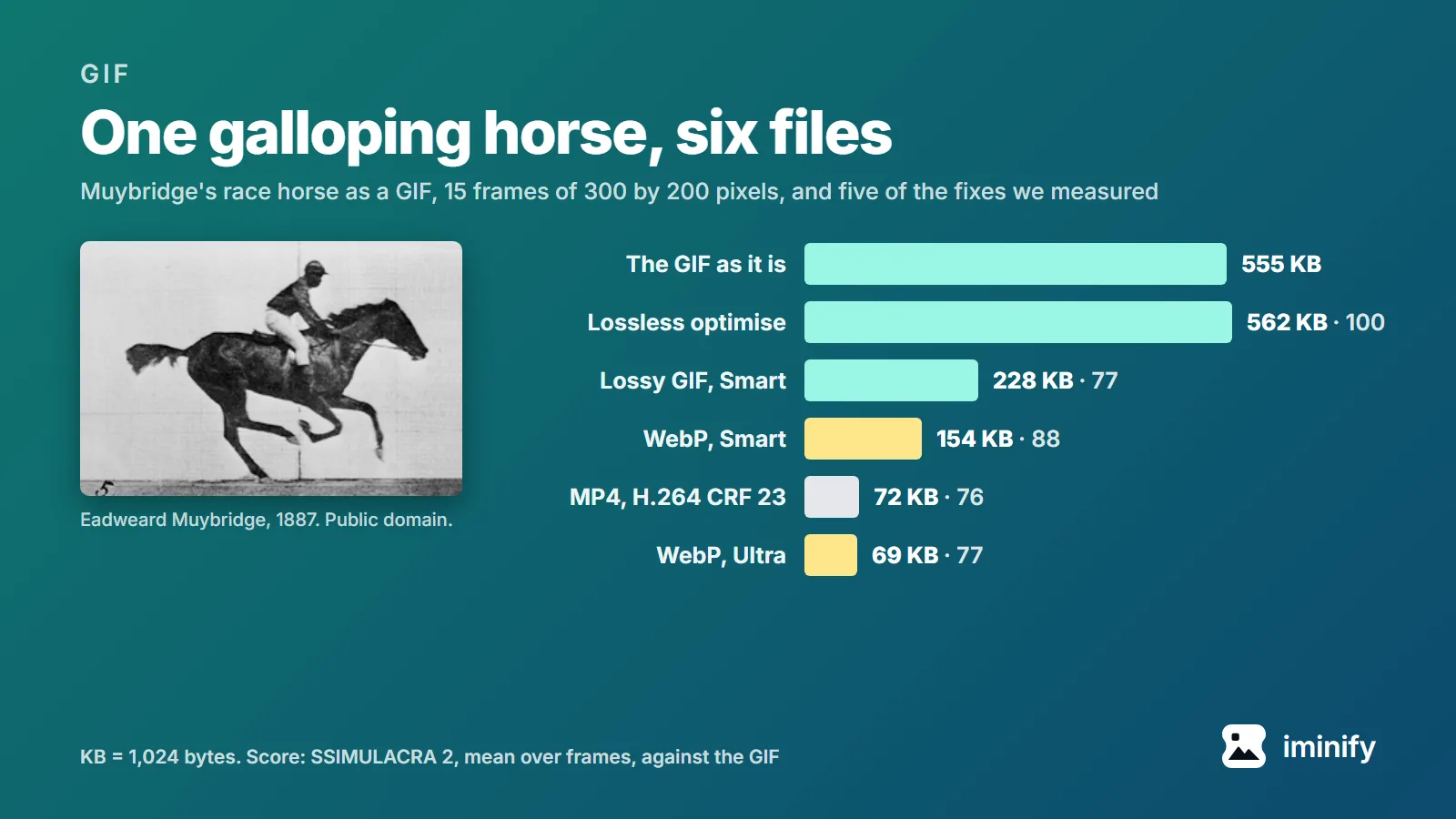
Eadweard Muybridge's galloping horse, as the GIF on Wikimedia Commons, is 15 frames of 300 by 200 pixels that play for a second and a half. It weighs 555 KB. Converted to an animated WebP at Iminify's Smart level, it came to 154 KB and scored 88 on SSIMULACRA 2, a quality measure on which 80 means an average viewer notices no difference side by side.
A GIF gets that big because it can only store its frames losslessly, in 256 colours, and every part of the picture that changes between frames is stored again. We ran the usual fixes on the horse and three other GIFs. The short version:
- If the GIF is going on a web page, convert it to animated WebP. Our Smart level, the default, made all four 34% to 72% smaller, and each scored above 80. Convert GIF to WebP.
- If it has to stay a GIF, switch Change Format off and make it smaller in pixels: half the width and height cut 54% to 68%. Lossy GIF compression at our Smart level cut 19% to 59%, at scores from 75 to 97.
- Don't expect a lossless "optimise" to do much. It saved 14 bytes on one of our four, nothing on another and made the horse bigger; only the fourth shrank by much, 14%.
Where a GIF's bytes go
A GIF frame is a grid of numbers, one per pixel, each pointing into a table of at most 256 colours, and the grid is compressed with LZW, a lossless method (the GIF89a specification). Nothing is thrown away, so every speck of grain costs bytes. From one frame to the next, GIF can store just a rectangle smaller than the picture, and its transparent pixels let the frame before show through, so what didn't change needn't be stored again.
Here is how much each of our four GIFs stores, and what that costs:
| GIF | Size and frames | Pixels stored, of all shown | Bytes per 1,000 pixels shown |
|---|---|---|---|
| Race horse | 300 x 200, 15 frames | 100% | 631 |
| Rotating earth | 400 x 400, 44 frames | 50% | 142 |
| Newton's cradle | 480 x 360, 36 frames | 27% | 50 |
| Bubble sort | 300 x 180, 267 frames | 5% | 11 |
The horse redraws every pixel of every frame, and each frame is a grainy photograph. In 265 of its 267 frames, the bubble sort redraws a strip of flat colour no bigger than 80 by 36 pixels. Per pixel on screen, the horse costs nearly 60 times as much.
So what decides a GIF's size is how many pixels it has to store, and how noisy they are.
What each fix did to four GIFs
Each fix started from the original GIF, and every result saved as a GIF then went through the lossless optimise in the second row, as our levels do: the bubble sort's GIF rows include the 14% that step takes off alone. Cells give the size in KB, then the SSIMULACRA 2 score: the mean over every frame, compared with the GIF's own frames, so 100 means nothing changed and 70 means artifacts you can see but that don't annoy.
| Fix | Newton's cradle | Race horse | Rotating earth | Bubble sort |
|---|---|---|---|---|
| The GIF as it is | 301 | 555 | 978 | 151 |
| Lossless optimise | 301 / 100 | 562 / 100 | 978 / 100 | 130 / 100 |
| Lossy GIF, our Smart level | 211 / 78 | 228 / 77 | 714 / 75 | 122 / 97 |
| Lossy GIF, our Ultra level | 181 / 66 | 181 / 67 | 569 / 59 | 120 / 95 |
| Down to 64 colours | 264 / 89 | 455 / 72 | 680 / 56 | 114 / 94 |
| Half the width and height | 132 | 178 | 351 | 70 |
| Every other frame, same duration | 199 | 298 | 495 | 63 |
| Animated WebP, our Smart level | 185 / 87 | 154 / 88 | 406 / 83 | 100 / 100 |
| Animated WebP, our Ultra level | 80 / 81 | 69 / 77 | 194 / 69 | 100 / 100 |
| MP4 video (H.264, CRF 23) | 33 / 83 | 72 / 76 | 134 / 75 | 75 / 83 |
The resized and frame-dropped files have no score: the measure compares pictures of the same size, one frame at a time.
A lossless optimise saved 14 bytes
A lossless optimise, here gifsicle -O3, can only repack what is already there. On Newton's cradle it saved 14 bytes and on the earth nothing, and it made the horse 7,784 bytes bigger. gifsicle's manual warns about exactly this: "-O3 may actually enlarge file size." Only the bubble sort shrank by much, 14%.
A guide published on dev.to in August 2026 puts lossless savings at "maybe 5–10% on a good day". On three of our four, the optimise saved 14 bytes or less. Iminify's Lossless level runs the same command and hands you back your own file when the result isn't smaller.
Fewer pixels and frames cut more than fewer colours
Down to 64 colours, Newton's cradle scored 89 for 12% off. The earth lost 30% of its bytes and fell to 56, below our Ultra lossy GIF at 59, which was smaller too: 569 KB against 680. Iminify has no colour-count setting. Its Smart and Ultra levels use gifsicle's lossy mode, which alters colours to shrink the file.
Half the width and height leaves a quarter of the pixels, and the files came out 54% to 68% smaller. The same dev.to guide says "~75% smaller", more than any of ours. Keeping every other frame, with each dropped frame's time added to the one kept, took 34% to 58% off, and the motion has about half as many steps. Iminify resizes a GIF by pixels or percentage and keeps it animated. It has no frame-rate setting.
Animated WebP beat lossy GIF, with the right options
At our Smart level, the animated WebP was smaller than the Smart lossy GIF on all four and scored higher on all four. On the horse, our Ultra WebP matched the Smart GIF's score of 77 at less than a third of its size: 69 KB against 228.
That's with two gif2webp options our Smart and Ultra levels switch on and gif2webp leaves off by default: -min_size, which encodes "to achieve smallest size", and -mixed, which lets the encoder choose lossy or lossless frame by frame. Without them, gif2webp made two of our four bigger than the GIF, one in each mode, so check the size of whatever a converter hands you. Plain gif2webp, which is lossless, made Newton's cradle 27% bigger than the GIF (382 KB); -min_size alone brought it down to 271 KB. Plain -lossy made the bubble sort 38% bigger (209 KB) and dropped its score to 79. With -min_size and -mixed both on, as at our Smart and Ultra levels, the encoder kept every bubble sort frame lossless: 100 KB, score 100.
Google's WebP FAQ says animated GIFs converted to lossy WebP are "64% smaller", and lossless ones "19% smaller". Those are averages over about 7,000 GIFs converted with default settings in 2013.
Every current browser plays animated WebP, and caniuse puts support at 96% of users in September 2026. We didn't test email clients or chat apps, so check the place you're posting before you swap.
An MP4 is smaller still, and we don't make those
Converted to MP4 with H.264 at ffmpeg's default quality, CRF 23, the four came to 33, 72, 134 and 75 KB: 2 to 9 times smaller than the GIFs, and smaller than our Smart WebP on all four. The dev.to guide says video is "10–20× smaller"; none of ours got there. And on the horse our Ultra WebP (69 KB, score 77) beat the MP4 (72 KB, score 76) on both counts.
A video isn't an image, though. On a web page it needs a <video autoplay loop muted playsinline> tag instead of <img>, as web.dev shows, and Iminify doesn't write video.
How we measured
The four GIFs are Wikimedia Commons originals: Newton's cradle by DemonDeLuxe (Dominique Toussaint), CC BY-SA 3.0; the race horse, Muybridge's photographs, published in 1887, public domain; the rotating earth by Marvel, CC BY-SA 3.0; and the bubble sort by Swfung8, CC BY-SA 3.0. They're the samples on our GIF to WebP page.
Our Smart level on the horse, as commands you can run:
curl -LO https://upload.wikimedia.org/wikipedia/commons/d/dd/Muybridge_race_horse_animated.gif
gifsicle -O3 --gamma=1 --lossy=12 Muybridge_race_horse_animated.gif -o horse-smart.gif
gif2webp -m 6 -mt -min_size -mixed -q 90 -metadata none Muybridge_race_horse_animated.gif -o horse-smart.webp
With gifsicle 1.96 and libwebp 1.5.0 they write 233,407 and 157,942 bytes; gifsicle 1.94, Ubuntu 24.04's package, wrote a 276,168-byte GIF. Ultra is --lossy=30 and -q 75. Our levels run no quality search on animations, so at Smart every animated GIF gets these flags, except that -m 6 becomes -m 4 once frames times pixels pass 12 million, as in the bubble sort.
The GIFs and WebPs were made in our encoder container, which holds the tools production uses. The MP4s came from ffmpeg 6.1.1 with x264 at CRF 23, in 4:2:0 colour, with -fps_mode passthrough so that each GIF frame stays one video frame; without it, ffmpeg duplicated frames and the bubble sort's MP4 grew to 123 KB. Frames were dumped with libwebp's anim_dump and with ffmpeg, then scored with ssimulacra2 from libjxl v0.12.0. SSIMULACRA 2 judges still pictures, so these scores say nothing about how smooth the motion is. All four GIFs are under 1,000 KB; we didn't test a long, multi-megabyte screen recording. KB means 1,024 bytes.
We also uploaded the horse to our live GIF to WebP page, once as WebP and once with Change Format off, and both files came back byte for byte the same as those two commands' output.