Does a JPEG lose quality every time you save it? We saved five photos 100 times
On this page
Two of the tests that come up for this question disagree. Fstoppers opened a photo in Photoshop 2020 and saved it 99 times at maximum quality, and saw "significant quality loss after you save it six times". Improve Photography saved one 30 times at maximum quality, painting a pixel white each time, and found "no noticeable reduction in image quality. None." Both judged by eye.
We opened a JPEG 100 times, copied it and zipped it, then saved five photos 100 times in a row in five programs and scored every save against the file we started from. The short answer:
- Opening, copying and zipping never changed a byte.
- In every same-setting run, no later save cost as much as the first. Saving again at the same setting, with no edits, then mostly stopped costing: at their defaults, by save 73, ImageMagick, Chrome and Pillow were writing identical files on all five photos, and mozjpeg on four.
- Cropping one pixel or turning the photo before each save kept eating it.
- One pairing of two JPEG libraries lost quality with every save: the jpegli encoder fed by mozjpeg's decoder. Iminify runs that pairing, so we tested our own tool too.
Opening, copying and zipping change nothing
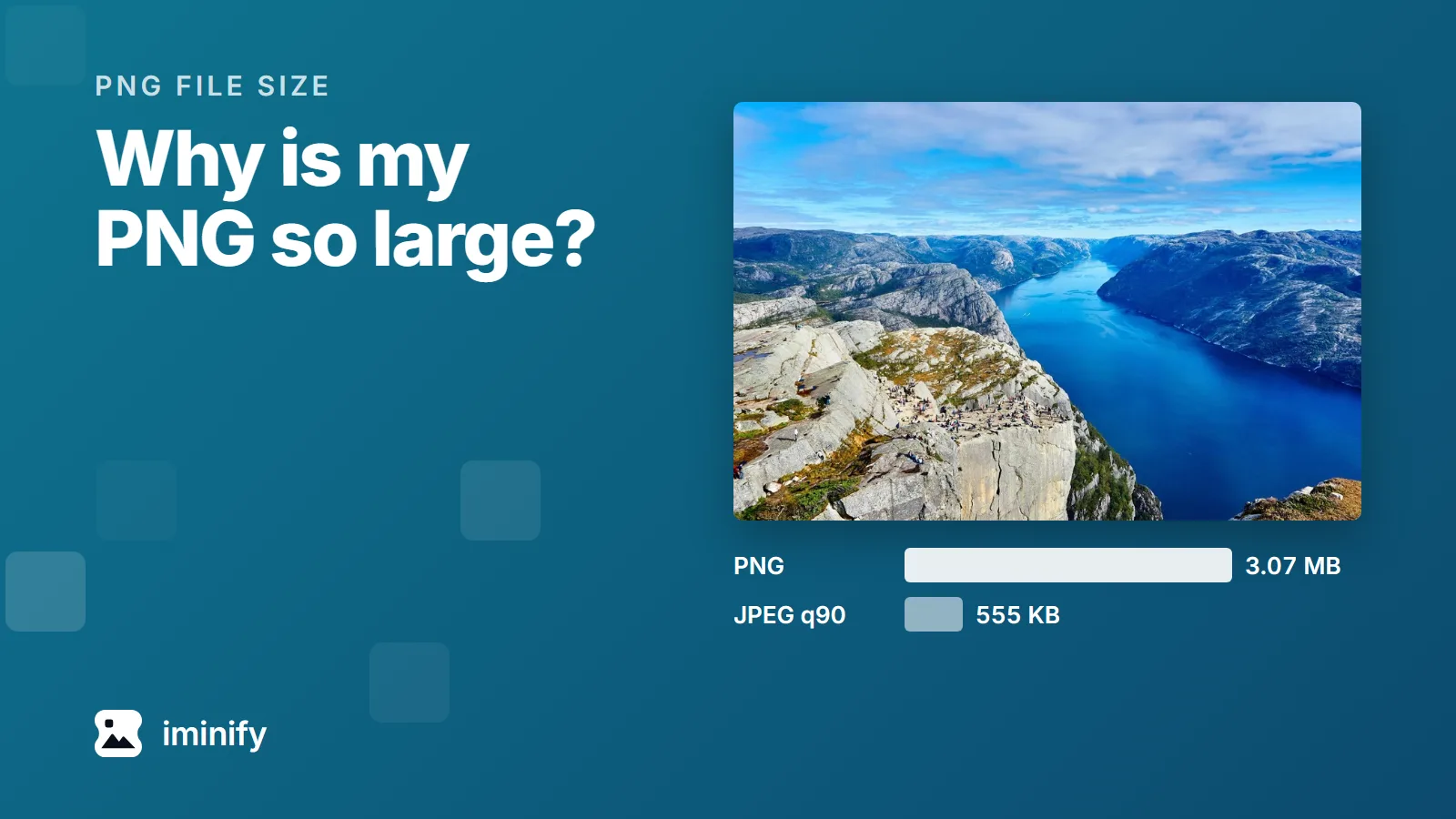
We took an 852,461-byte photo of a fjord, opened and decoded it 100 times with Python's Pillow library and 100 times in Chrome, copied it, and zipped and unzipped it. Its SHA-256 fingerprint came out the same every time.
No later save costs as much as the first
Saving is different: the program decodes the JPEG to pixels and compresses them again. Each did that at its own default, which we read back from the files:
- ImageMagick 7.1.2 kept the photo's own setting, quality 92 with full colour detail (4:4:4), as its documentation says.
- Chrome's canvas saved at 92 with colour at half resolution (4:2:0).
- Pillow 12.3 and mozjpeg 4.1.5 saved at 75, 4:2:0.
- jpegli saved with full colour at its default, which its help calls "quality 90".
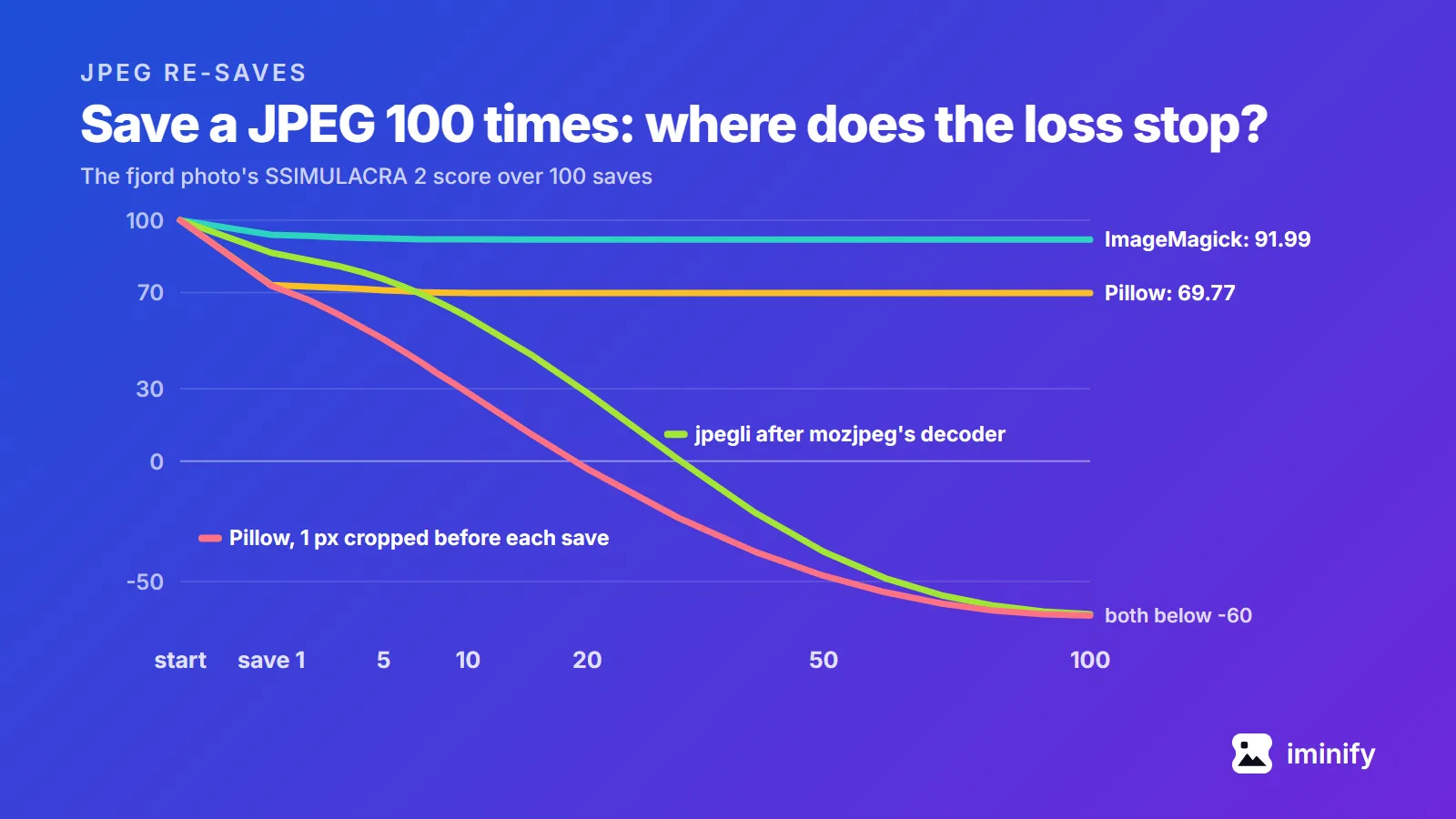
We scored every save with SSIMULACRA 2, a quality metric built from viewing tests, where 90 means visually lossless and 70 "high quality. ... Artifacts are perceptible, but not annoying." Its README calls anything below zero "extremely low quality, very strong distortion." The fjord:
| Program | Save 1 | Save 2 | Save 10 | Save 100 | Stopped changing after save |
|---|---|---|---|---|---|
| ImageMagick | 93.94 | 93.48 | 92.02 | 91.99 | 12 |
| Chrome canvas | 89.23 | 87.84 | 80.63 | 77.44 | 34 |
| Pillow | 73.11 | 72.46 | 69.83 | 69.77 | 12 |
| mozjpeg | 70.08 | 69.14 | 67.05 | 67.05 | 12 |
| jpegli, decoded by its own djpegli | 84.28 | 80.22 | 77.57 | 77.13 | 20 |
| jpegli, decoded by mozjpeg's djpeg | 86.50 | 83.41 | 59.77 | -63.62 | never |
After the first save, ImageMagick, Chrome, Pillow and mozjpeg lost less and less on most photos, until the file stopped changing. Across the five photos ImageMagick stopped changing after 3 to 12 saves, Pillow after 4 to 72, Chrome after 18 to 44, and mozjpeg after 5 to 12 on four of them (on the fifth it cycled through 12 files).
In Pillow at 75, halving the colour resolution made the fjord drift more: it lost 1.63 points between save 1 and save 100 with full colour (subsampling=0), and 3.34 with half. Chrome's later saves on the fjord added up to 11.79 points, more than its first save's 10.77; ImageMagick's, at the same quality with full colour, to 1.95. Cloudinary's article on generation loss says why: "the chroma channels become increasingly blurry with each iteration of subsampling/upsampling."
Both tests at the top of this post saved at maximum quality. The nearest loop we ran is Pillow at 95, the top of its documented scale, with half colour: the fjord went from 89.11 after one save to 71.67 after 100, and from save 53 it alternated between two files. We didn't test Photoshop, GIMP or phone photo apps.
On a photo of raspberries, Pillow's file stopped changing after save 72, but on the way two tiny squares, 8 by 8 pixels each, kept brightening. The score, 78.28 after the first save, fell from 74.87 at save 10 to 40.18 at save 100.
jpegli after mozjpeg's decoder lost quality with every save
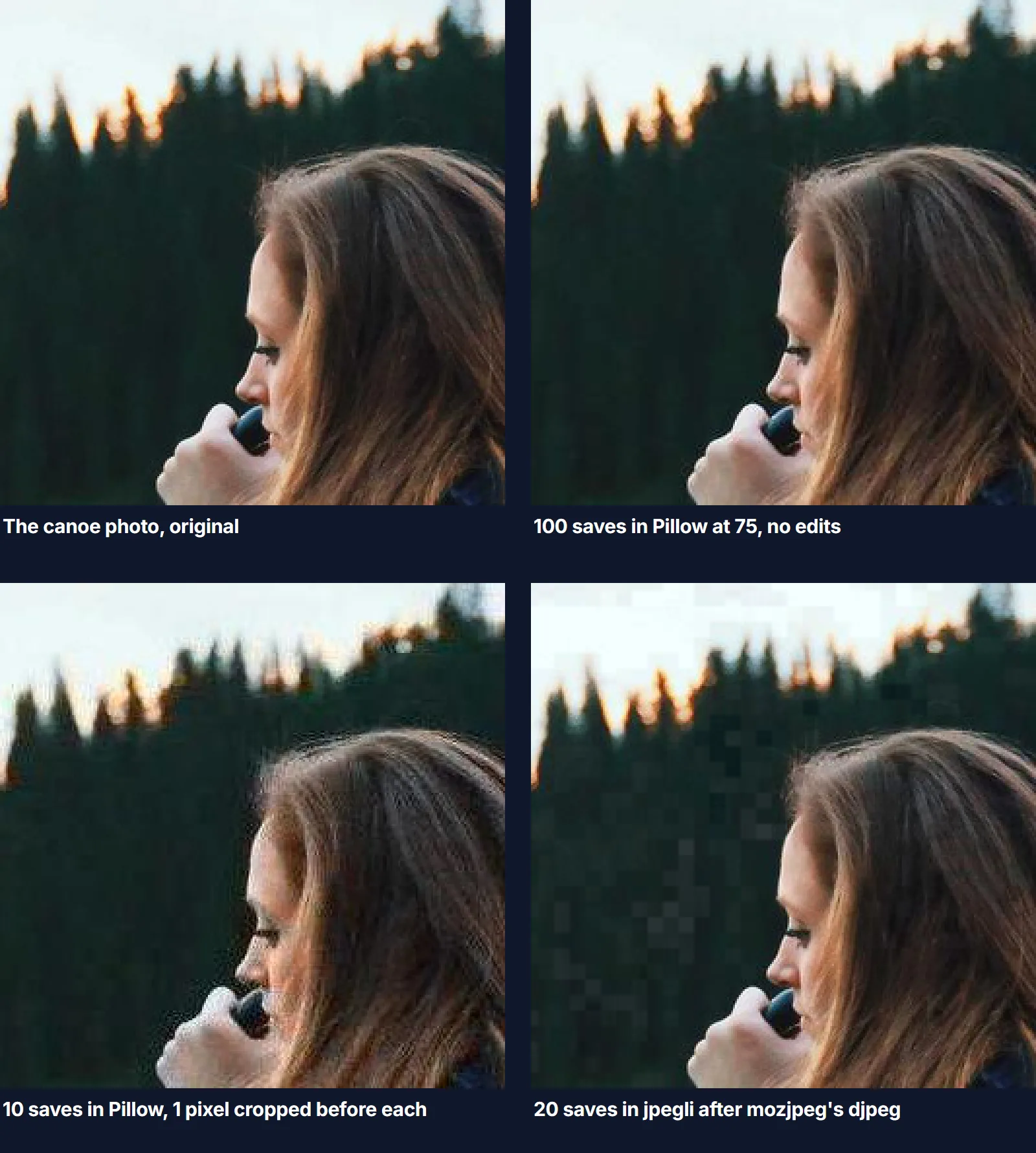
Iminify decodes an ordinary JPEG upload with mozjpeg's djpeg and encodes it with jpegli, the JPEG encoder from the JPEG XL project. Our loop used the same pair at jpegli's defaults, and in 100 saves jpegli never wrote the same file twice on any of the five photos. The fjord's score kept falling, to 28.33 after 20 saves. By save 20 grey blocks had appeared in the dark trees of a canoe photo.
With the flags Iminify uses on a photo at Smart's ceiling, quality 90 and half colour, the fjord still fell to 45.44 after 20 saves. With jpegli's own djpegli decoding, the loop at jpegli's defaults stopped changing after 7 to 20 saves on the five photos, like the others. We haven't found the cause.
Don't feed an Iminify result back into Iminify
We uploaded the fjord to Iminify's JPEG compressor at Smart, downloaded the result and uploaded that: four passes in all. Against the original the four results scored 84.22, 80.25, 75.35 and 70.75, and shrank from 568,598 bytes to 453,273. The first two passes were byte for byte the first two saves of our loop with Iminify's flags above. From the third, Smart picked a lower quality: it compares with your upload, not with the photo you started from, and the last three scored 86.26 to 88.42 against the file each was given.
To try another level or size, use Recompress in the result's menu. Iminify's FAQ says "The new result is encoded from the original you uploaded, never from the optimized copy".
Crops off the block grid and turns keep costing
JPEG compresses a picture in blocks of 8 by 8 pixels (16 by 16 when the colour is at half resolution). Crop one pixel off the left edge and every block holds different pixels; Wikipedia's page on generation loss calls that "substantial degradation".
With Pillow at 75 on the fjord:
- Cropping 1 pixel off the left before each save: 72.83 after the first, 28.34 after 10, below zero after 20, -64.16 after 100.
- Cropping 16 pixels: 69.89 after 10, level with no crop at all (69.83).
- Turning it a quarter turn anticlockwise before each save: 66.90 after four saves, one full turn (71.45 without turning), and 52.90 after 100.
jpegtran turns a JPEG without decoding it. Its manual says "there is no image degradation at all, which would not be true if you used djpeg followed by cjpeg". We turned each of the five photos a quarter turn four times with it:
jpegtran -rotate 90 -perfect -copy all -outfile turned.jpg photo.jpg
After four turns every photo decoded to exactly the original pixels. -perfect makes jpegtran refuse a turn it can't do losslessly, which can happen when the width or height isn't a whole number of blocks. -copy all also keeps an EXIF orientation tag as it was, so a phone photo you turned because one app showed it sideways can show sideways in apps that read the tag; the manual suggests exiftran for such files.
Re-saving at a higher quality doesn't bring detail back
We saved each photo once at 75 in Pillow, then saved that file again at 90 and at 100. On all five photos, 90 cost 1.39 to 1.45 times the bytes for a lower score, and 100 cost 3.16 to 4.11 times for a score within 0.3 of where it started.
How to edit a JPEG without losing more quality
- Keep the original, and export from it, not from your last export.
- Make every change, then save once, at the quality you want to keep.
- Turn and crop with a lossless tool.
jpegtranis the one we tested for turns; it comes with libjpeg-turbo and mozjpeg. A lossless crop keeps its top-left corner on the block grid. - If you must re-save, use the same program at the same setting: that's the case where most programs stopped changing the file. The same quality number means different things in different encoders, so "the same setting" in another program isn't.
- To shrink a JPEG with no new generation, use Lossless on Iminify: it repacks the file with mozjpeg's
jpegtran, and the page says "Not one pixel changes".
How we measured
The five photos are Iminify's public sample JPEGs, 1800x1200 at quality 92, 4:4:4, the set our SSIMULACRA 2 post downloads. Each save decoded the previous file and encoded it at the program's defaults: Pillow 12.3.0 (libjpeg-turbo 3.1.4.1) Image.save(); mozjpeg 4.1.5 djpeg then cjpeg; jpegli at commit 031a0077 on main, cjpegli after mozjpeg's djpeg; ImageMagick 7.1.2-12 magick in.jpg out.jpg; Chrome 153 canvas.toBlob(cb, 'image/jpeg') with no quality. Scores come from ssimulacra2 in libjxl 0.12.0, against the starting file (for the crops, the same region of it): every save of the loops, and a sample of saves for the crops and turns.