Compress PNG images

Drop PNGs below and get smaller PNGs back, with transparency intact. Pick Lossless to change nothing, or Smart for the big savings. Up to 16 MB a file as a guest or 32 MB with a free account. Free. No account, no watermark.

  • Stays a PNG
  • Transparency kept
  • Lossless option
Compression Level
None
No compression, only apply settings on image
Lossless
Without any visual change in the image quality
Ultra
Max compression with some quality loss
Smart
Balance between the image quality and compression
Change Format Will allow you to convert images to different extensions
Resize Will allow you to change the width, height or scale of images
Keep EXIF Will allow you to preserve meta data in images
Maximum file size is 16 MB per image and supported formats are: PNG, JPG, JPEG, WEBP, GIF, HEIC, HEIF, TIFF, TIF
Guests get 10 images a day, 10 left today. A free account gets 40 a day.
Delete this image?
The image and its optimized copy will be removed from storage. This cannot be undone.

Rename this image
Choose the name the optimized image downloads with. Its format stays the same.

Uploaded as

Rename the selected images
Each image gets this name and a number, counted in the order they were uploaded. Their formats stay the same.

Share this image
Choose the compression level that suits your images
Level What it promises What happens Pick it when
Lossless
Not one pixel changes in a JPEG, PNG or GIF The file is repacked, never re-encoded. JPEGs get an optimised Huffman table and progressive scan, PNGs a tighter deflate pass, GIFs a lossless gifsicle run. A lossy WebP has no repack step, so it is re-encoded at the highest quality the level allows. A sideways phone JPEG is rotated losslessly on the way through and keeps its colour profile. The one exception to the promise is a PNG or WebP tagged with a wide-gamut profile such as Display P3: its colours are converted to sRGB, so the values change but the picture doesn't. Logos, line art, anything you'll edit again, or when the file is evidence.
Smart
No visible change, targets 40 dB PSNR and a perceptual score of 70 A quality search runs per image and stops at the lowest quality that still clears the PSNR target. That answer is then scored on the SSIMULACRA 2 scale, because an average over every pixel lets a mostly flat picture through at a quality its detail doesn't deserve, and when it falls under 70 the search moves back up until it doesn't. Photos and graphics end up at different qualities because they need different ones; an image that cannot reach the targets inside the quality ceiling is encoded at the ceiling. Almost everything on a website. This is the default for a reason.
Ultra
Smallest file, targets 34 dB PSNR and a perceptual score of 50 The same two-stage search with lower targets. Fine texture softens a little; edges and text stay sharp. Thumbnails, backgrounds, email images, anything shown small or blurred anyway.
None
No compression at all Only the resize, conversion or metadata setting you chose is applied. An untouched upload comes back byte for byte. You only wanted to resize or convert, and quality is someone else's decision.

Measured, not estimated

What compression did to four real PNGs

Two screenshots, a social card and a transparent icon from our showcase, compressed as PNG at each level.

Sample Original Lossless Smart Ultra
Social card 1200 by 630 208 KB PNG 152 KB 27.2% smaller 44 KB 79.1% smaller 36 KB 82.8% smaller
Phone screenshot 1170 by 2532 0.9 MB PNG 745 KB 22.3% smaller 260 KB 72.9% smaller 216 KB 77.5% smaller
App icon 1600 by 1600 113 KB PNG 100 KB 11.6% smaller 19 KB 83% smaller 19 KB 83% smaller
Desktop screenshot 1440 by 900 303 KB PNG 180 KB 40.6% smaller 87 KB 71.4% smaller 78 KB 74.3% smaller

Metadata stripped, no resize. On the icon, Smart and Ultra are the same file. Ultra tries its own colour range, then Smart's, then the full palette, and keeps whichever came out smallest, so it never loses to Smart.

How it works

Two ways to shrink a PNG

The lossless way is repacking. A PNG's pixels are squeezed with deflate, and most software does that quickly, not well. Iminify reruns it with zopfli, a much slower compressor that finds a shorter encoding of the very same pixels. Large files get optipng instead, because zopfli's cost grows with every pixel. Nothing about the image changes either way.

The lossy way is quantisation, and it's where the big numbers come from. A normal PNG can use 16 million colours. pngquant rebuilds it with a palette of at most 256, chosen for that image and dithered where it helps. A screenshot or a logo rarely needs more, and one byte a pixel in place of three or four is a very different file.

pngquant is given a quality range, not a colour count. If it can't reach the bottom of the range it declines to write anything, and the file is repacked losslessly instead. That's how a gradient-heavy PNG avoids visible banding.

What survives

What a PNG keeps when it's compressed

  • Transparency

    Full alpha survives at every level, including partial transparency on anti-aliased edges.

  • Every pixel, at Lossless

    Lossless changes the packing and nothing else. A wide-gamut colour profile is the one exception: it's converted to sRGB.

  • EXIF, when you switch it on

    Rare in PNGs. It's written back as an eXIf chunk if Keep EXIF is on.

  • Animation

    An animated PNG is reduced to its first frame, because neither pngquant nor optipng handles APNG.

When not to

When PNG compression is the wrong tool

  • The PNG is a photograph. It will shrink, but a JPG, WebP or AVIF of it is many times smaller. PNG was never meant for photos.
  • It has smooth gradients and you need them perfect. Use Lossless, not Smart.
  • The format doesn't matter to you. PNG to WebP is smaller than any PNG at the same quality.

How to

Compress a PNG in three steps

  1. 1

    Drop your PNGs

    Change Format stays off, so you get PNGs back.

  2. 2

    Lossless or Smart

    Lossless for source assets. Smart for anything that only has to look right.

  3. 3

    Check, then download

    The difference map in Compare shows exactly which pixels changed, if any.

Questions

PNG compression questions

From the blog

What we've measured so far

We run the encoders on real photos and screenshots and publish the numbers: when WebP beats AVIF, what quality 80 means in each encoder, and how many kilobytes an image on a web page should weigh.

All posts
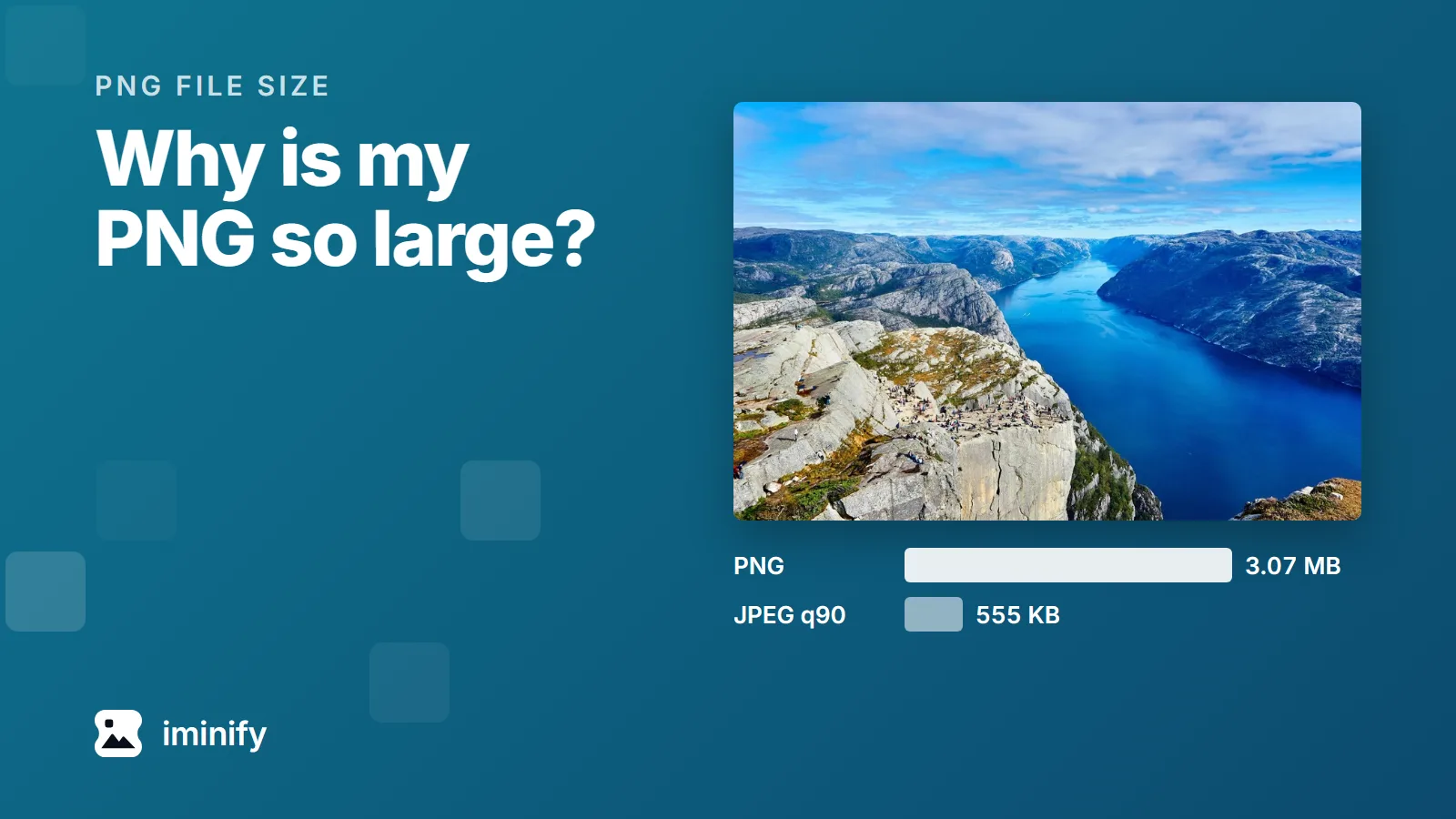
The fjord photograph from our test set above two bars: 3.07 MB as a PNG and 555 KB as a JPEG at quality 90.

Why is my PNG file so large? Four causes, measured

We took the fjord photograph from our test images, a 1,800 by 1,200 JPEG of 832 KB, and saved the same pixels as a PNG. It came to 3.34 MB at the default setting of Pillow, the Python imaging library. Through zopflipng, a slower lossless compressor, 3.07 MB. As a JPEG at quality 90 it's 555 KB, and it scores 84.22 on a perceptual scale where 80 means an average observer can't see the difference side by side. A photograph was the most expensive of the four causes in the comparisons below. The four: It's a photograph. It has more pixels than it will be shown at. It stores more per pixel than the picture needs: 16 bits per colour channel, or millions of colours where 256 would do. The program that saved it didn't compress it very hard. Each has its own fix, and the fix for one can be wrong for another. A JPEG rescues a photograph. Our desktop screenshot came out bigger as a JPEG than as a PNG through zopflipng.
7 min read
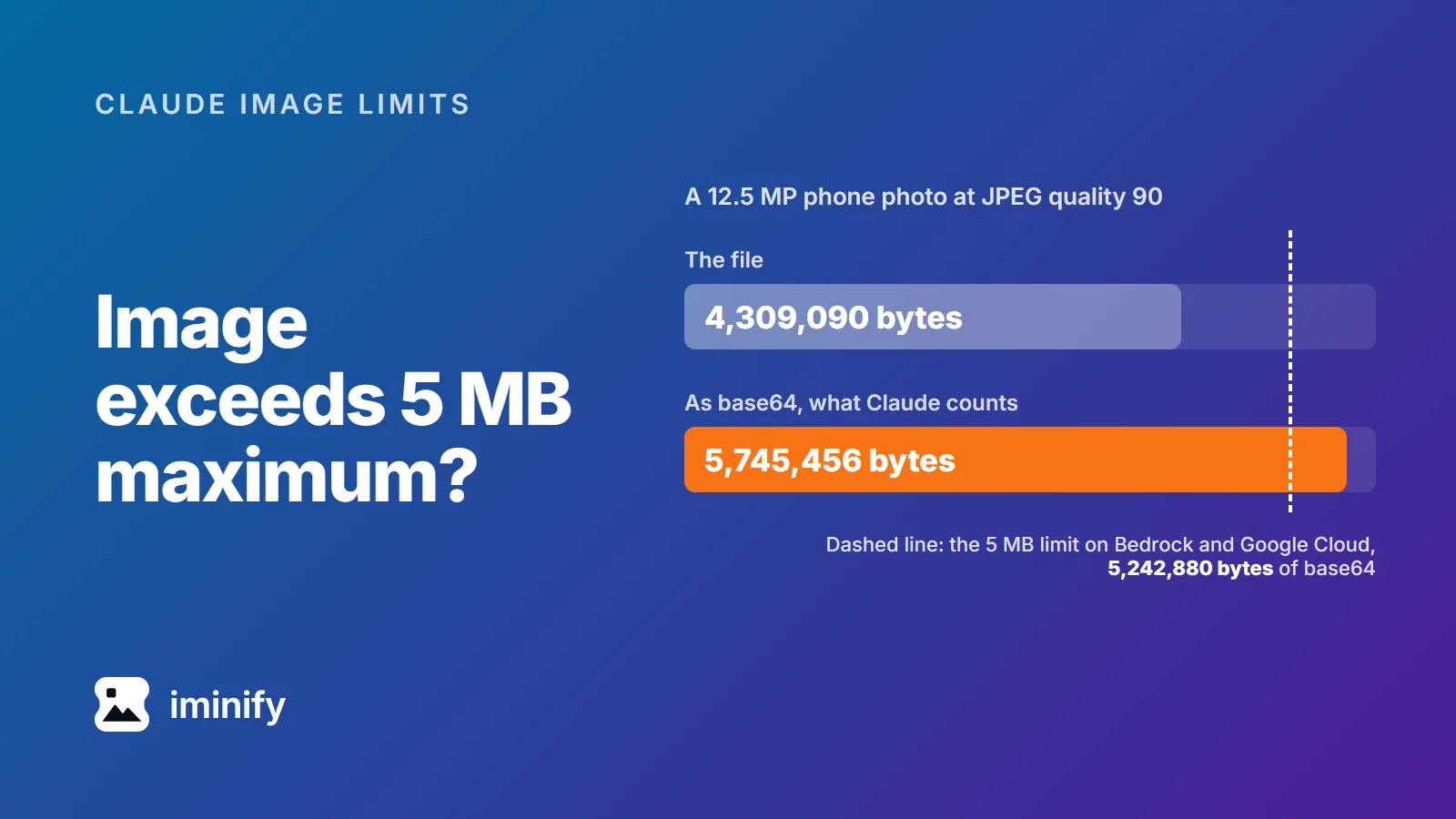
Bar chart: a 12.5 MP phone photo at JPEG quality 90 is 4,309,090 bytes as a file and 5,745,456 bytes as base64, past a dashed line at the 5,242,880-byte limit on Bedrock and Google Cloud.

Image exceeds 5 MB maximum? Claude counts the base64, not your file

Our 12.5-megapixel test photo, re-saved with jpegli at quality 90, is 4,309,090 bytes. That's under 5 MB, and it's still too big for Claude on Amazon Bedrock or Google Cloud. Anthropic's limit there is "5 MB (base64-encoded)", and base64 turns those 4,309,090 bytes into 5,745,456. The error compares the encoded size with 5,242,880 bytes, as in this one from a Claude Code issue: image exceeds 5 MB maximum: 5281812 bytes > 5242880 bytes. So the ceiling is 3,932,160 bytes of actual file on Bedrock and Google Cloud, and roughly 7.5 MB on the direct Claude API, whose limit is 10 MB. Separately, no side may pass 8000 pixels, or 2000 once a request carries more than 20 images. For photos, one step clears all of it: resize to 2000 pixels on the long edge and save it as JPEG.

8 min read
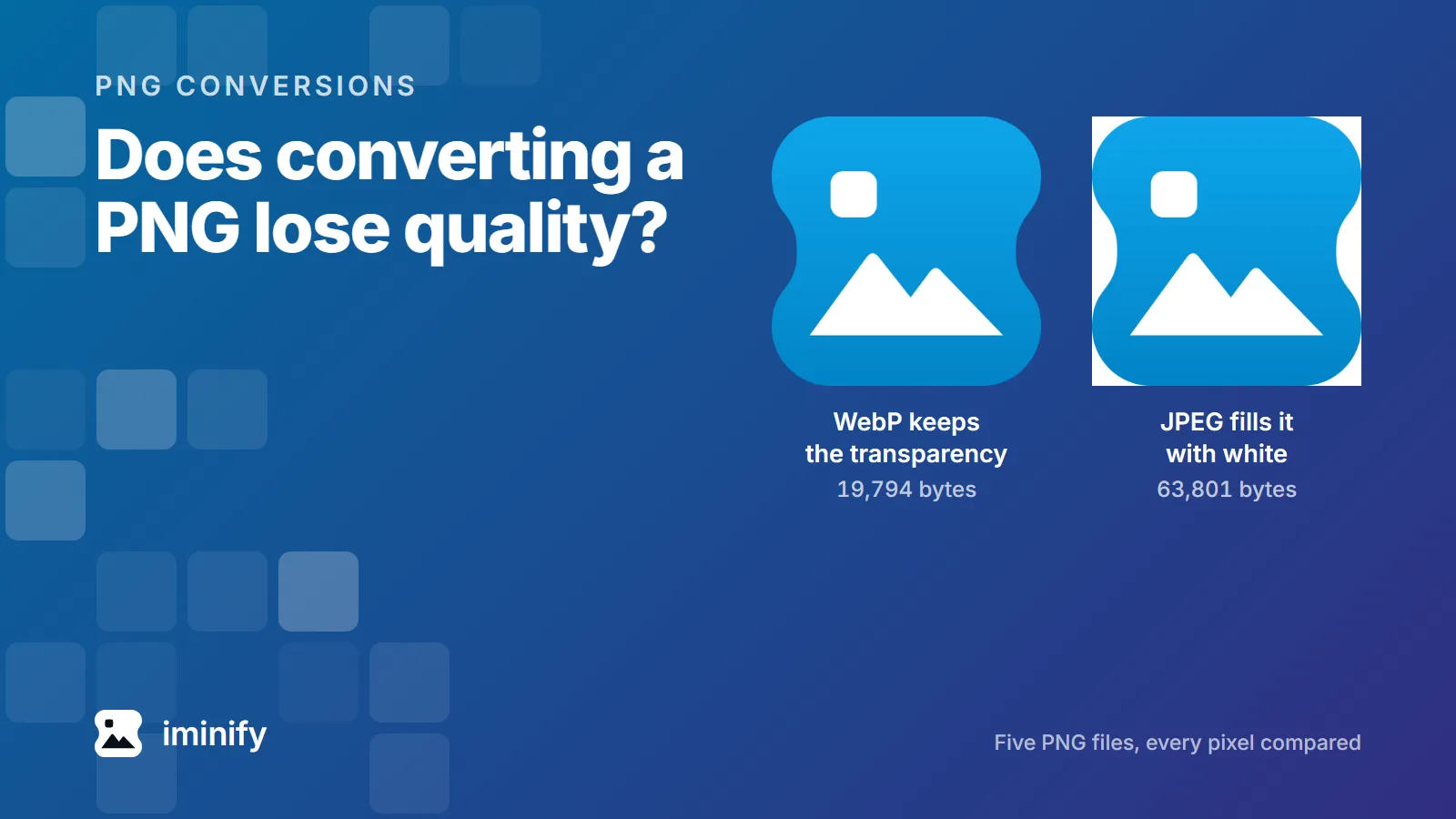
The same app icon twice: as a 19,794-byte WebP with its transparency showing the background through, and as a 63,801-byte JPEG sitting on a white square.

Does converting PNG to WebP lose quality? Five files, every pixel checked

We converted five PNG files to WebP with the encoder forbidden to throw anything away, then compared every pixel against the original. All five kept every 8-bit pixel, and the files were between 28.6% and 77.3% smaller. So no, converting a PNG to WebP doesn't have to cost you anything you can see. The catch is that it isn't the conversion you're usually pointed at. Of the first four results for this question in September 2026, three recommend a quality number between 80 and 100, and in cwebp every one of those is a lossy setting. So is the button marked "compress PNG". Here's what each of them actually costs.

8 min read

Make your PNGs lighter

Drop a PNG, pick a level and check the difference map before you download.