Why is my AI upscale file so big? Three things, measured on a 4x Real-ESRGAN upscale
On this page
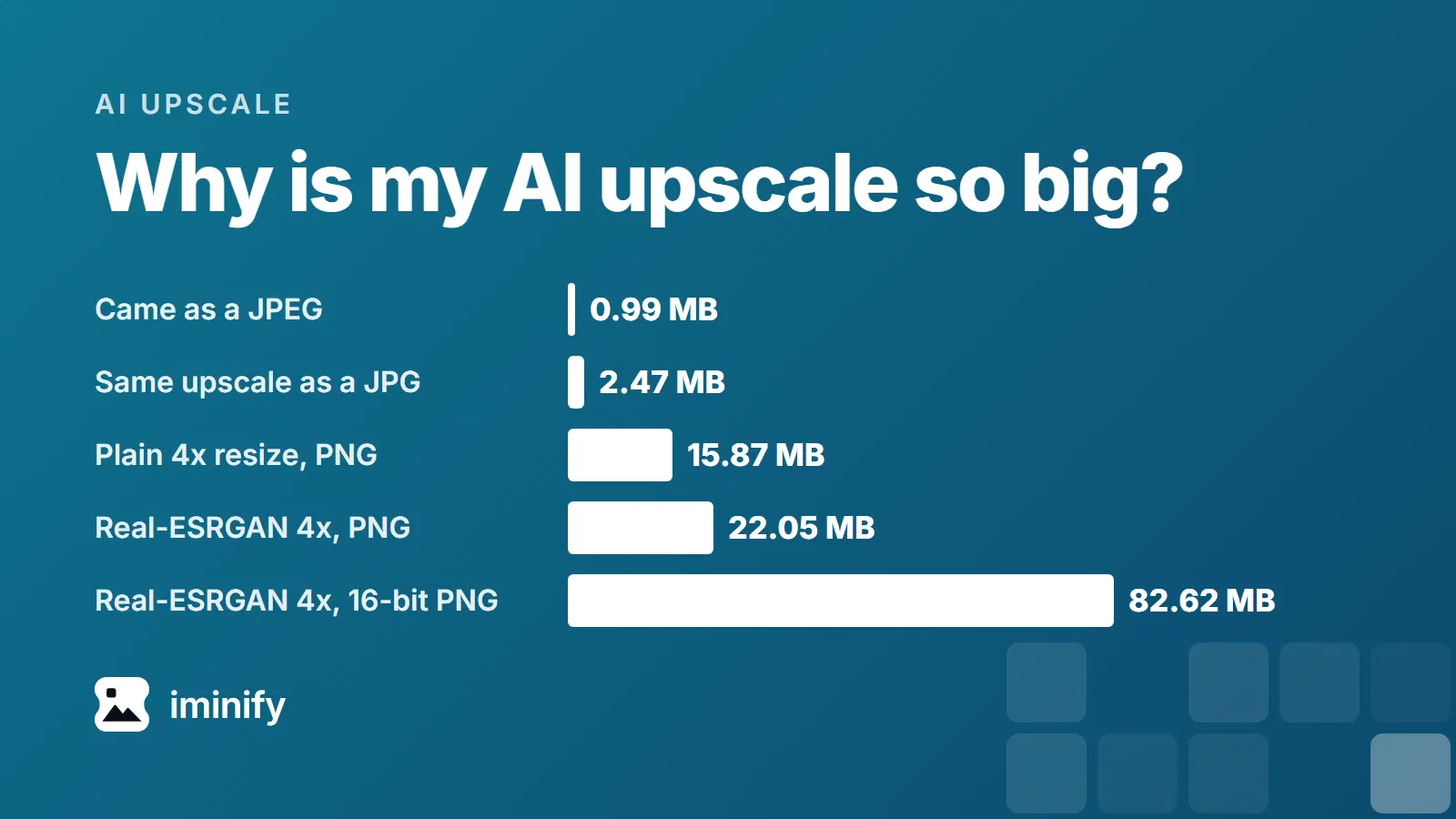
A 1024 x 1024 harbour picture generated by Gemini came to us as a 989 KB JPEG. We upscaled it 4x with Real-ESRGAN, an open AI upscaler, and saved the 4096 x 4096 result as an 8-bit PNG: 22.1 MB, 22 times the file we started with. Saved as a 16-bit PNG, the same upscale is 82.6 MB.
Three things stack up. A 4x upscale has 16 times the pixels, the model's output is busier than a plain resize of the same size, and the bit depth you export at can multiply the file again. If you only want the file smaller, save the upscale as a JPG or WebP: Iminify made the harbour picture's 2.1 to 2.5 MB. We ran Real-ESRGAN, not Topaz Gigapixel or the models inside Upscayl, so every AI upscale we measured came from one open model.
4x means 16 times the pixels, and our PNGs grew 12 to 15 times
A scale factor multiplies both sides of the picture, so 2x gives 4 times the pixels, 4x gives 16 and Gigapixel's top setting, 6x, gives 36. A reply in a Topaz forum thread turns that into a rule for file size: a 3x upscale of a 54 MB file comes to "about 486 MB", and "a 4x upscale gives you an increase to 16x".
Our MB are 1,000,000 bytes and our KB 1,000, unlike post 1, post 7 and the pricing page, which use 1,024-based units. OpenCV wrote every PNG in this table at compression level 6.
| Picture | Pixels in | Pixels out | Source as PNG | Plain 4x resize, PNG | Real-ESRGAN 4x, PNG |
|---|---|---|---|---|---|
| Gemini harbour photo | 1024 x 1024 | 4096 x 4096 | 1.86 | 15.87 | 22.05 |
| Gemini flat illustration | 1024 x 1024 | 4096 x 4096 | 0.85 | 7.16 | 12.48 |
| Fjord photograph | 1800 x 1200 | 7200 x 4800 | 3.48 | 31.38 | 44.69 |
The Real-ESRGAN PNGs are 11.9, 14.7 and 12.8 times the PNG of the picture they came from, short of that rule's 16. Against the files the pictures came as (989 KB, 456 KB and 852 KB) they are 22, 27 and 52 times, and the source's own PNG is already 1.9, 1.9 and 4.1 times its JPEG.
Real-ESRGAN's PNG was 39 to 74 percent bigger than a plain resize
Our print-size post resampled two 4K Gemini images and said that a file from an AI upscaler "may weigh differently". From each picture we also made a 4x file with a plain Lanczos resize and saved it with the same writer. Real-ESRGAN's PNGs came out 39, 74 and 42 percent bigger.
The model's pictures are busier too. The average difference between horizontally neighbouring grey pixels was 1.7, 1.6 and 1.6 times higher in its output (3.99 against 2.38 on the harbour photo). PNG's filters predict each byte from the bytes before it and above it and store the difference. The ratios don't rank like the 39, 74 and 42 percent gaps (the harbour picture has the highest ratio and the smallest gap), so we haven't shown that busyness explains them.
Written at 16 bits, the model's output was 3.7 to 6 times the 8-bit file
At 16 bits per channel, the model's float output came to 82.6, 74.4 and 164.4 MB: 3.7, 6.0 and 3.7 times the 8-bit files. At 4096 x 4096 the raw pixels are 50.3 MB at 8 bits and 100.7 MB at 16, and the harbour photo's 8-bit PNG is 44% of the first while its 16-bit PNG is 82% of the second.
We stored the 8-bit pictures as 16 bits, every value times 257, and the harbour photo came to 26.2 MB and the illustration to 15.1 MB, 1.19 and 1.21 times the 8-bit files. We didn't run that on the fjord. Our PNG post built a 1,200 x 800 fjord at 16 bits with real extra precision: 4.75 MB against 1.51 MB at 8 bits.
Upscayl's source writes 8-bit PNGs, and a Topaz export page lists a bit depth setting
Upscayl's defaults are PNG and 4x, in its main branch (commit a00d55fe, 27 March 2026) and its 2.15.0 release. Its engine's current source (upscayl-ncnn release 20251207 and master) writes PNGs at 8 bits per channel, from stb_image_write off Windows and Windows' own encoder on Windows. So the 16-bit files above don't apply to a PNG written by that source.
At its default compression of 0, the engine's current source writes a JPG at quality 100 (the encoder's top quality on Windows) and a WebP as lossless. For a small JPG or WebP, raise the compression setting, which the Windows JPG writer ignores, or compress the result afterwards.
A Topaz export page, the one Gigapixel's Quick Start links to, is written for Photo AI. It lists JPEG with a default quality of 95, PNG with a Compress slider and a Bit depth setting, and TIFF with Bit depth and ZIP or LZW. Gigapixel's own docs say, on their troubleshooting page, that the maximum upscale potential is "a dimension of 32,000 pixels on the longest edge, or a file size of 2 GB; whichever comes first". We didn't run Topaz, so look for a Bit depth setting in your own export dialog.
Saved as JPG or WebP, the 22 MB PNG came to 2 to 2.5 MB
These are Iminify results for the harbour photo's 4096 x 4096 PNG, run through its API on 10 November 2026. Smart is the default level. The score is SSIMULACRA 2 against the PNG we uploaded, where 80 is the point at which distortion isn't noticeable side by side.
| Saved as | MB | Share of the 22.05 MB PNG | Score |
|---|---|---|---|
| Lossless, PNG | 21.50 | 97.5% | 100 |
| Lossless, WebP | 15.61 | 70.8% | 100 |
| Smart, PNG (a palette of at most 256 colours) | 7.29 | 33.1% | 66.5 |
| Smart, JPG | 2.47 | 11.2% | 81.6 |
| Smart, WebP | 2.10 | 9.5% | 80.4 |
| Smart, AVIF | 1.45 | 6.6% | 79.6 |
| Smart, JPG, 2,048 pixels wide | 0.87 | 3.9% | not scored: resized |
Above 8 megapixels Smart doesn't check its result against SSIMULACRA 2 as it encodes, so the scores are what the files got, not a target. The palette PNG scored 66.5, so we wouldn't use Smart's PNG for a picture like this one. Our flat illustration went from 12.5 MB to 119 KB as a WebP, 262 KB as a JPG and 3.2 MB as a PNG, scoring 71.7, 71.6 and 72.1.
For a picture that goes on a screen or in an email, JPG or WebP: the harbour photo scored 81.6 as a JPG and 80.4 as a WebP, and the illustration 71.6 and 71.7, under the 80 mark, so open the result before you keep it.
Fewer pixels is the other lever. The harbour PNG resized to 2,048 pixels wide came to 0.87 MB as a Smart JPG, and a 2x file made by resizing the same 4x output was 31, 32 and 30 percent of the 4x PNG with a quarter of the pixels. Keep a PNG as an editing master, at 8 bits unless you need more.
What Iminify takes and what it doesn't do
Iminify has no AI upscaler. It takes at most 64,000,000 pixels: a flat 8000 x 8000 PNG went through, and flat 8000 x 8001 and 8192 x 8192 PNGs were refused with "the largest this tool can process is 64 megapixels". Since 2x multiplies the pixels by 4, the picture you upscale can be at most 16 megapixels at 2x, 4 at 4x and 1.77 at 6x.
File size is the other limit. Its pricing page, read on 10 November 2026, says 16 MB as a guest, 32 MB with a free account and 90 MB on Pro and Max. The harbour PNG is over the guest limit, the fjord PNG needs Pro or Max, and the 16-bit harbour file fits only on those two.
How we measured
We ran Real-ESRGAN x4plus, with the weights from the project's v0.1.0 release (SHA-256 4fa0d389...), on CPU in float32 through spandrel 0.4.1 and torch 2.5.1, in tiles of 256 pixels with 10 pixels of context, in a container with no network. The control is OpenCV's INTER_LANCZOS4 resize. OpenCV wrote every upscale PNG at compression level 6. The 16-bit files are round(x * 65535) of the model's float output, the 2x files are the 8-bit 4x output resized with the same Lanczos, and the busyness figure is the mean absolute difference between horizontal neighbours of the grey image.
The inputs are two 1024 x 1024 JPEGs from Nano Banana 2.1, made on 26 October 2026, and the fjord photograph (1800 x 1200, 852,461 bytes; Alexey Topolyanskiy, Unsplash License) from Iminify's published showcase. We upscaled the harbour photo three times, at 8, 4 and 8 threads, and the 8-bit and 16-bit PNGs were identical each time. The other two were upscaled once.
Each Smart result ran twice from the stored upload and returned identical bytes. The Lossless results ran once. We scored each result against the PNG we uploaded, except the resized one, with SSIMULACRA 2 from libjxl 0.12.0, decoding WebP with dwebp 1.5.0 and AVIF with avifdec 1.2.1.