Does PowerPoint compress images? In our Office 2024 for Windows test it re-encoded big photos and turned a WebP into a PNG
On this page
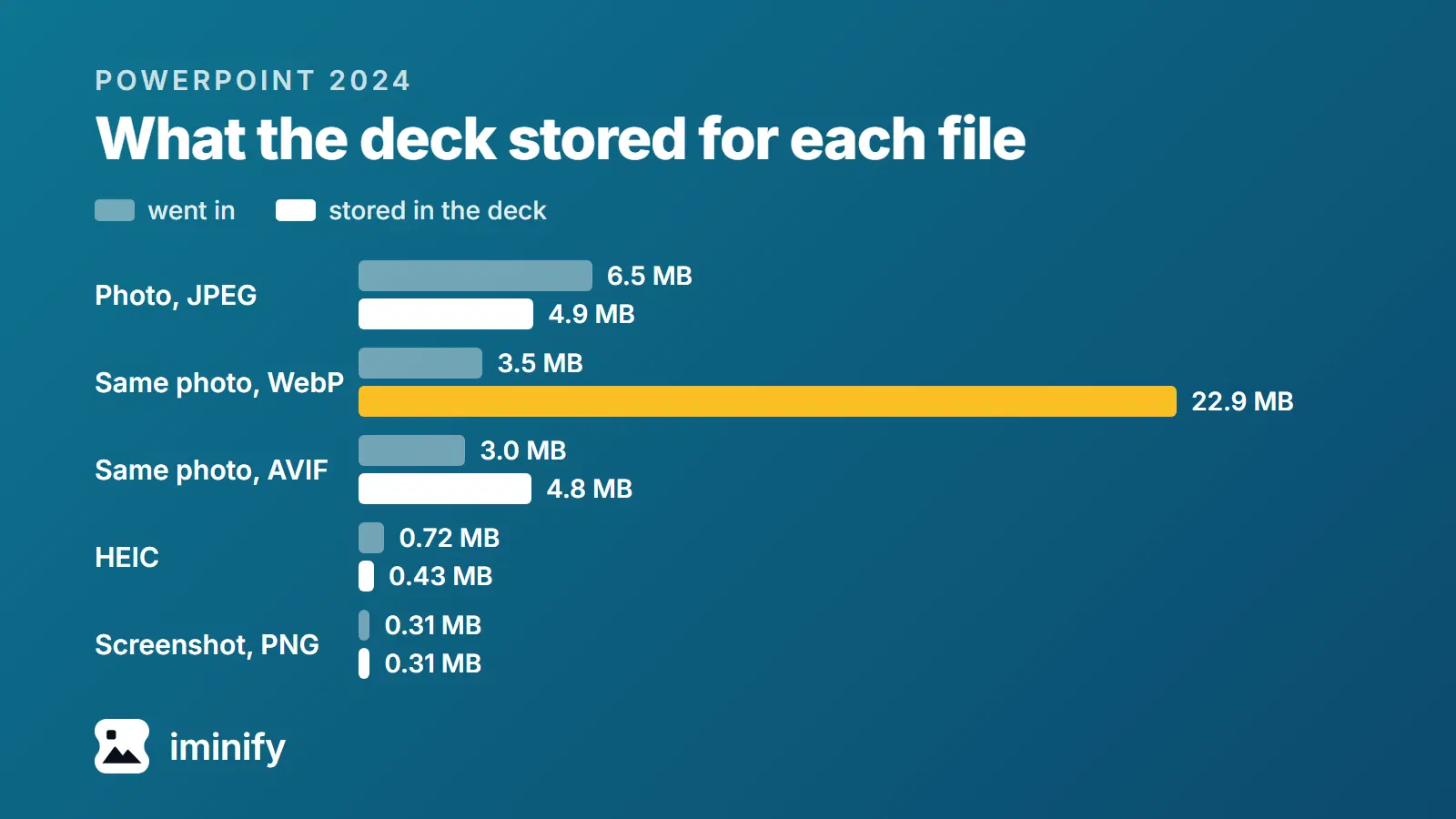
We ran 18 pictures through PowerPoint 2024 for Windows from a script, each into its own deck, then unzipped the saved deck. The 6.5 MB Pixel 8 photo came out as a 4.9 MB JPEG, 3,284 pixels wide, without its GPS position. A 3.5 MB WebP came out as a 22.9 MB PNG. A phone screenshot came out byte for byte as it went in.
So PowerPoint does compress some pictures. It measures a photo in pixels per inch (ppi) at its size on the slide. Above 330 ppi it swaps a JPEG or PNG photo for a copy at about 330 ppi (more for our two photos with a rotation tag). In our runs a JPEG was swapped only when the copy was smaller than your file. Word's number is 220 ppi. If you want a small deck, make the pictures small before you insert them.
PowerPoint left screenshots and small photos alone and re-encoded big ones
Microsoft says that in PowerPoint "the default image resolution is already set to high fidelity", which means "pictures are not compressed unless they exceed the size of the document canvas" (Microsoft Support). The guides differ: Indezine, updated in July 2024 and naming no PowerPoint version, saw a 4.2 MB JPEG that filled a slide become a 128 KB deck. In our runs the 6.5 MB Pixel photo, placed as tall as the slide, came out at 4.9 MB: compressed, but nowhere near 128 KB.
We placed each picture with PowerPoint's insert call from a script and read it back out of the saved deck. Here ppi is the stored picture's pixels divided by the inches it covers on the slide. The photos come from our JPG-size post and Iminify's sample files. We made the Pixel photo's PNG (ImageMagick, metadata stripped), WebP (cwebp quality 80) and AVIF (avifenc quality 60) ourselves, made the TIFF from the 852 KB JPEG, and took the HEIC from libheif's example file.
| What went in | What the deck stored |
|---|---|
| Pixel 8 photo, JPEG, 4080x3072, 6.5 MB, with GPS | JPEG, 3284x2473, 4.9 MB, no GPS |
| Fujifilm photo, JPEG, 6240x4160, 16.6 MB, with a rotation tag | JPEG, 3713x2475, 4.5 MB, turned upright on the slide |
| The Pixel photo as a PNG, 24.3 MB | JPEG, 3284x2473, 4.8 MB |
| The Pixel photo as a WebP, 3.5 MB | PNG, 3284x2473, 22.9 MB |
| The Pixel photo as an AVIF, 3.0 MB | JPEG, 3284x2473, 4.8 MB |
| HEIC, 1280x854, 718 KB | JPEG, 1280x854, 433 KB |
| An 852 KB JPEG, PNG screenshots of 310 KB and 982 KB, a transparent PNG icon, a 6.5 MB TIFF, a GIF | The same files |
Above 330 ppi, a JPEG was replaced only when the copy was smaller
PowerPoint placed the Pixel photo 9.96 inches wide, so 330 ppi is about 3,290 pixels across, and across the whole 13.33-inch slide it is 4,400. We resized that photo and placed each version:
| Photo | Weight | ppi on the slide | What the deck stored |
|---|---|---|---|
| 3,200 px, quality 92 | 3.88 MB | 321.2 | The same file |
| 3,600 px, quality 92 | 4.70 MB | 361.5 | The same file |
| 3,700 px, quality 92 | 4.90 MB | 371.5 | JPEG, 3,291 px, 4.77 MB |
| 4,000 px, quality 50 | 2.27 MB | 401.6 | The same file |
| 3,600 px, quality 100 | 9.10 MB | 361.5 | JPEG, 3,291 px, 4.71 MB |
The 3,600 px picture at quality 92 (4.70 MB) was left alone. At quality 100 it was replaced by a 4.71 MB copy, which weighs more than the quality-92 file but far less than the 9.10 MB file it replaced. Across 16 sizes and qualities of that photo, PowerPoint replaced a file only when the copy weighed less, and it replaced none at or under 330 ppi.
Every JPEG PowerPoint wrote when it resampled matches libjpeg's quality 95. The copies carry no EXIF and no colour profile, so the GPS position and camera name are gone. A photo PowerPoint leaves alone keeps its GPS.
The rotation tag, Orientation 6 on both tagged photos (the Fujifilm and a Galaxy S24 Ultra phone photo), is turned on the slide, not in the pixels (what the tag is). We exported the Fujifilm slide and the tower in the photo stood upright. The two came out at 495 and 440 ppi, not 330.
The change happens at insertion. Making the picture 3 inches wide afterwards left the Pixel photo's 3,284 pixels in the file, and opening and saving again changed nothing in 18 of 18 decks.
A WebP becomes a PNG, and AVIF and HEIC become JPEGs
With the Windows HEIF, AV1 and WebP extensions installed, PowerPoint inserted all three. We didn't try it without them. It stores a WebP as a PNG: a 1,800x1200 WebP of 61 KB became a 770 KB PNG whose 2,160,000 pixels all equal libwebp 1.5.0's decode, and the 3.5 MB WebP became the 22.9 MB PNG, more than six times its size. An AVIF came out as a JPEG larger than the AVIF.
If you have a WebP, convert it to JPG before you insert it. Our WebP-to-JPG page does that, and the WebP post says what it costs.
Compression off in the file kept JPEGs and PNGs as they were; a stored 96 ppi changed nothing
Microsoft's Turn off picture compression page says to tick "Do not compress images in file". Its file-size page says to pick a default resolution of "150ppi or lower" to shrink a deck. We didn't use the Options screen. We edited both settings in the deck's file.
With the compression flag off, all 12 placements of JPEG and PNG pictures stored the source byte for byte. A WebP was still turned into a PNG.
Then we set the stored resolution to 330, 220, 150 and 96 ppi and placed six files at two sizes each. Every one of the 44 placements we could compare with a default-settings run matched it byte for byte. PowerPoint's AddPicture2 call has a compress switch: on one photo, on gave the 330 ppi copy and off kept the file, in a default deck and in one set to 96 ppi. We can't say what the Insert dialog or Compress Pictures does with that setting.
Word resamples photos to 220 ppi at the size it places them
Microsoft's picture-size page says "The default picture resolution in Microsoft 365 is 220 ppi". Word 2024 wrote no setting in a new document:
| What went in | PowerPoint stored | Word stored |
|---|---|---|
| Pixel 8 photo, JPEG, 6.5 MB | JPEG, 4.9 MB | JPEG, 1429x1076, 1.16 MB |
| JPEG, 1800x1200, 852 KB | The same file | JPEG, 1430x953, 589 KB |
| Phone screenshot, PNG, 982 KB | The same file | PNG, 916x1982, 777 KB |
| TIFF, 6.5 MB | The same file | JPEG, 589 KB |
| The Pixel photo as a WebP, 3.5 MB | PNG, 22.9 MB | PNG, 4.4 MB |
The TIFF and the 852 KB JPEG are the same picture, so Word made the same 589 KB file from both. It kept the desktop screenshot, the transparent icon and the GIF as they were.
Make the picture the size you need before you insert it
In our runs a JPEG that PowerPoint couldn't make smaller went in as it was. We sent four photos to Iminify at the Smart level as JPG: the Pixel 8 photo, a 13.1 MB Pixel 8 Pro photo, a 14.9 MB Sony photo and a 10.5 MB Gemini picture, each at full size, at 3,300 pixels wide and at 1,920. PowerPoint stored 11 of the 12 results unchanged and re-encoded the 8.6 MB full-size Pixel 8 Pro file to 4.0 MB. At 1,920 pixels (144 to 193 ppi on the slide) the four files weighed 0.40 to 1.00 MB, where PowerPoint's own 330 ppi copies of the originals weighed 2.75 to 4.89 MB. Word kept three of the 12, all at 1,920 pixels, and re-encoded the other nine.
So for a deck shown on a screen, resize each photo to about 1,920 pixels wide and save it as a JPG before you insert it. Our upload-limit post found that resizing costs less than lowering the quality on a 6.5 MB phone photo. Iminify is ours, and it doesn't open a .pptx or a .docx, so compress the picture files and insert those. Compress JPEG has a Resize setting for the width; we used the API's width.
How we measured
Office 2024 (16.0.20625.20108) on Windows 11, driven from PowerShell. PowerPoint: Shapes.AddPicture on a blank slide, then SaveAs to a .pptx, and AddPicture2 for the compress switch. Word: InlineShapes.AddPicture, then SaveAs2. We edited autoCompressPictures and defaultImageDpi in the saved file's XML. We unzipped each file and hashed every picture against its source.
JPEG tables were compared with libjpeg's standard ones, and EXIF came from ExifTool 13.25. KB and MB are 1,000 and 1,000,000 bytes. Seventeen placements of the Pixel photo in PowerPoint with compression on gave the same bytes. Iminify's results came through its API on 24 November 2026, one run each. We report no quality score for the copies, and we didn't test Office for Mac, Office on the web, Google Slides, the clipboard, or Word's compression flag and resolution setting.