Background remover PNG too big? One cutout went from almost 7 MB to 356 KB as WebP
On this page
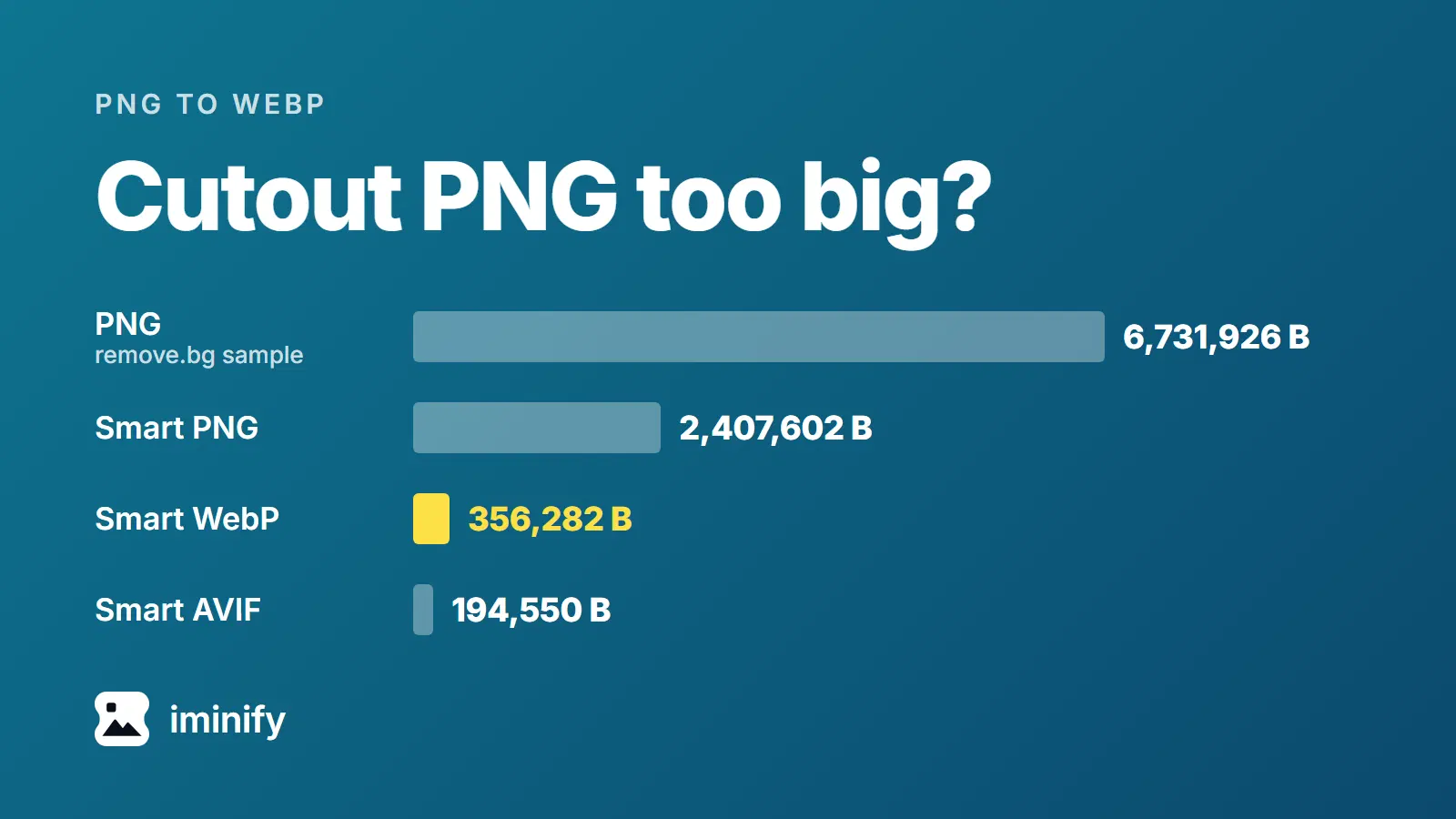
The sample cutout that remove.bg publishes on its API page is a 6,731,926-byte PNG. Through Iminify at Smart, its default lossy level, the same file came back as a 356,282-byte WebP (356 KB) with every transparency value unchanged. The AVIF was 194,550 bytes and changed transparency values by up to 29 of 255; the PNG was 2,407,602 bytes and kept 32 of the 256 values.
So save the cutout as WebP, which changed no transparency value, and keep the PNG from the remover as your master. PNG to WebP does it. Below is what each choice gives up.
Most of a cutout PNG is the picture, not the transparency
Every pixel of a cutout carries a number from 0 to 255 for how see-through it is, on top of its colours. That is the transparency channel (the alpha channel, in editors). Saved on its own as a grey PNG, the sample's channel is 126,988 bytes. Inside the PNG it costs more: after a lossless repack (the size Iminify's Lossless PNG gives, below) the file is 6,147,485 bytes, and without the channel it is 5,447,020, so the channel accounts for 700,465 bytes, 11.4%.
On three cutouts we made, from the photographs of our first post, it accounts for 16.7% to 19.4%. Our PNG post never measured that on a real cutout. The picture is the rest.
About 63% of the sample's pixels are fully transparent, and every one of them holds the same black, so no second picture is hiding under them.
remove.bg's own table lists its PNG at 7 MB, its WebP at 6 MB and a ZIP at 3 MB (the sample files weigh 6,731,926, 5,885,026 and 2,489,246 bytes). The ZIP is a JPG plus a separate transparency PNG that you put back together yourself. The sample PNG has 9,996,213 pixels and the WebP 11,107,122, so per pixel the WebP is 21.3% smaller than the PNG. That WebP is lossless, and nowhere near 356,282 bytes. The page says background removal moves to Leonardo.Ai on 1 December 2026.
What each format did to the same cutout
We uploaded the sample to Iminify through its API on 7 November 2026 and asked for the levels and formats below. The scores are SSIMULACRA 2 (100 is identical), measured by us on the files we got back.
| Iminify result | Bytes | Smaller than the 6,731,926-byte PNG | Score | Transparency values |
|---|---|---|---|---|
| Lossless PNG | 6,147,485 | 8.7% | 100 | all 256 kept |
| Smart PNG | 2,407,602 | 64.2% | 70.11 | 32 of 256 left |
| Lossless WebP | 3,509,220 | 47.9% | 100 | all 256 kept |
| Smart WebP | 356,282 | 94.7% | 70.85 | 256, none changed |
| Smart AVIF | 194,550 | 97.1% | 70.08 | 256, largest change 29 |
Smart is lossy: it changes the colours to save bytes, which is what a score under 100 measures. A second upload of the same file gave byte-identical results. Our three cutouts ordered the same way. Smart WebP was 87.3% to 91.2% smaller than the PNG, Smart AVIF 97.7% to 98.2% and Smart PNG 62.2% to 70.7%.
Compress PNG keeps a PNG but leaves fewer transparency values
Smart and Ultra, its smaller-file level, give the PNG a palette of at most 256 entries, and each entry has to cover a colour and a transparency together. The sample came back with 32 distinct transparency values; ours (cup, raspberries, canoe) kept 56, 64 and 62 of the 248 values they had. The largest change to one pixel's transparency was 58 on the sample and 30 to 42 on ours, out of 255. Smart WebP changed none.
If a form accepts only PNG, use Compress PNG at Lossless and expect little: it saved 8.7% on the sample and 0.1% to 1.5% on ours.
AVIF is smaller partly because it changes the transparency too
Smart AVIF's largest change to a transparency value was 29 on the sample and 52, 36 and 41 on ours, in the same order. That's the default post 5 found: avifenc without --qalpha codes the transparency at lossy quality too.
We encoded all four cutouts at -q 70 both ways. The lossy transparency made the file 13.3% smaller on the sample and 48.0% to 68.5% smaller on ours, and the score moved by 0.02 to 0.41, in favour of the exact transparency. Over a white background the mean worst-channel error across the partly transparent pixels differed by 0.1 to 0.7 out of 255 between the two. The lossy transparency costs little, so AVIF is a fair choice when the file must be as small as possible.
Below, one stretch of hair edge from our canoe cutout at 4x on blue: the cutout, Smart PNG, Smart WebP and Smart AVIF. The outline holds in all three. Speckle appears in the PNG, while the WebP and AVIF smooth the hair texture. (The blog saves this strip as WebP too, so it is a little softer than the files.)

How to shrink a cutout
- Keep the PNG the remover gave you. A lossy file can't give the edge back.
- Resize to the width the page shows. The sample re-encoded as WebP at quality 80 (our run, not Iminify's) was 554,312 bytes at 2,721 pixels wide, 299,324 at 2,000 and 137,282 at 1,200. Trimming the empty margin saved 1.3% of the PNG and 0.3% of the WebP, so skip it.
- Open PNG to WebP and leave it on Smart. Iminify can't remove backgrounds; it shrinks the file you already have.
- Lay the result on a coloured background and look along the edge before you upload it.
- For a big file on a page you control, try PNG to AVIF. Auto picks the smallest format only up to 8 megapixels and goes straight to WebP above that, which is why the sample (10 megapixels) came back as WebP and not the AVIF that was 45.4% smaller. Our cutouts, at 2.2 megapixels, came back as AVIF.
How we measured
The files are remove.bg's sample set from its API page (fetched 7 November 2026; we show none of its pixels) and three cutouts we made with rembg 2.0.87, model isnet-general-use, from the Unsplash-licensed photographs of our first post: a coffee cup by Justin Leibow, raspberries by Ben Moore and a canoe by Roberto Nickson. In our three cutouts rembg's mask reached 255 on under 1% of the subject's pixels, so we set every transparency value of 247 or more to 255.
Scores come from ssimulacra2 (libjxl 0.12.0) on the RGBA files, decoded with dwebp and avifdec; it blends transparency against dark and bright backgrounds and keeps the worse score, as in our AVIF and WebP post. The other runs are ours. On the sample's full-size WebP decoded to PNG (2,721 pixels wide) we ran cwebp 1.5.0 with -m 6 -pass 10 -mt (adding -q 80 for the sizes, after an ImageMagick resize for the narrower ones). avifenc 1.2.1 with -s 4 -y 420 ran at -q 70, with and without --qalpha 100, on that file and on the three cutouts' own PNGs. optipng 0.7.8 with -o2 -strip all repacked the PNGs behind the channel figures.
We uploaded nothing to remove.bg, so what its app exports is untested.