Blog

Notes on smaller images

How the encoders decide, when a format wins, and what makes a page load fast. Written by Mozex, who runs Iminify.

All posts

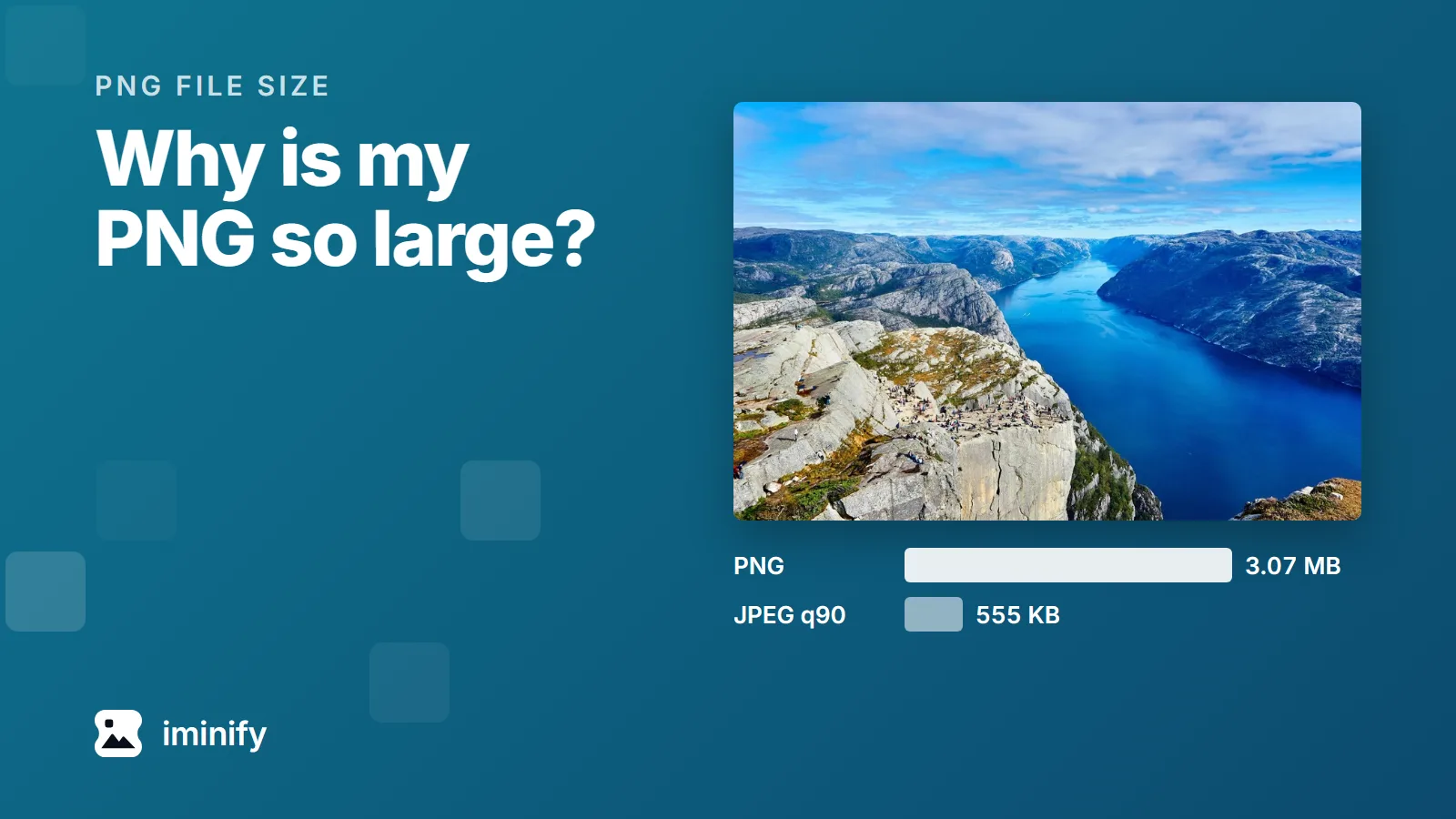
The fjord photograph from our test set above two bars: 3.07 MB as a PNG and 555 KB as a JPEG at quality 90.

Why is my PNG file so large? Four causes, measured

We took the fjord photograph from our test images, a 1,800 by 1,200 JPEG of 832 KB, and saved the same pixels as a PNG. It came to 3.34 MB at the default setting of Pillow, the Python imaging library. Through zopflipng, a slower lossless compressor, 3.07 MB. As a JPEG at quality 90 it's 555 KB, and it scores 84.22 on a perceptual scale where 80 means an average observer can't see the difference side by side. A photograph was the most expensive of the four causes in the comparisons below. The four: It's a photograph. It has more pixels than it will be shown at. It stores more per pixel than the picture needs: 16 bits per colour channel, or millions of colours where 256 would do. The program that saved it didn't compress it very hard. Each has its own fix, and the fix for one can be wrong for another. A JPEG rescues a photograph. Our desktop screenshot came out bigger as a JPEG than as a PNG through zopflipng.
7 min read
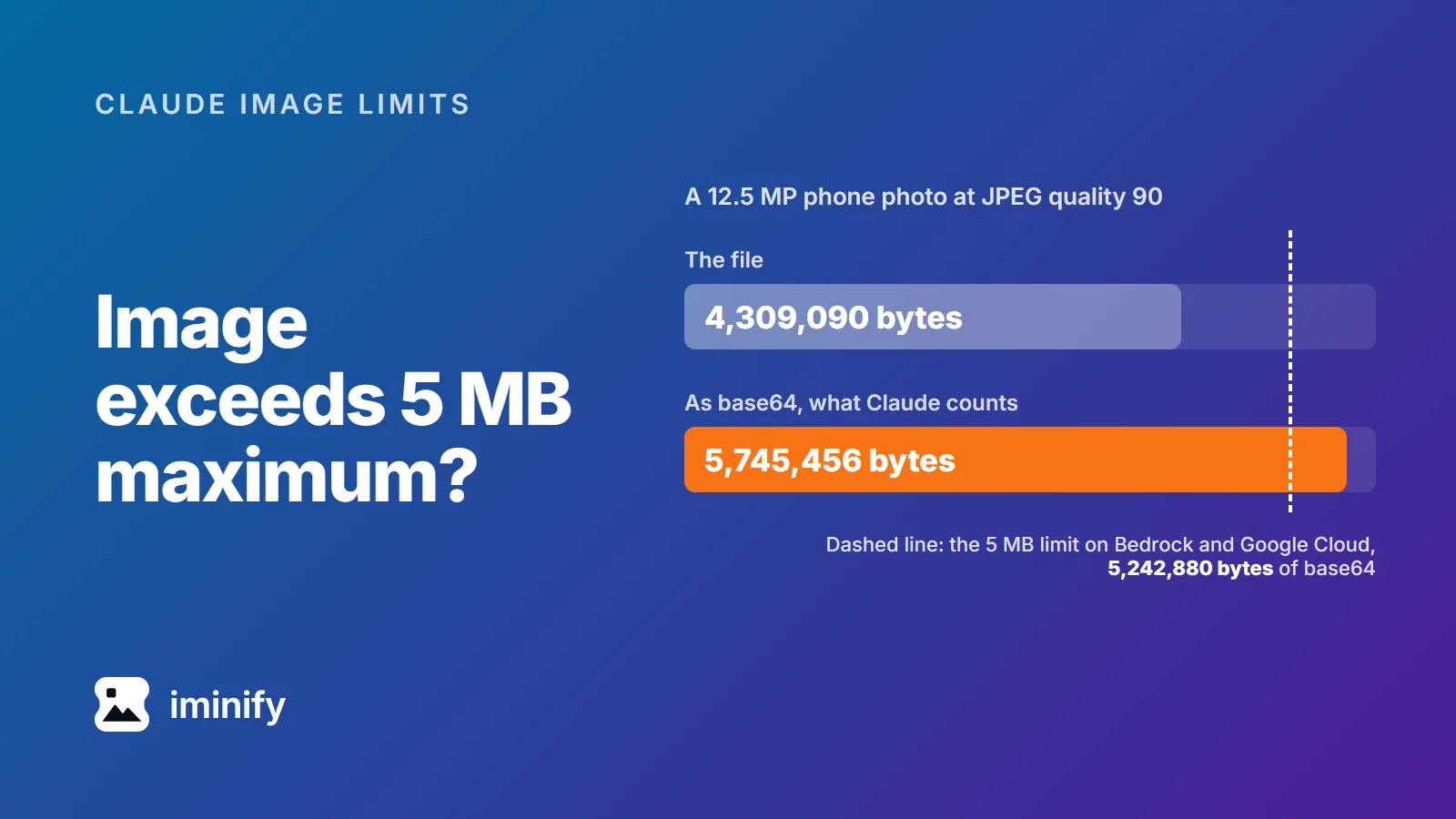
Bar chart: a 12.5 MP phone photo at JPEG quality 90 is 4,309,090 bytes as a file and 5,745,456 bytes as base64, past a dashed line at the 5,242,880-byte limit on Bedrock and Google Cloud.

Image exceeds 5 MB maximum? Claude counts the base64, not your file

Our 12.5-megapixel test photo, re-saved with jpegli at quality 90, is 4,309,090 bytes. That's under 5 MB, and it's still too big for Claude on Amazon Bedrock or Google Cloud. Anthropic's limit there is "5 MB (base64-encoded)", and base64 turns those 4,309,090 bytes into 5,745,456. The error compares the encoded size with 5,242,880 bytes, as in this one from a Claude Code issue: image exceeds 5 MB maximum: 5281812 bytes > 5242880 bytes. So the ceiling is 3,932,160 bytes of actual file on Bedrock and Google Cloud, and roughly 7.5 MB on the direct Claude API, whose limit is 10 MB. Separately, no side may pass 8000 pixels, or 2000 once a request carries more than 20 images. For photos, one step clears all of it: resize to 2000 pixels on the long edge and save it as JPEG.

9 min read
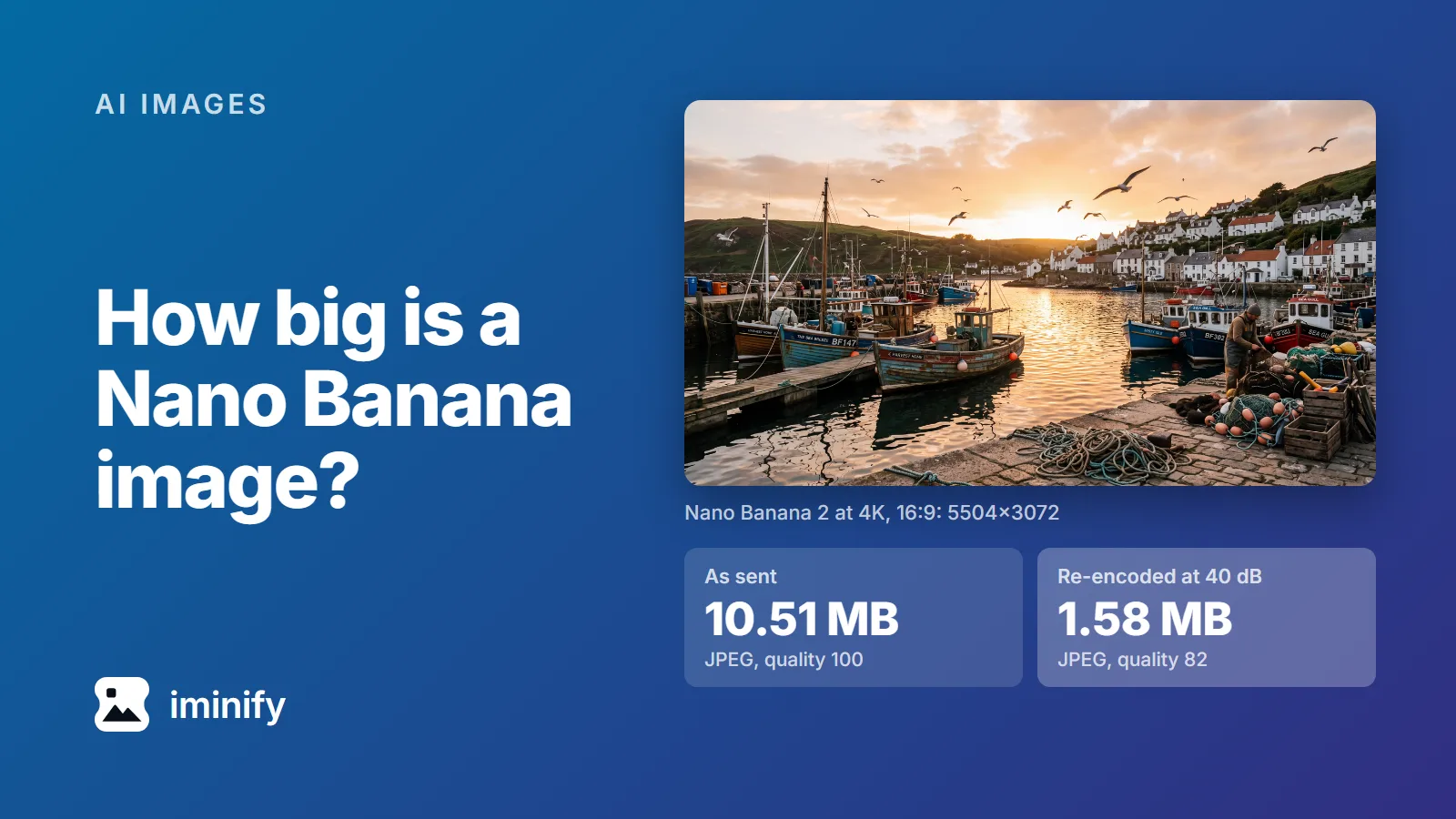
The harbour picture Nano Banana 2 generated at 4K, 5504x3072: 10.51 MB as sent, a quality-100 JPEG, and 1.58 MB re-encoded as a quality-82 JPEG holding 40 dB.

How big is a Nano Banana image? 52 files measured, from 512 px to 4K

We asked Nano Banana 2 for a 4K, 16:9 picture of a fishing harbour through the Gemini API on 23 September 2026. It came back as a 5504x3072 JPEG of 10.51 MB. The same request again gave 11.10 MB. Both files were saved at JPEG quality 100, the top of the scale. So, how big is a Nano Banana image? From Nano Banana 2 or Pro, a detailed picture is roughly 1 MB at 1K, 4 MB at 2K and 10.45 to 12.13 MB at 4K, and a flat illustration less. The original Nano Banana sends a PNG instead, about 2.1 MB for the same prompt at 1024x1024. Here are the 52 images of our test set, from all four Nano Banana models, and what five of them shrink to.

9 min read
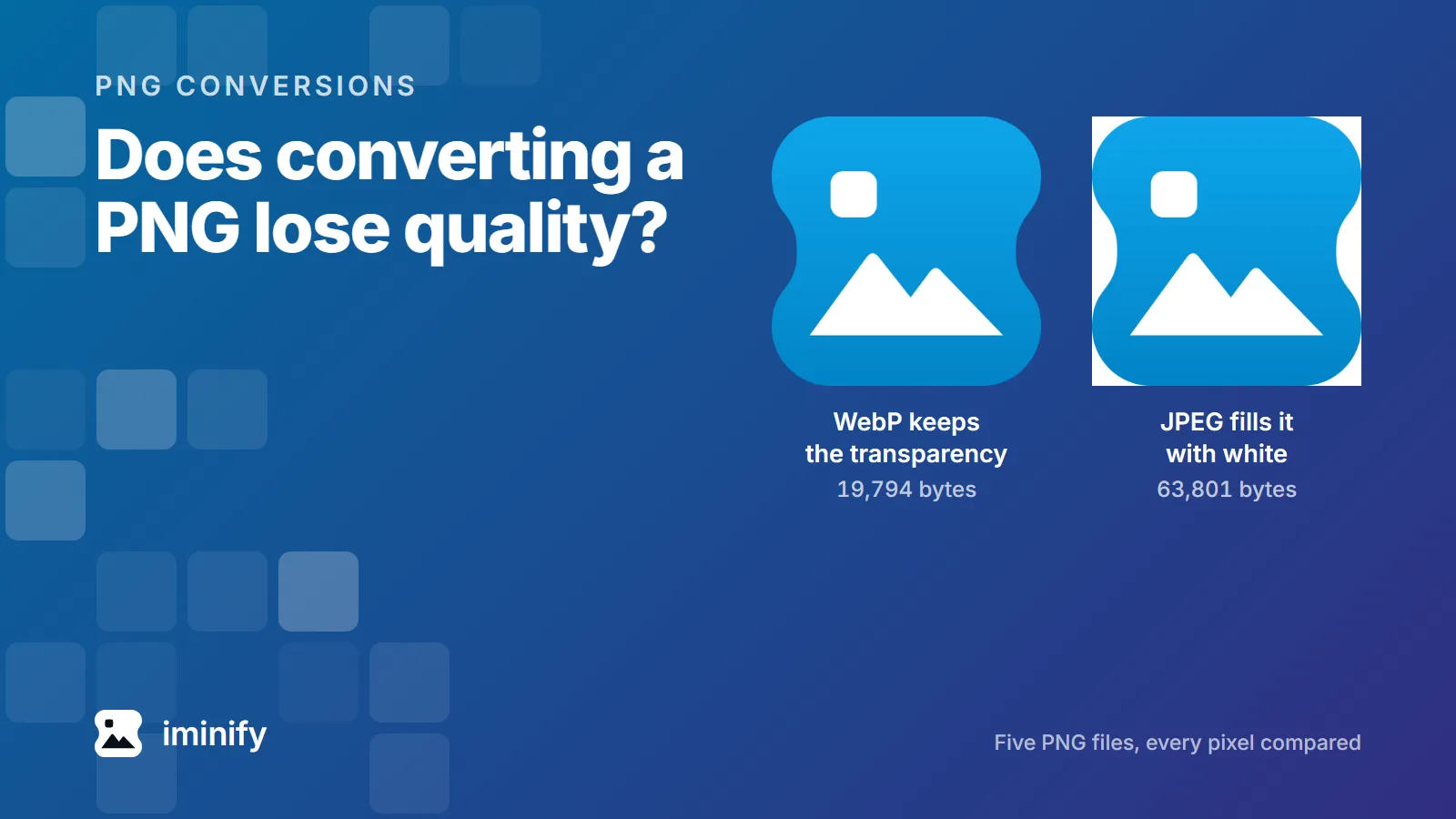
The same app icon twice: as a 19,794-byte WebP with its transparency showing the background through, and as a 63,801-byte JPEG sitting on a white square.

Does converting PNG to WebP lose quality? Five files, every pixel checked

We converted five PNG files to WebP with the encoder forbidden to throw anything away, then compared every pixel against the original. All five kept every 8-bit pixel, and the files were between 28.6% and 77.3% smaller. So no, converting a PNG to WebP doesn't have to cost you anything you can see. The catch is that it isn't the conversion you're usually pointed at. Of the first four results for this question in September 2026, three recommend a quality number between 80 and 100, and in cwebp every one of those is a lossy setting. So is the button marked "compress PNG". Here's what each of them actually costs.

8 min read
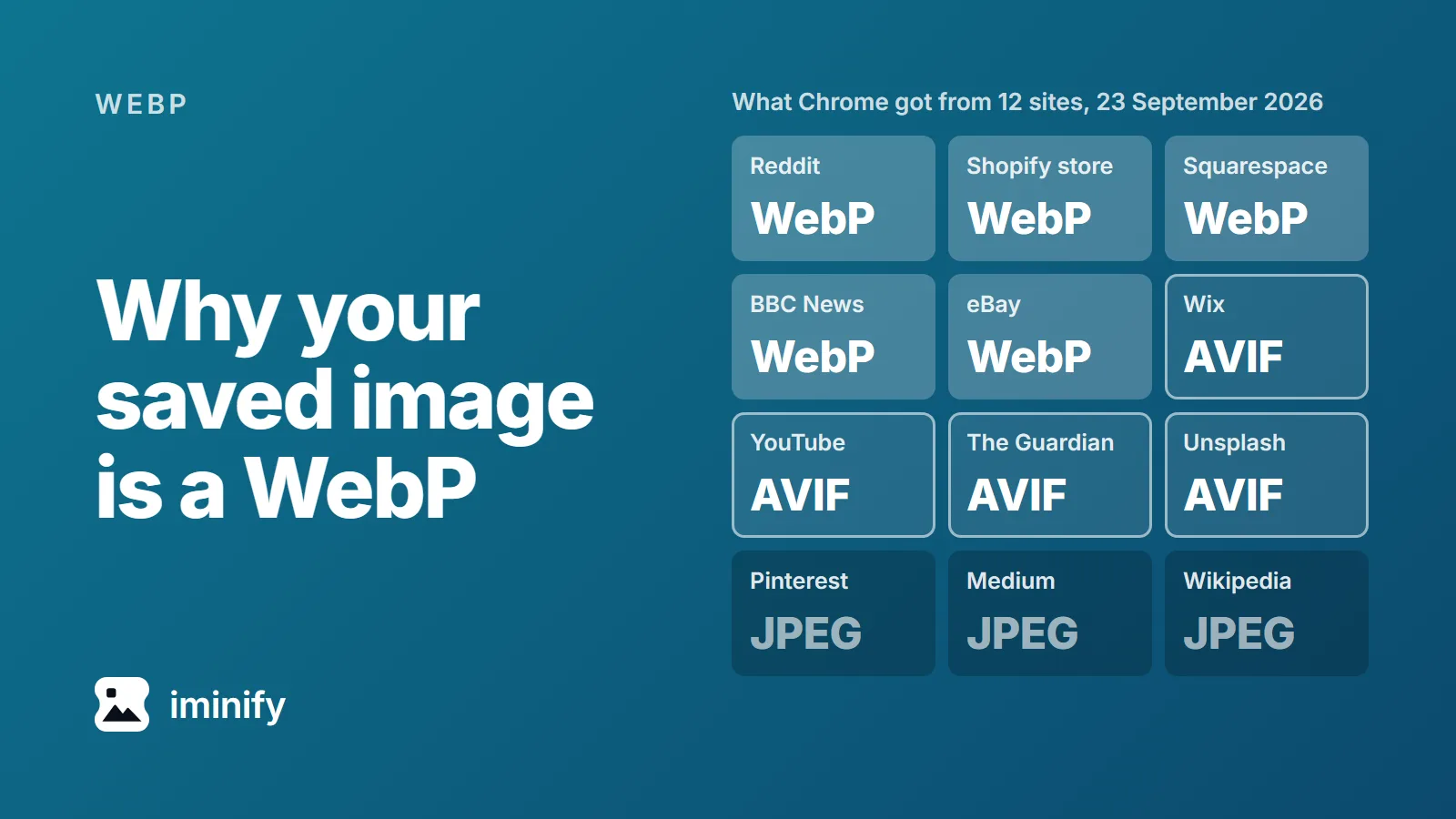
Twelve sites and the image format Chrome got from each on 23 September 2026: WebP from Reddit, a Shopify store, Squarespace, BBC News, eBay; AVIF from Wix, YouTube, The Guardian, Unsplash; JPEG from Pinterest, Medium, Wikipedia.

Why do images save as WebP? What 12 sites sent Chrome, and how to get the JPG

The hero photo on the Allbirds home page has a file name that ends in .jpg. On 23 September 2026 the site sent Chrome a WebP of 572 KB. Ask the same image address for a JPEG and it sends one, 663 KB. That's why your saved image is a WebP. Many sites pick the format each time they send a picture, from a list of formats your browser says it can show. Twelve sites made it into our test: nine sent Chrome a WebP or an AVIF, and every one of those nine would also hand over a JPEG (JPG is the same format) if asked the right way. The four ways that worked are below the table.

8 min read
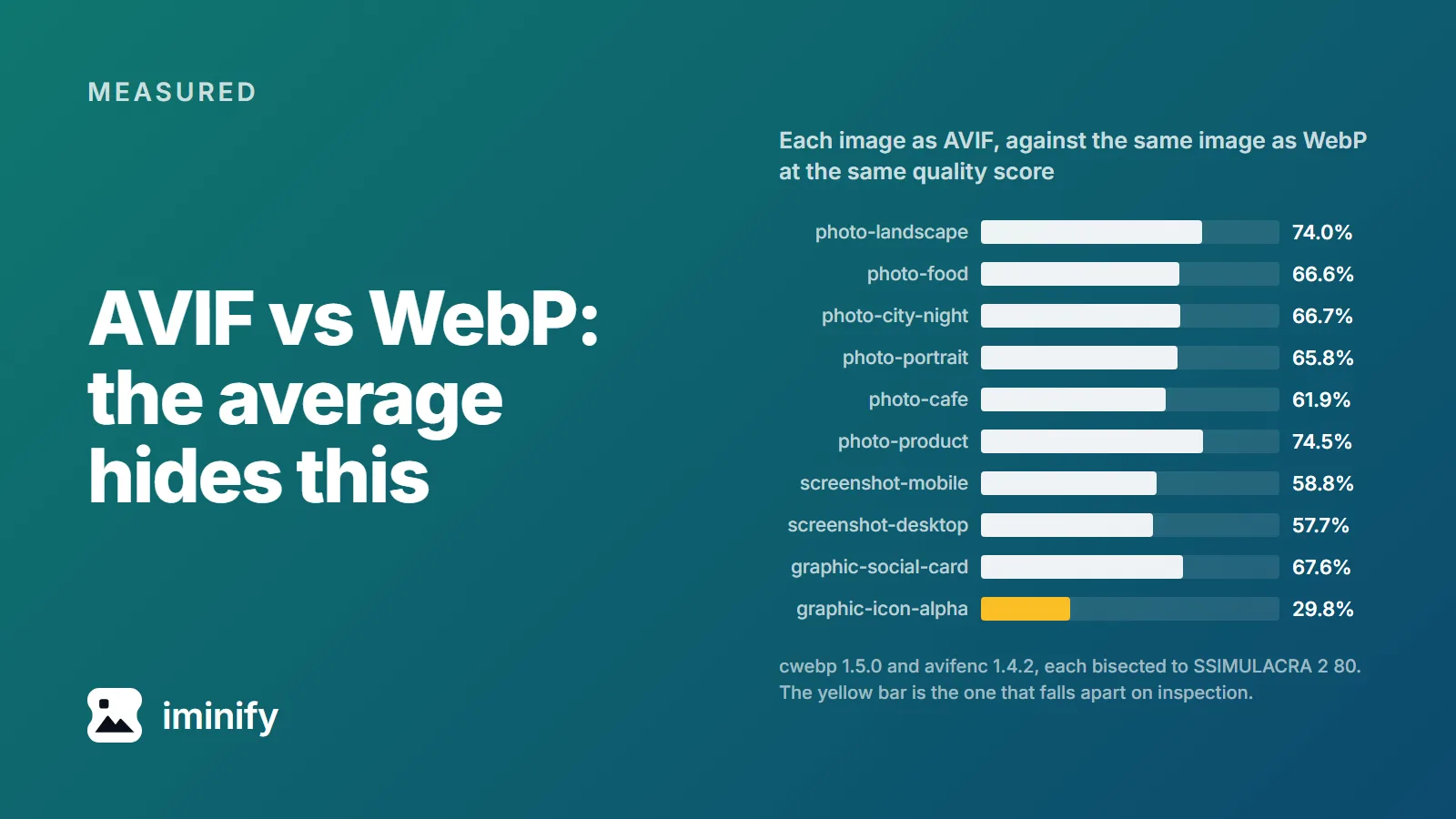
Bar chart of ten test images: each one as AVIF, sized against the same image as WebP at a matched quality score. The bars run from 29.8% on the transparent icon to 74.5% on the product photo.

AVIF vs WebP file size: ten images, one quality score, and where WebP still wins

Five of the fifteen pages we read for "avif vs webp file size" put AVIF 20 to 30% under WebP, ShortPixel among them. Six give no comparable figure, three put it between 11.76% and 50%, and one forum thread reports an AVIF twice the size. We put the ten images of our published corpus through cwebp and two builds of avifenc, bisecting each to the same SSIMULACRA 2 score of 80. The totals: 1,675.4 KB for WebP, 1,114.7 KB for a current AVIF, 33.5% smaller. So the headline is roughly right. It's also the least useful number here. If the verdict is all you want: AVIF for photographs and screenshots, WebP for lossless, and WebP again on our one transparent image once both encoders keep the alpha plane lossless.

8 min read
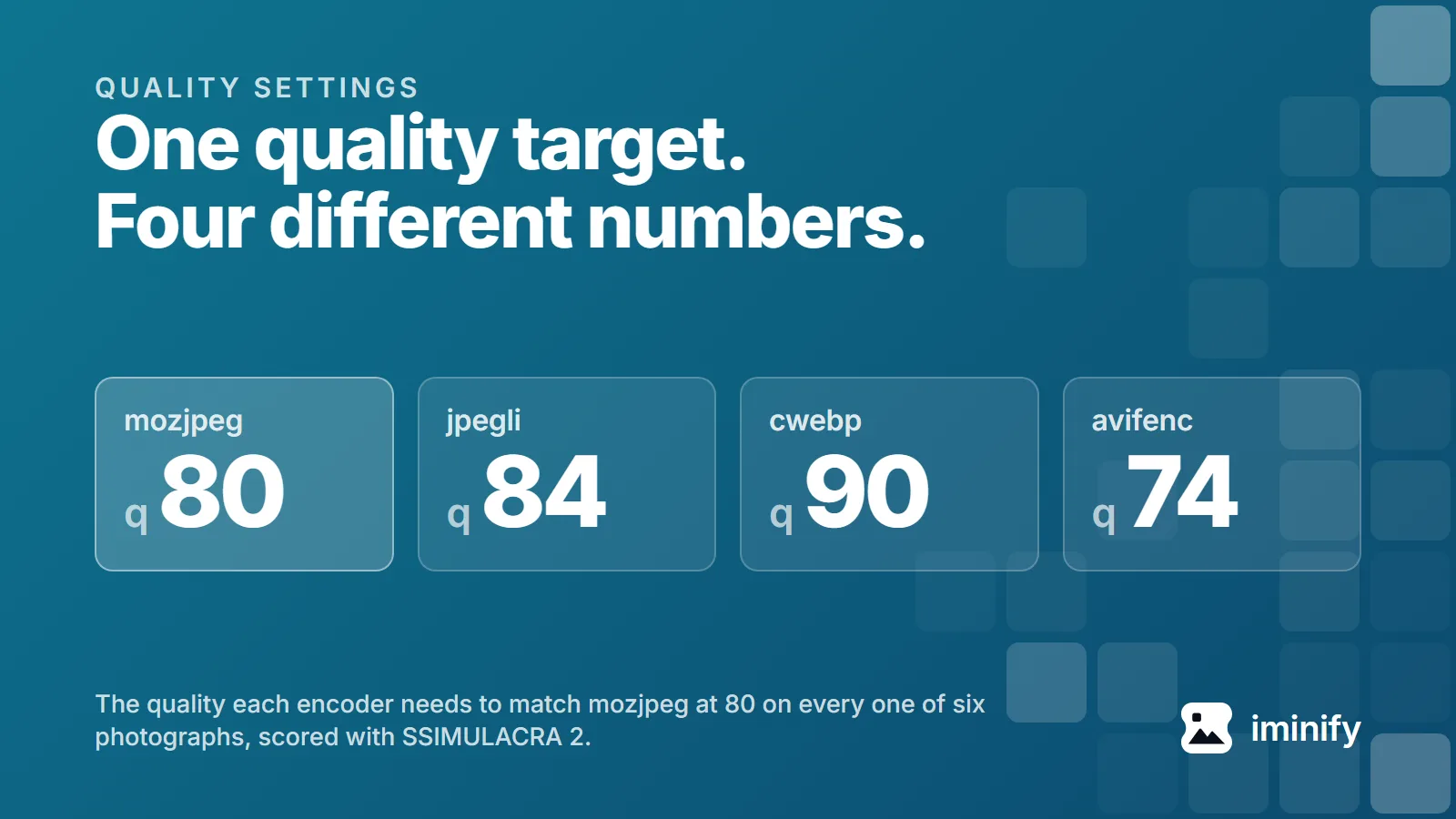
Four tiles reading mozjpeg q80, jpegli q84, cwebp q90 and avifenc q74: the quality each encoder needs to match mozjpeg at 80 on every one of six photographs.

JPEG 80 is not WebP 80: what quality means in four encoders

We set four encoders to quality 80 and pointed them at one photograph, an 1800x1200 shot of a fjord. jpegli scored 74.2 on the SSIMULACRA 2 scale, mozjpeg 74.8, cwebp 72.8, avifenc 85.5. One picture, one number typed into four tools, and nearly thirteen points between the best result and the worst. Quality 80 names four unrelated parameters that happen to share a range. We measured what each produces across ten public images, worked backwards to the number every encoder needs to land in the same place, and read all four sources to see why they disagree.

9 min read
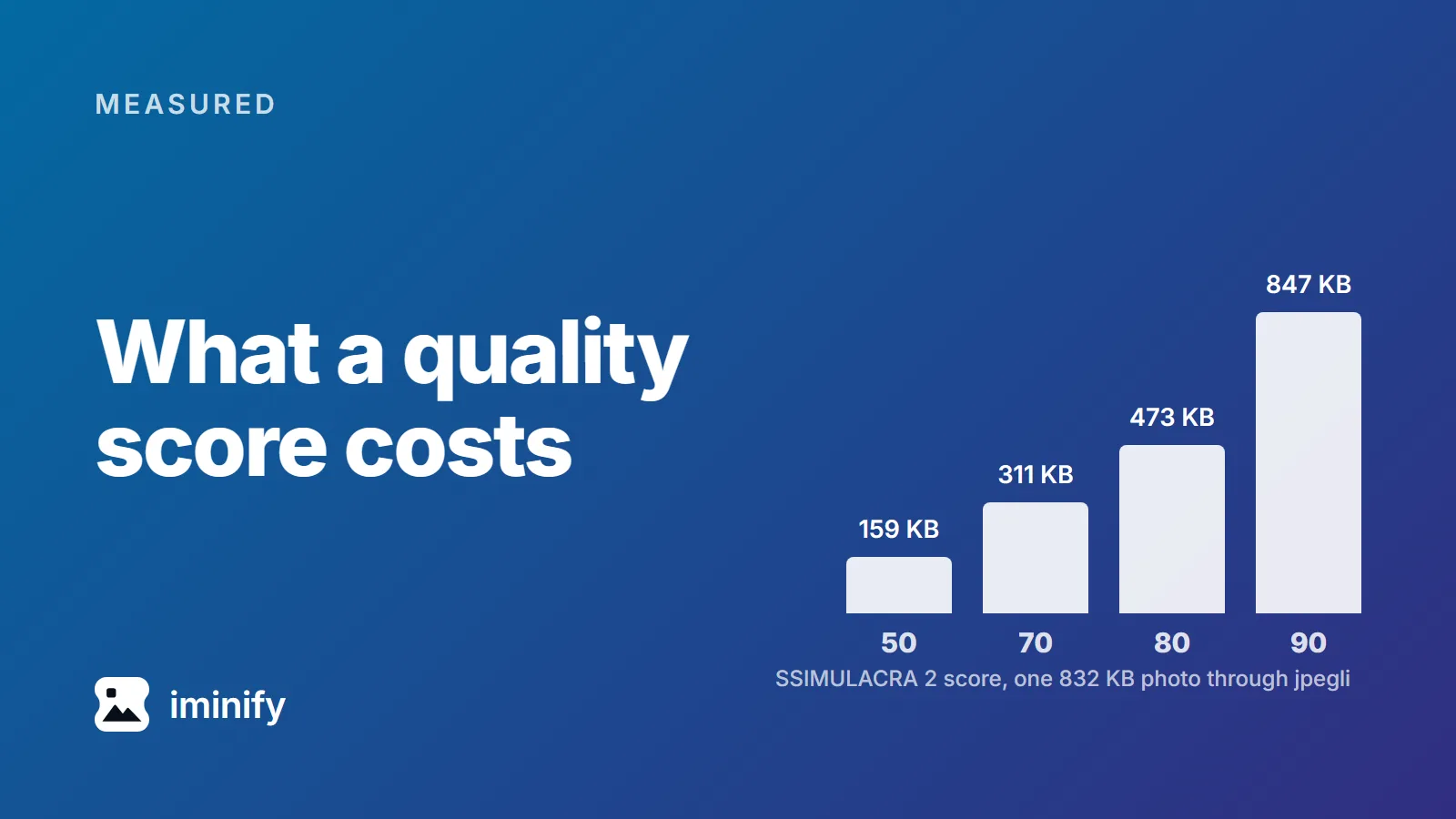
Bar chart: one 832 KB photo through jpegli costs 159 KB at a SSIMULACRA 2 score of 50, 311 KB at 70, 473 KB at 80 and 847 KB at 90.

SSIMULACRA 2 scores in practice: what 50, 70 and 90 cost in kilobytes

We ran cwebp at quality 75 over ten images, at the settings below. A night skyline came out at 63.0 on the SSIMULACRA 2 scale, an app icon at 83.1. Same encoder, same quality number, twenty points apart, and 63 sits below the line the scale calls "artifacts are perceptible, but not annoying". A quality number tells the encoder how hard to try. SSIMULACRA 2 describes what came out, on a scale topping out at 100, and means much the same for a JPEG, a WebP or an AVIF. So we measured what each point costs: ten public images, three encoders, a grid of quality settings across each encoder's range, bisected around each target.

8 min read
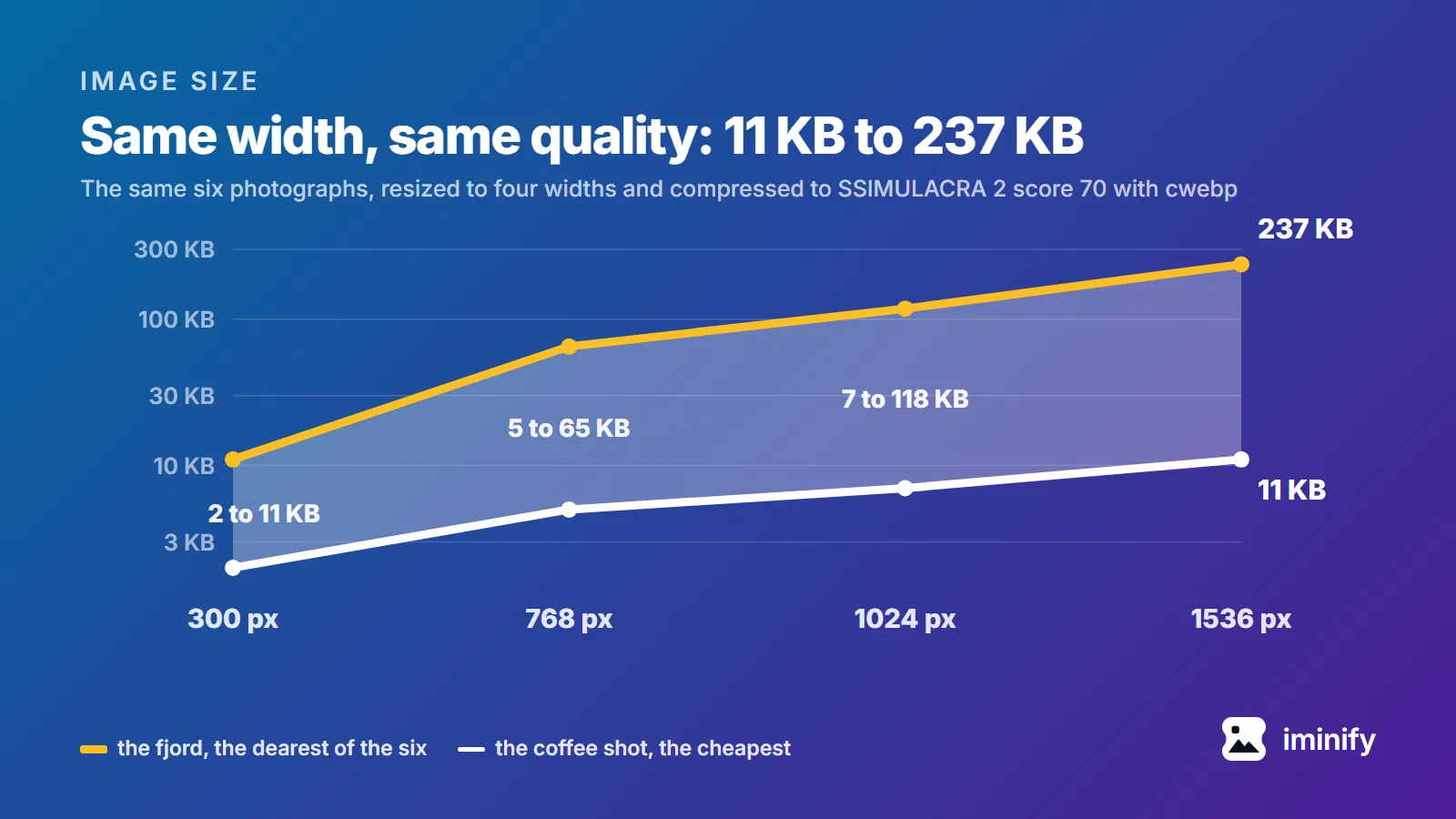
Line chart on Iminify's blue gradient: from 300 to 1536 pixels wide, on a log kilobyte scale, the fjord photograph rises from 11 KB to 237 KB and the coffee shot from 2 KB to 11 KB, both at SSIMULACRA 2 score 70 through cwebp.

How many KB should a website image be? Measured at four widths

The pages that rank for "image size for website in kb" don't agree. We opened four and read what each recommends for one full-width hero image. ShortPixel says 200 KB or less. ForegroundWeb says every image on the site should be "less than 500 KB". HubSpot says "The file size is recommended at 10 MB" and adds that smaller is better, and Shopify's blog labels a hero the same, with 20 MB for a background. Fifty times between tightest and loosest, for the same picture in the same slot. Three of them pair the figure with a pixel size, which is the right instinct, and one suggests a JPEG quality to save at. None says what visual quality its number actually buys. So we measured it: ten images, four widths, three encoders, every file held to the same visual quality score. The tool that will judge the page has had a budget all along, and none of those four pages mentions that budget.

8 min read
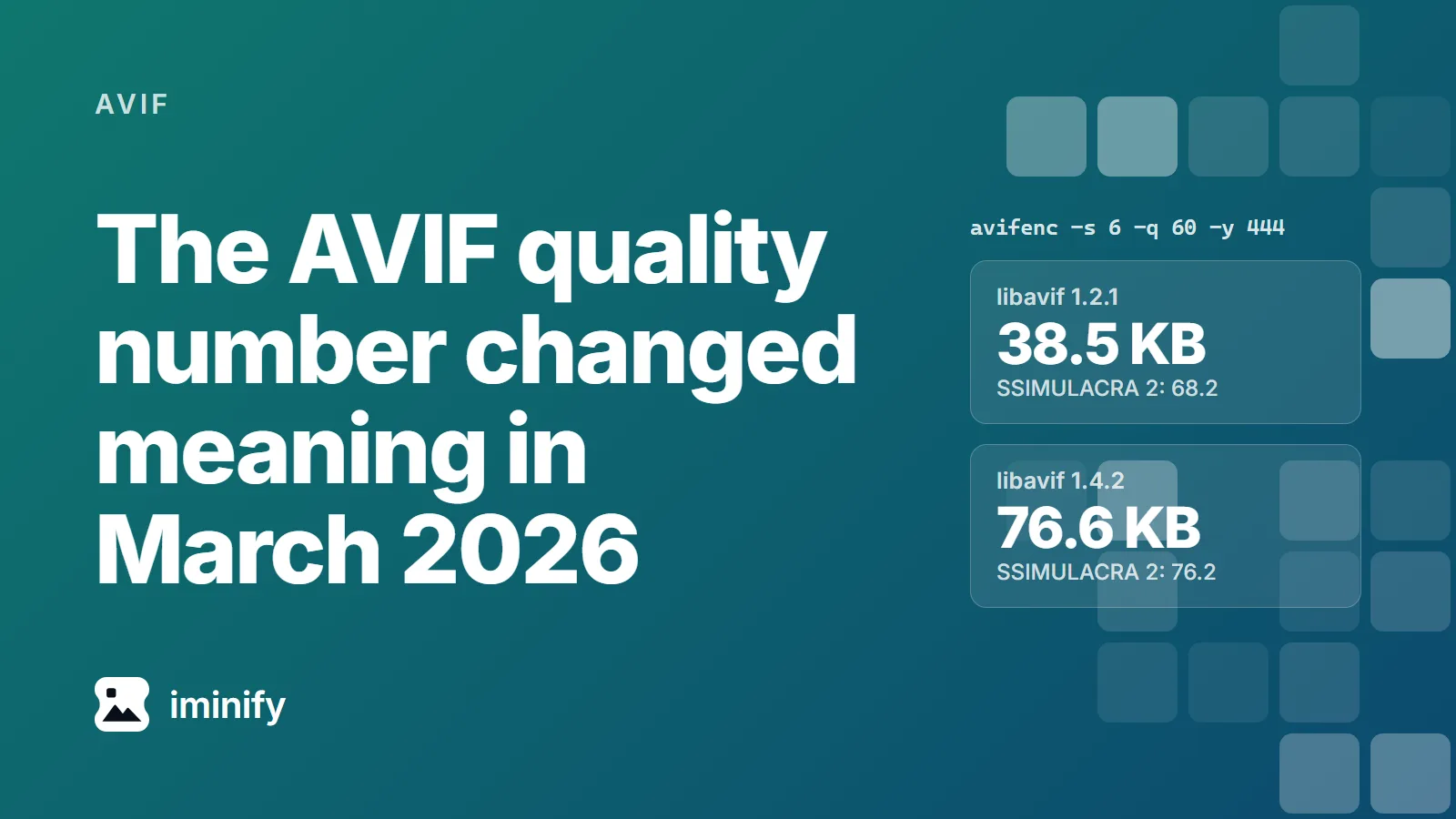
Two cards next to the command avifenc -s 6 -q 60 -y 444: libavif 1.2.1 writes 38.5 KB at SSIMULACRA 2 68.2, libavif 1.4.2 writes 76.6 KB at 76.2.

What AVIF quality setting should you use? The answer changed in March 2026

We ran one avifenc command on one photo, the raspberries from our corpus, in two containers. On Debian 13, whose libavif-bin is 1.2.1, it wrote 38.5 KB. On Alpine edge, which packages libavif 1.4.2, it wrote 76.6 KB: twice the file, the biggest increase of our ten, at a SSIMULACRA 2 score of 76.2 instead of 68.2. Neither container is broken. In March 2026 libavif changed what the number means.

7 min read
Showing 13 to 22 of 22 results

Try it on your own images

Drop a photograph in, pick Smart, and compare the result with the original before you download. Free, no account needed.